

Webhooks can be tested at no cost in development environments. To enable webhooks in production,
upgrade to the Enterprise plan in the Privy Dashboard.
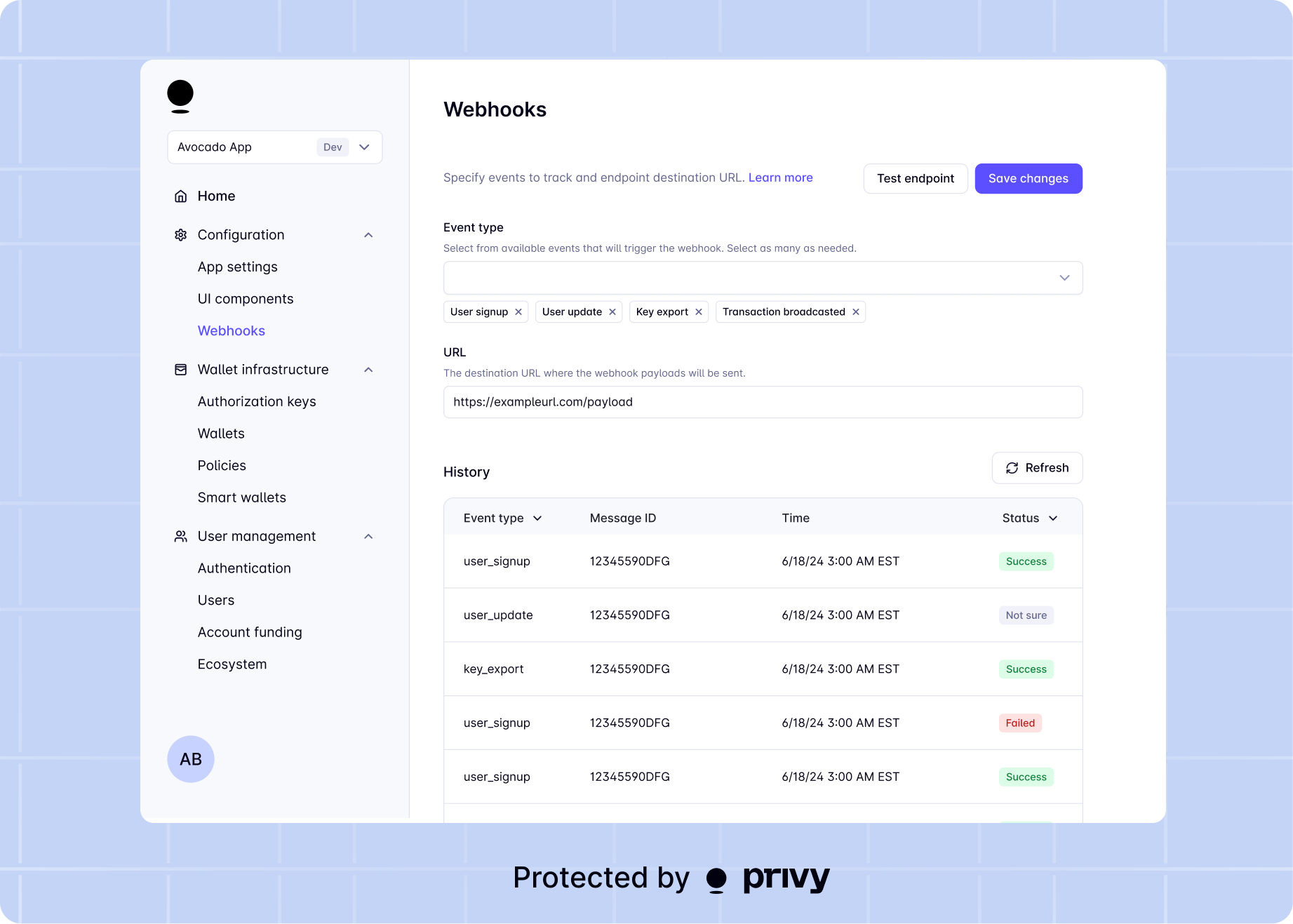
Registering an endpoint
- In your backend, create a new endpoint that will accept POST requests from Privy
- In the dashboard, go to the Configuration > Webhooks page
-
Add your new endpoint as the destination URL and select any event types you’d like to be notified for. The URL must begin with
https://.
User events
Wallet events
Transaction events
Wallet action events
Usage charge events
Privy publishes usage charge events for sponsoring gas, bridging, and swap provider fees. View usage webhooks for event availability, payloads, and reconciliation guidance.Intent events
User operation events
That’s it! You’ve successfully configured webhooks for your app. 🎉
Testing the webhook setup
Quick testing guide
Quick testing guide
During development and testing, you can quickly verify your webhook endpoint is working correctly. Here’s a simple step-by-step guide:Copy the public URL (e.g.,
Step 1: Expose your local endpoint
If you’re testing locally, you’ll need to expose your local server to the internet. Use a tool like ngrok or Cloudflare Tunnel:https://abc123.ngrok.io or https://abc123.trycloudflare.com).Step 2: Create your webhook endpoint
Create a simple endpoint in your backend that accepts POST requests:Step 3: Register your endpoint in the dashboard
- Go to Configuration > Webhooks in the Privy Dashboard
- Add your public URL (from Step 1) as the webhook endpoint
- Select the event types you want to test
Step 4: Test your endpoint
Click the “Test webhook” button in the dashboard. This will send a test webhook (privy.test) to your endpoint with the following payload:Step 5: Verify receipt
Check your server logs to confirm you received the webhook. You should see:- The webhook payload in your console/logs
- A successful 200 response returned to Privy
Webhook delivery
Privy sends webhooks to your configured endpoint via Svix. The webhook system operates on an at least once delivery basis with automatic retries if the endpoint does not successfully respond.Redundant webhook deliveries can be identified using the
idempotency_key field where available,
ensuring your application can safely handle duplicate events.Retry behavior
Your endpoint must return a 2xx response for the webhook delivery to be considered successful. Anything else is considered an error response, and will be retried based on the following schedule, where each period is started following the failure of the preceding attempt:- Immediately
- 5 seconds
- 5 minutes
- 30 minutes
- 2 hours
- 5 hours
- 10 hours
- 10 hours (in addition to the previous)
Static IPs
Webhooks will be delivered from the following list of IP addresses:Webhook signing key
The webhook signing key is necessary to verify that the payloads sent to your endpoint are from Privy. Follow the steps below in order to set up webhook verification in your backend.Verifying a webhook payload
Verifying a webhook payload
Webhook payloads must be verified before they are trusted and used on your server. This is done by verifying a signature sent with your webhook. Privy uses
svix for webhooks infrastructure.Verify a webhook with the SDK
Use the If the webhook payload is valid, the method returns the verified payload. If the webhook payload is invalid, the method throws an
PrivyClient’s webhooks().verify method to verify an incoming webhook. Pass in the request body and svix headers. As an example, for a Next.js API request:InvalidWebhookError.Manual verification
In order to verify an incoming webhook, please refer to svix’s manual verification guide or library verification guide.Webhook events reference
User events
Events for user creation, authentication, and account linking. Includes
user.created,
user.authenticated, and more.Wallet events
Events for deposits, withdrawals, and wallet security. Includes
wallet.funds_deposited,
wallet.funds_withdrawn, and more.Transaction events
Events for transaction lifecycle. Includes
transaction.confirmed,
transaction.failed, and more.Wallet action events
Events for swaps, transfers, and earn actions. Includes
wallet_action.swap.*,
wallet_action.transfer.*, and more.MFA events
Events for multi-factor authentication. Includes
mfa.enabled and
mfa.disabled.Intent events
Events for the intent approval lifecycle. Includes
intent.created,
intent.authorized, and
intent.rejected.User operation events
Events for ERC-4337 UserOperation lifecycle. Includes
user_operation.completed.