

Supported Platforms
- ✅ MacOS / iOS
- ✅ Android
- ✅ WebGL
- ❌ Windows
- ❌ Linux
Prerequisites
- Unity Editor 2022.3.42f1 or newer
Installation
Privy’s Unity SDK can be installed via the Unity Package Manager, OpenUPM, or by copying the SDK folder directly into your project.Option 1: Unity Package Manager (git URL)
- Open your project in the Unity editor.
- Navigate to Window > Package Manager.
- Click the + button and select Add package from git URL.
- Enter the following URL:
Option 2: OpenUPM
- Install the OpenUPM CLI if you haven’t already.
- From your project root, run:
The SDK bundles third-party dependencies (
jsoncanonicalizer and unity-webview) inside
SDK/ExternalDependencies. If your project already includes any of these packages, manually
exclude the duplicates to avoid conflicts.Using Privy namespaces
Privy v1.0 organizes its public types into specific namespaces. Add the relevantusing directives at the top of each file:
WebGL Setup
Privy’s Unity SDK leverages an iframe to secure the key material for a user’s embedded wallet. Given the use of an iframe, we recommend testing builds with Privy’s Unity SDK in the browser, or on a non-WebGL platform in the Unity editor. To configure settings for your WebGL build to work with Privy, go to your Project Settings in the Unity editor. Next, select Player and navigate to WebGL. Set the following values:- In Resolution and Presentation, select
unity-webview, orunity-webview-2020as the template if you are using a Unity editor version newer than 2020.
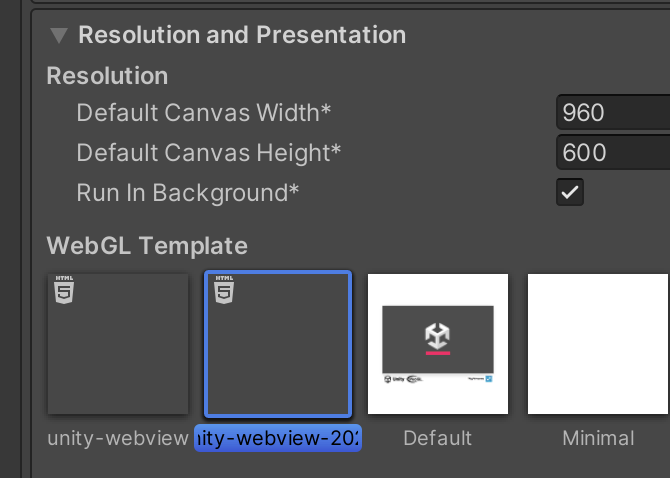
- In Other Settings/Optimization, managed stripping level to minimal

The following versions of the Unity editor are not supported, due to this
bug:
2022.3.20f1, 2022.3.40f1, 2023.2.12f1, 6000.0.0b11.