

Execution wallets work alongside existing external wallet setups.
Architecture
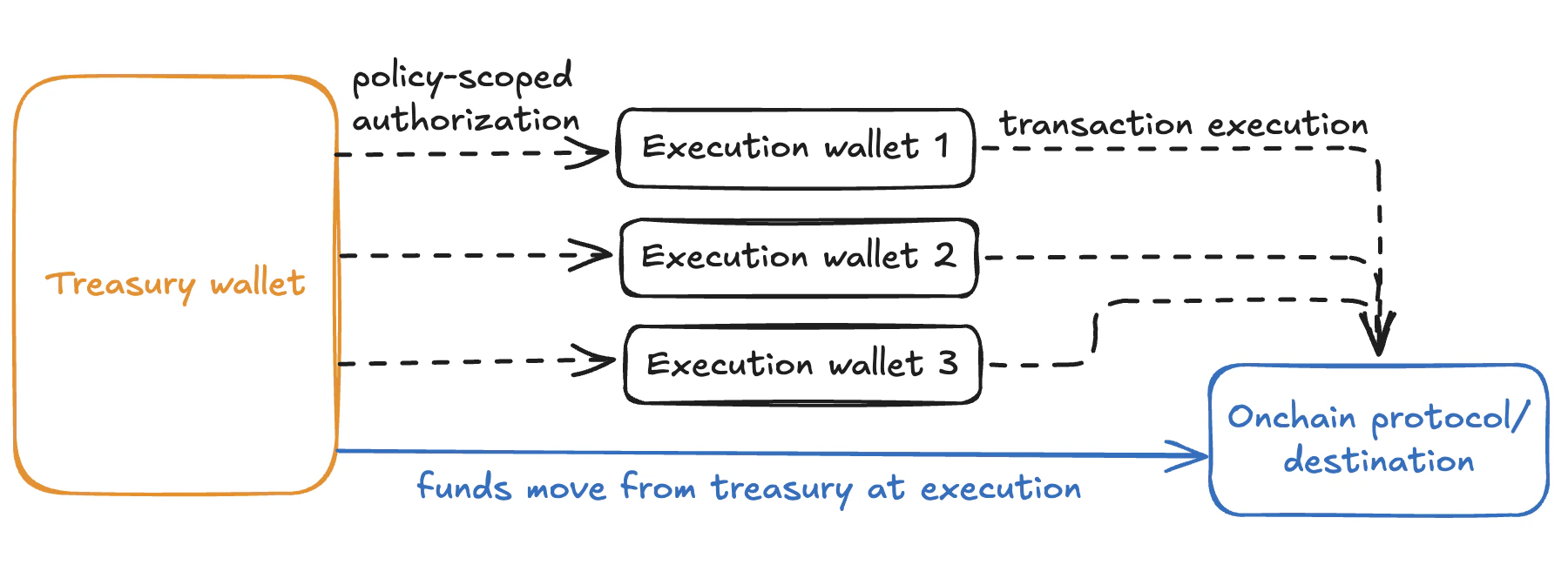
- Treasury funds remain in custody (e.g., Bridge or another provider)
- Execution wallets are EIP-7702 smart accounts authorized to act on approved funds under policy constraints
- Batched transactions allow each wallet to execute multiple protocol interactions atomically in a single transaction
- A fleet of execution wallets can run in parallel across different strategies, with no shared nonce or ordering constraint across wallets
- No working balance required — gas is sponsored via the EIP-7702 smart account layer
Setup
1
Create authorization keys
Your backend controls execution wallets via authorization keys. These keys sign requests to Privy’s API on behalf of each wallet, enabling programmatic execution without manual approvals.Create authorization keys in the Privy Dashboard and securely store the corresponding private keys.For higher-value wallets, register the authorization keys in a key quorum. This requires multiple parties to sign before a wallet action is executed.
Create authorization keys
Create authorization keys in your Privy Dashboard.
Key quorums quickstart
Set up a key quorum for multi-party governance.
2
Define execution policies
Policies constrain what each execution wallet can do. Well-scoped policies ensure that execution wallets can only interact with approved protocols and move funds within defined limits.Common policy configurations for execution wallets include:
- Allowlisted contracts: Restrict the wallet to interact only with specific onchain protocols (e.g., a particular lending pool or liquidity venue)
- Transfer limits: Cap the amount that can be moved per transaction or within a time window
- Recipient restrictions: Limit where funds can be sent, such as only back to the treasury address
- Chain restrictions: Restrict execution to specific networks
id after creation to assign it to the wallets you provision later.Policies overview
Learn how to construct policies with Privy’s policy language.
Create a policy
Create a policy for your execution wallets.
3
Provision an execution wallet fleet
Create one or more Privy wallets, each owned by the authorization key (or key quorum) and subject to the policies you defined.Provisioning multiple wallets allows your application to distribute transactions across the fleet and execute in parallel. Each wallet is an independent EOA with its own nonce, so there is no ordering constraint between wallets.When creating each wallet:
- Set
owner_idto theidof the authorization key or key quorum - Set
policy_idsto include theidof the policy you created
Create a wallet
Provision wallets for your execution fleet.
4
Upgrade execution wallets with EIP-7702
Upgrade each execution wallet to a smart account using EIP-7702. This gives each wallet the ability to send batched transactions and enables gas sponsorship, so the wallets do not need to hold a native token balance for gas.Use Privy’s
sign7702Authorization method to generate the delegation authorization for each wallet, then submit the upgrade transaction via your preferred account abstraction provider.EIP-7702 overview
Learn how to upgrade EOAs with EIP-7702.
Sign EIP-7702 authorization
Sign an EIP-7702 authorization with a Privy wallet.
5
Execute batched transactions
Each upgraded execution wallet can now send multiple protocol interactions atomically in a single batched transaction. Distribute transactions across the fleet to parallelize execution — for example, separate wallets can interact with different protocols simultaneously, or multiple wallets can execute the same strategy concurrently.
Send a Solana transaction
Execute transactions on Solana.
Send batch transactions
Follow the batch transactions guide for the transaction submission pattern.
6
Monitor execution activity
Privy provides webhooks for transaction lifecycle events and balance changes. Use these to observe execution activity, trigger downstream workflows, and reconcile with your treasury system.
Transaction webhooks
Monitor transaction status and completion events.
Balance webhooks
Track deposits and withdrawals across the fleet.
Learn more
Organization wallets
Set up an organization wallet with key quorums and policies.
EIP-7702
Learn how EIP-7702 enables batch transactions and gas sponsorship.
Policies overview
Configure fine-grained execution controls.
Manual approvals
Add human review for high-value or sensitive transactions.