> ## Documentation Index
> Fetch the complete documentation index at: https://docs.privy.io/llms.txt
> Use this file to discover all available pages before exploring further.
# UI component
> Pre-built UI component to prompt users to provision or revoke signers on their wallets
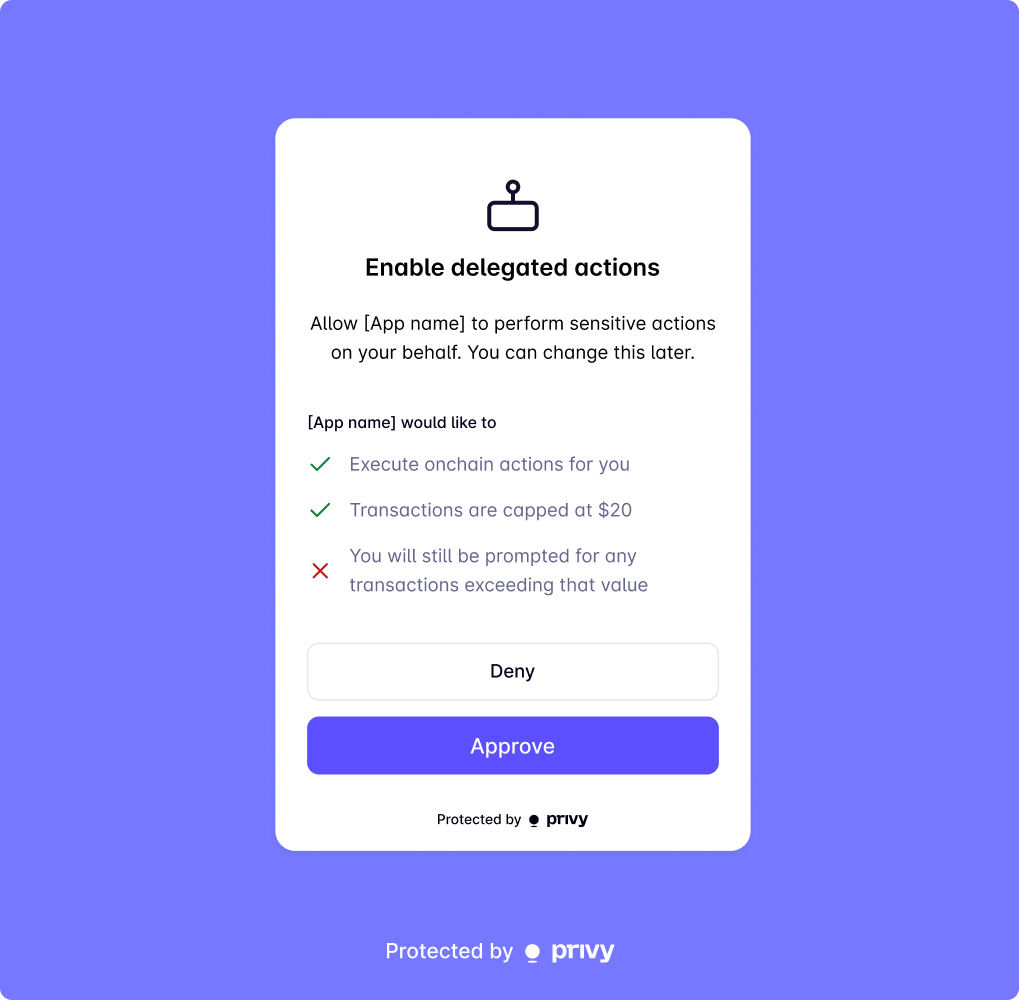
Privy provides a UI component that you can use to prompt users to provision signers for their wallets and revoke server-side access.
## Provision server-side access
To prompt users to delegate their wallets *with* a consent screen, use the `delegateWallet` method from the `useDelegatedActions` hook:
```tsx theme={"system"}
import {useDelegatedActions} from '@privy-io/react-auth';
...
const {delegateWallet} = useDelegatedActions();
```
### Parameters
Address of the embedded wallet to delegate.
Chain type of the embedded wallet to delegate.
When invoked, the `delegateWallet` method will open a Privy modal where the user can either approve or reject the delegation.
If the user approves, Privy will initiate the process to provision a signer for the wallet. If the user refuses or there is another error during provisioning, this method will throw an error.
### Usage
```tsx theme={"system"}
import {
usePrivy,
useSolanaWallets,
useDelegatedActions,
type WalletWithMetadata,
} from '@privy-io/react-auth';
function DelegateActionButton() {
const {user} = usePrivy();
const {ready, wallets} = useSolanaWallets(); // or useWallets()
const {delegateWallet} = useDelegatedActions();
// Find the embedded wallet to delegate from the array of the user's wallets
const walletToDelegate = wallets.find((wallet) => wallet.walletClientType === 'privy');
// Check if the wallet to delegate by inspecting the user's linked accounts
const isAlreadyDelegated = !!user.linkedAccounts.find(
(account): account is WalletWithMetadata => account.type === 'wallet' && account.delegated,
);
const onDelegate = async () => {
if (!walletToDelegate || !ready) return; // Button is disabled to prevent this case
await delegateWallet({address: walletToDelegate.address, chainType: 'solana'}); // or chainType: 'ethereum'
};
return (
);
}
```
To prompt users to provision a signer for their wallets *with* a consent screen, use the `delegateWallet` method from the `useDelegatedActions` hook:
```tsx theme={"system"}
import {useDelegatedActions} from '@privy-io/expo/ui';
...
const {delegateWallet} = useDelegatedActions();
```
### Parameters
Address of the embedded wallet to delegate.
Chain type of the embedded wallet to provision a signer for.
When invoked, the `delegateWallet` method will open a Privy modal where the user can either approve or reject the provisioning of a signer.
If the user approves, Privy will initiate the process to provision a signer for the wallet. If the user refuses or there is another error during provisioning, this method will throw an error.
### Usage
```tsx theme={"system"}
import {
usePrivy,
useEmbeddedEthereumWallet,
getAllUserEmbeddedEthereumWallets,
} from '@privy-io/expo';
import {useDelegatedActions} from '@privy-io/expo/ui';
function DelegateActionButton() {
const {user, isReady} = usePrivy();
const wallets = getAllUserEmbeddedEthereumWallets(user); // or getAllUserEmbeddedSolanaWallets
const {delegateWallet} = useDelegatedActions();
// Find the embedded wallet account to delegate
const walletToDelegate = wallets.find((wallet) => wallet.wallet_index === 0);
// Check if the wallet is already delegated
const isAlreadyDelegated = walletToDelegate.delegated;
const onDelegate = async () => {
if (!walletToDelegate || !isReady) return; // Button is disabled to prevent this case
await delegateWallet({address: walletToDelegate.address, chainType: 'ethereum'}); // or chainType: 'solana'
};
return (
);
}
```
***
## Revoke server-side access
To prompt users to revoke a signer with a revocation screen, use the `revokeWallets` method from the `useDelegatedActions` hook:
```tsx theme={"system"}
import {useDelegatedActions} from '@privy-io/react-auth';
...
const {revokeWallets} = useDelegatedActions();
```
When invoked, the `revokeWallets` method will open a Privy modal where the user can either confirm the revocation of their signer. If the user has no signers, this method will error.
Once a user confirms revocation, your app will no longer be able to take actions on behalf of the user with their wallet unless the user [provisions a signer](/wallets/using-wallets/signers/delegate-wallet).
If a user has provisioned multiple signers, they will **all** be revoked.
### Usage
```tsx theme={"system"}
import {usePrivy, useDelegatedActions, type WalletWithMetadata} from '@privy-io/react-auth';
function RevokeDelegateActionButton() {
const {user} = usePrivy();
const {revokeWallets} = useDelegatedActions();
// Check if the user has any delegated wallets by searching the linkedAccounts array for wallets
// with `delegated: true` set
const hasDelegatedWallets =
user.linkedAccounts.filter(
(account): account is WalletWithMetadata => account.type === 'wallet' && account.delegated
).length !== 0;
const onRevoke = async () => {
if (!hasDelegatedWallets) return; // Button is disabled to prevent this case
await revokeWallets();
};
return (
);
}
```
To prompt users to revoke a signer with a revocation screen, use the `revokeWallets` method from the `useDelegatedActions` hook:
```tsx theme={"system"}
import {useDelegatedActions} from '@privy-io/expo/ui';
...
const {revokeWallets} = useDelegatedActions();
```
When invoked, the `revokeWallets` method will open a Privy modal where the user can either confirm the revocation of their signer. If the user has no signers, this method will error.
Once a user confirms revocation, your app will no longer be able to take actions on behalf of the user with their wallet unless the user [provisions a signer](/wallets/using-wallets/signers/delegate-wallet).
If a user has provisioned multiple signers, they will **all** be revoked.
### Usage
```tsx theme={"system"}
import {usePrivy, getAllUserEmbeddedEthereumWallets} from '@privy-io/expo';
import {useDelegatedActions} from '@privy-io/expo/ui';
function RevokeDelegateActionButton() {
const {user} = usePrivy();
const {revokeWallets} = useDelegatedActions();
const wallets = getAllUserEmbeddedEthereumWallets(user); // or getAllUserEmbeddedSolanaWallets
// Check if the user has any delegated wallets by searching the user's wallets for any with
// `delegated: true` set.
const hasDelegatedWallets = wallets.some((wallet) => wallet.delegated);
const onRevoke = async () => {
if (!hasDelegatedWallets) return; // Button is disabled to prevent this case
await revokeWallets();
};
return (
);
}
```