> ## Documentation Index
> Fetch the complete documentation index at: https://docs.privy.io/llms.txt
> Use this file to discover all available pages before exploring further.
# Configure smart wallets in the dashboard
> Enable and configure smart wallet type (Alchemy, Kernel, Safe) in the Privy Dashboard
Enable smart wallets in the [Privy Dashboard](https://dashboard.privy.io/apps?page=smart-wallets)
before implementing this feature.
## 1. Enable smart wallets
First, enable the smart wallets toggle and select a smart wallet type. Privy currently supports [Alchemy](https://www.alchemy.com/docs/wallets/smart-contracts/choosing-a-smart-account), [Kernel](https://zerodev.app/), [Biconomy](https://www.biconomy.io/smart-accounts), [Safe](https://safe.global/), [Thirdweb](https://thirdweb.com/contracts), and the [Coinbase Smart Wallet](https://github.com/coinbase/smart-wallet) as smart wallet types.
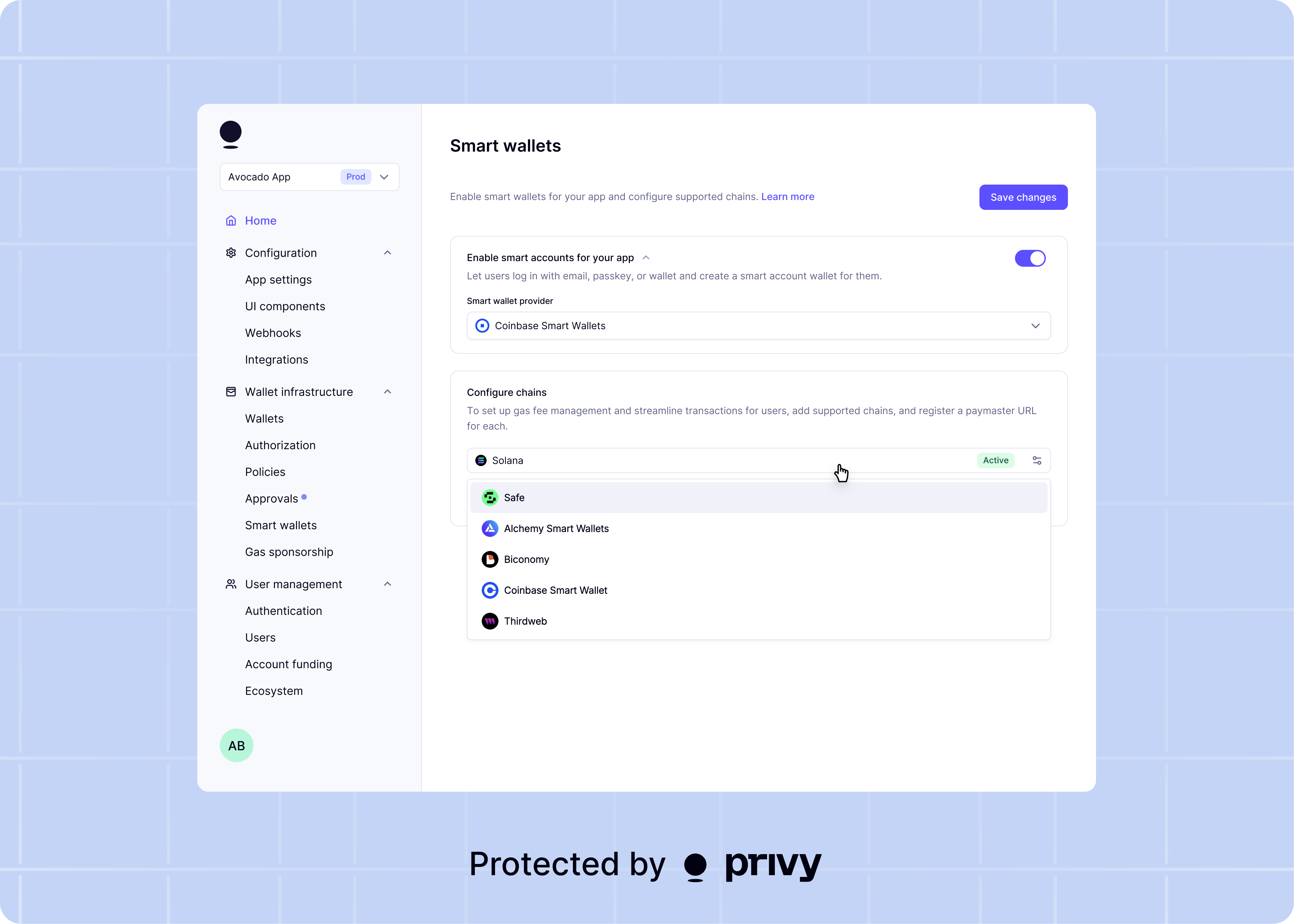 If you modify your smart wallet type after users have already created smart wallets, Privy will
provision the original smart wallet type for existing users to ensure they can access the accounts
they already use.
## 2. Configure the supported networks
Next, configure the networks for your smart wallets. You should do this for *any* network that your app plans to use smart wallets on.
If you modify your smart wallet type after users have already created smart wallets, Privy will
provision the original smart wallet type for existing users to ensure they can access the accounts
they already use.
## 2. Configure the supported networks
Next, configure the networks for your smart wallets. You should do this for *any* network that your app plans to use smart wallets on.
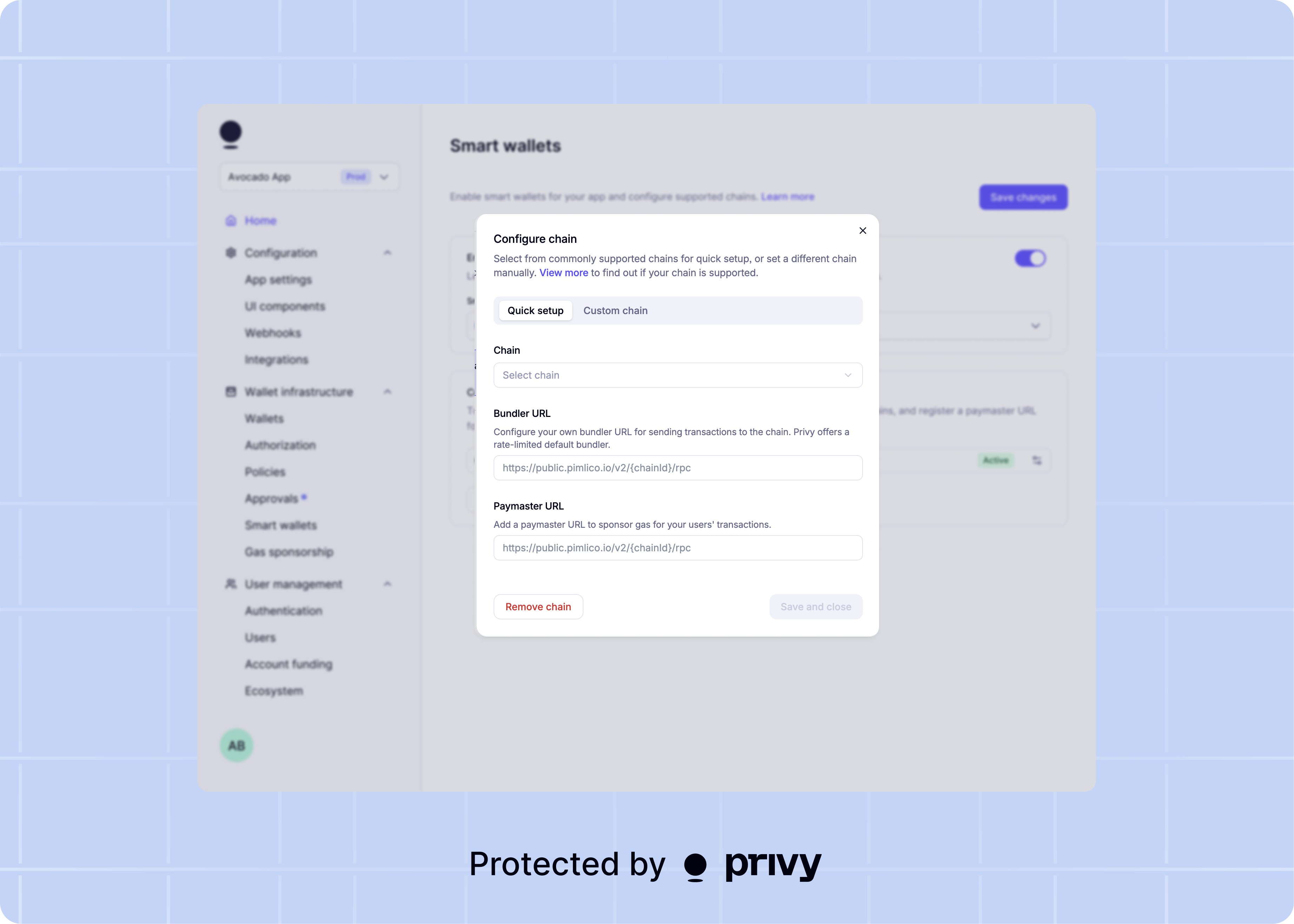 For each configured network, you can optionally provide a bundler URL and/or a paymaster URL.
#### Bundler
The **bundler URL** specifies the node you want to use bundle operations from multiple users into a single transaction. If a bundler URL is not set for a network, Privy defaults to Pimlico's public bundler (`https://public.pimlico.io/v2/{chainId}/rpc`).
**We strongly recommend setting your own bundler URL when taking smart wallets to production**, to
give you more control over bundler rate limits. Privy's default bundler is heavily rate limited
and is not suitable for production usage.
#### Paymaster
The **paymaster URL** specifies the paymaster used to sponsor gas fees for the smart wallets on the network. If a paymaster URL is set, Privy will use that paymaster to sponsor gas fees for your users' transactions. If a paymaster URL is not set, your users' smart wallets must have a balance of the network's native currency to pay for gas fees for transactions.
For additional security, we strongly recommend setting **Allowed domains** for your paymaster and/or bundler through your provider's dashboard, to restrict usage of these URLs to only your website.
#### Recommended providers
If you are looking to set up a paymaster or bundler for your app, we suggest the following providers:
| Provider | Get started |
| -------- | -------------------------------------------------------------------------------------------------------------------------------------------------------------- |
| Pimlico | [https://dashboard.pimlico.io](https://dashboard.pimlico.io) |
| ZeroDev | [https://dashboard.zerodev.app/](https://dashboard.zerodev.app/) |
| Alchemy | [https://www.alchemy.com/docs/wallets/smart-contracts/choosing-a-smart-account](https://www.alchemy.com/docs/wallets/smart-contracts/choosing-a-smart-account) |
| Biconomy | [https://dashboard.biconomy.io/](https://dashboard.biconomy.io/) |
| Thirdweb | [https://thirdweb.com](https://thirdweb.com) |
| Coinbase | [https://www.coinbase.com/developer-platform/products/paymaster](https://www.coinbase.com/developer-platform/products/paymaster) |
If using **Alchemy** for your paymaster, please provide your Alchemy gas policy ID. Each gas
policy ID is tied to a specific chain and Alchemy project.
If using **Biconomy** as a paymaster with `@privy-io/react-auth`, you can override our default
paymaster context in the `SmartAccountsProvider`. View more in [our setup
notes](/wallets/using-wallets/evm-smart-wallets/usage).
#### Custom chains
If you do not see the chain you wish to configure on the drop down, you can configure a custom chain. Before configuring a custom chain on the Privy dashboard, please ensure the chain is supported by your smart wallet provider. Custom chain configuration requires an EIP155 chain ID, chain name, paymaster URL, bundler URL, and RPC URL; none of these values can be defaulted as they are in supported chains.
For each configured network, you can optionally provide a bundler URL and/or a paymaster URL.
#### Bundler
The **bundler URL** specifies the node you want to use bundle operations from multiple users into a single transaction. If a bundler URL is not set for a network, Privy defaults to Pimlico's public bundler (`https://public.pimlico.io/v2/{chainId}/rpc`).
**We strongly recommend setting your own bundler URL when taking smart wallets to production**, to
give you more control over bundler rate limits. Privy's default bundler is heavily rate limited
and is not suitable for production usage.
#### Paymaster
The **paymaster URL** specifies the paymaster used to sponsor gas fees for the smart wallets on the network. If a paymaster URL is set, Privy will use that paymaster to sponsor gas fees for your users' transactions. If a paymaster URL is not set, your users' smart wallets must have a balance of the network's native currency to pay for gas fees for transactions.
For additional security, we strongly recommend setting **Allowed domains** for your paymaster and/or bundler through your provider's dashboard, to restrict usage of these URLs to only your website.
#### Recommended providers
If you are looking to set up a paymaster or bundler for your app, we suggest the following providers:
| Provider | Get started |
| -------- | -------------------------------------------------------------------------------------------------------------------------------------------------------------- |
| Pimlico | [https://dashboard.pimlico.io](https://dashboard.pimlico.io) |
| ZeroDev | [https://dashboard.zerodev.app/](https://dashboard.zerodev.app/) |
| Alchemy | [https://www.alchemy.com/docs/wallets/smart-contracts/choosing-a-smart-account](https://www.alchemy.com/docs/wallets/smart-contracts/choosing-a-smart-account) |
| Biconomy | [https://dashboard.biconomy.io/](https://dashboard.biconomy.io/) |
| Thirdweb | [https://thirdweb.com](https://thirdweb.com) |
| Coinbase | [https://www.coinbase.com/developer-platform/products/paymaster](https://www.coinbase.com/developer-platform/products/paymaster) |
If using **Alchemy** for your paymaster, please provide your Alchemy gas policy ID. Each gas
policy ID is tied to a specific chain and Alchemy project.
If using **Biconomy** as a paymaster with `@privy-io/react-auth`, you can override our default
paymaster context in the `SmartAccountsProvider`. View more in [our setup
notes](/wallets/using-wallets/evm-smart-wallets/usage).
#### Custom chains
If you do not see the chain you wish to configure on the drop down, you can configure a custom chain. Before configuring a custom chain on the Privy dashboard, please ensure the chain is supported by your smart wallet provider. Custom chain configuration requires an EIP155 chain ID, chain name, paymaster URL, bundler URL, and RPC URL; none of these values can be defaulted as they are in supported chains.