> ## Documentation Index
> Fetch the complete documentation index at: https://docs.privy.io/llms.txt
> Use this file to discover all available pages before exploring further.
# Funding overview
> Enable users to fund wallets with fiat, crypto, or bank transfers
export const CardOnrampMainnetOnly = () =>
Card and fiat on-ramp purchases are supported on mainnets only. On testnets (e.g. Polygon Amoy,
Sepolia), on-ramps cannot purchase testnet tokens, so this flow will not be shown or will fail.
;
Privy provides UI components and integrations that let users fund wallets with native currencies (e.g. ETH, SOL), USDC, and other tokens. Funded wallets enable onchain actions like purchasing goods, swapping tokens, and minting NFTs.
 ## Funding methods
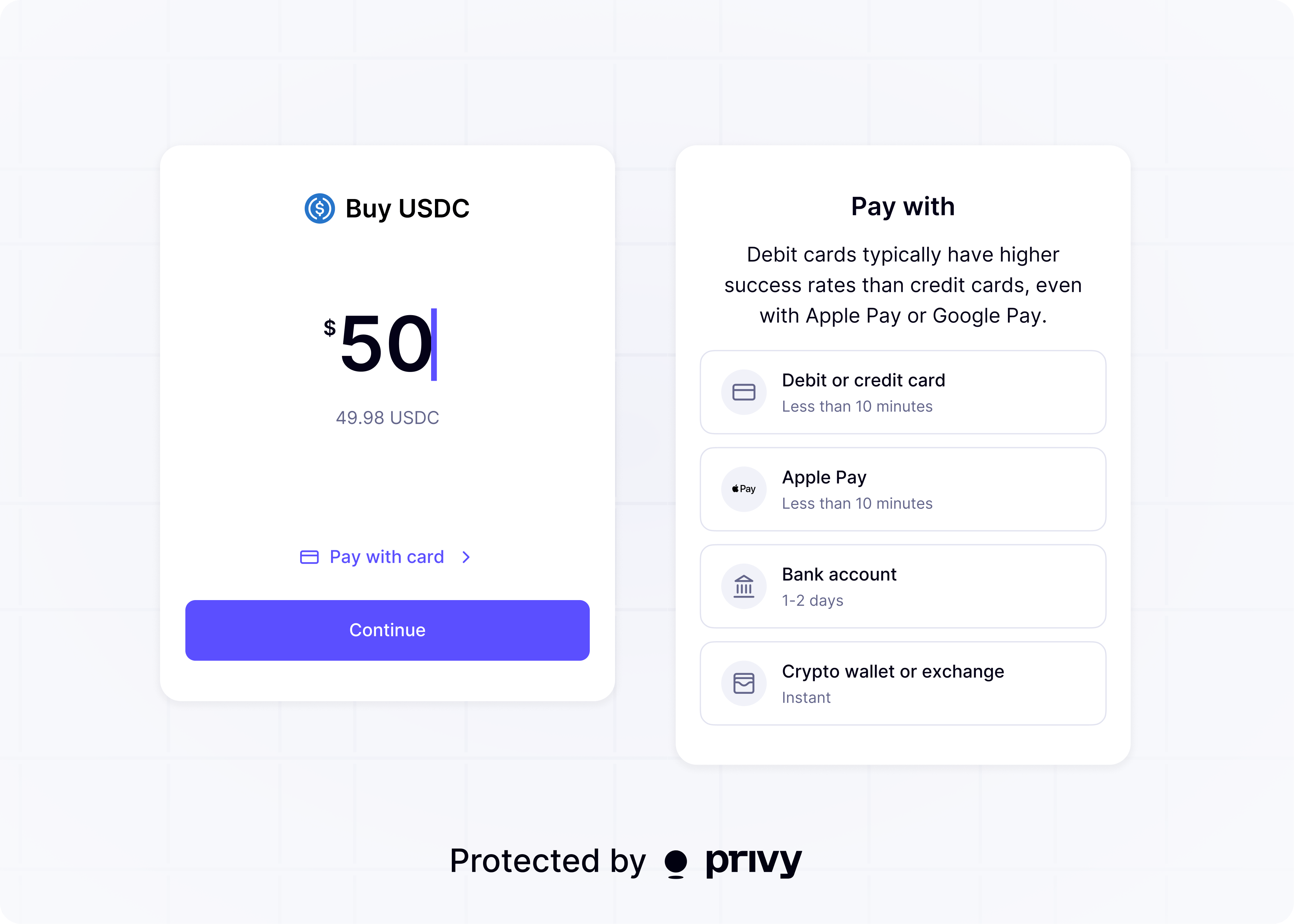
Privy supports several ways for users to get assets into their wallets. Each method suits different use cases depending on where the user's funds originate.
### Unified funding
Use [`useAddFunds`](/wallets/funding/add-funds) to offer fiat purchases, crypto transfers, or both from one modal. Configure a destination wallet once, then pass `fiat`, `crypto`, or both method configs.
### Fiat-to-crypto onramps
Your app can let users purchase crypto with fiat currencies (USD, EUR, GBP, and more) through Privy's built-in onramp flow. The [`useFiatOnramp`](/wallets/funding/fiat-onramp) hook handles provider selection and payment processing.
Supported payment methods include debit and credit cards, Apple Pay, and Google Pay. Onramp providers Meld, MoonPay, and Coinbase process payments and deliver crypto to user wallets.
Card-based purchases are not always instantaneous. Funds may take a few minutes to a few days to
arrive. Debit cards generally have higher approval rates than credit cards.
### Bank deposits
Your app can let users fund wallets by transferring fiat from a bank account (ACH, wire, or SEPA) through the [`useFundWalletWithBankDeposit`](/wallets/funding/bank-deposits) hook. The onramp provider converts the fiat deposit into crypto and delivers it to the destination wallet.
Bank deposits require Bridge API keys and KYC verification.
### Crypto deposit addresses
Your app can let users fund wallets by sending crypto from any supported chain through the [`useDepositAddress`](/wallets/funding/crypto-deposit-addresses) hook. Privy generates a unique deposit address, bridges or swaps the deposited tokens, and delivers them to the destination wallet.
This is useful when users already hold crypto on a different chain than the one your app uses, or in a different wallet, app, or exchange.
## Getting started
Enable and configure funding methods in the [Privy Dashboard](https://dashboard.privy.io/apps?page=funding). See the [configuration guide](/wallets/funding/configuration) for details.
Select the integration that fits your use case:
| Use case | Integration |
| ------------------------------------------------- | --------------------------------------------------------------------- |
| One modal for fiat purchases and crypto transfers | [Unified funding](/wallets/funding/add-funds) |
| Fiat purchases via card, Apple Pay, or Google Pay | [Fiat-to-crypto onramps](/wallets/funding/fiat-onramp) |
| Bank transfers (ACH, wire, SEPA) | [Bank deposits](/wallets/funding/bank-deposits) |
| Crypto deposit addresses | [Crypto deposit addresses](/wallets/funding/crypto-deposit-addresses) |
Follow the guide for your chosen integration to add funding to your app.
## Funding methods
Privy supports several ways for users to get assets into their wallets. Each method suits different use cases depending on where the user's funds originate.
### Unified funding
Use [`useAddFunds`](/wallets/funding/add-funds) to offer fiat purchases, crypto transfers, or both from one modal. Configure a destination wallet once, then pass `fiat`, `crypto`, or both method configs.
### Fiat-to-crypto onramps
Your app can let users purchase crypto with fiat currencies (USD, EUR, GBP, and more) through Privy's built-in onramp flow. The [`useFiatOnramp`](/wallets/funding/fiat-onramp) hook handles provider selection and payment processing.
Supported payment methods include debit and credit cards, Apple Pay, and Google Pay. Onramp providers Meld, MoonPay, and Coinbase process payments and deliver crypto to user wallets.
Card-based purchases are not always instantaneous. Funds may take a few minutes to a few days to
arrive. Debit cards generally have higher approval rates than credit cards.
### Bank deposits
Your app can let users fund wallets by transferring fiat from a bank account (ACH, wire, or SEPA) through the [`useFundWalletWithBankDeposit`](/wallets/funding/bank-deposits) hook. The onramp provider converts the fiat deposit into crypto and delivers it to the destination wallet.
Bank deposits require Bridge API keys and KYC verification.
### Crypto deposit addresses
Your app can let users fund wallets by sending crypto from any supported chain through the [`useDepositAddress`](/wallets/funding/crypto-deposit-addresses) hook. Privy generates a unique deposit address, bridges or swaps the deposited tokens, and delivers them to the destination wallet.
This is useful when users already hold crypto on a different chain than the one your app uses, or in a different wallet, app, or exchange.
## Getting started
Enable and configure funding methods in the [Privy Dashboard](https://dashboard.privy.io/apps?page=funding). See the [configuration guide](/wallets/funding/configuration) for details.
Select the integration that fits your use case:
| Use case | Integration |
| ------------------------------------------------- | --------------------------------------------------------------------- |
| One modal for fiat purchases and crypto transfers | [Unified funding](/wallets/funding/add-funds) |
| Fiat purchases via card, Apple Pay, or Google Pay | [Fiat-to-crypto onramps](/wallets/funding/fiat-onramp) |
| Bank transfers (ACH, wire, SEPA) | [Bank deposits](/wallets/funding/bank-deposits) |
| Crypto deposit addresses | [Crypto deposit addresses](/wallets/funding/crypto-deposit-addresses) |
Follow the guide for your chosen integration to add funding to your app.