> ## Documentation Index
> Fetch the complete documentation index at: https://docs.privy.io/llms.txt
> Use this file to discover all available pages before exploring further.
# EVM funding (legacy)
This page documents the `useFundWallet` hook for EVM wallets. For newer funding integrations, see
[Fiat-to-crypto onramps](/wallets/funding/fiat-onramp) or [Bank
deposits](/wallets/funding/bank-deposits).
# Prompting users to fund wallets
With funding methods enabled for your app, Privy will prompt users to fund their wallets at two points in their experience:
1. Manually, when you call Privy's `fundWallet` method documented below
2. Automatically, when the user attempts to send a transaction but has insufficient funds
You can also configure the chain, asset, and amount that users should fund their wallets with directly in code.
## Manually invoking funding
Once you've enabled a set of funding methods for your app, to invoke the funding flow, use the **`useFundWallet`** hook from the Privy SDK as follows:
Prompt the user to fund their wallets by calling `fundWallet`.
```tsx theme={"system"}
import {useFundWallet} from '@privy-io/react-auth';
...
const {fundWallet} = useFundWallet();
await fundWallet({address: 'your-wallet-address-here'});
```
If you are using Privy's cross-chain bridging feature to fund an EVM wallet using assets on Solana,
you will additionally need to mount the **`useSolanaFundingPlugin()`** hook in your app like so:
```tsx theme={"system"}
import {useSolanaFundingPlugin} from '@privy-io/react-auth/solana';
...
// Ensure this is mounted throughout the entire funding flow
useSolanaFundingPlugin();
```
Once invoked, the **`fundWallet`** method will open a modal that contains a list of funding options the user can take. If only one funding method was enabled for your app, Privy will navigate the user directly to that specific flow.
You can pass additional configurations to the funding flow in the `options` parameter to **`fundWallet`**.
Purchases with third-party providers are not always instantaneous, and there may be some time
before the user completes their purchase and the funds are available in their wallet.
## Automatically invoking funding
With funding methods enabled for your app, if a user attempts to send a transaction but does not have sufficient funds to do so, Privy will show them an "Add funds" button in the transaction modal that enables them to invoke funding flows.
## Setting a funding amount in code
Optionally, you can pass in a **chain, funding amount, and funding asset** to `fundWallet` to override your Dashboard configuration.
To do so, in the `options` parameter to `fundWallet`, pass an object with the following fields:
| Parameter | Type | Description |
| ------------------------------- | --------------------------------------------------- | -------------------------------------------------------------------------------------------------------------------------------------------------------------------------------------------------------------------------------------------------------------------------------------------- |
| `chain` | [`Chain`](https://viem.sh/docs/chains/introduction) | Optional. A [`viem/chains`](https://viem.sh/docs/chains/introduction) object for the network on which users should fund their accounts. Defaults to the network you configured in the Privy Dashboard. |
| `asset` | `'native-currency' \| 'USDC' \| {erc20: string}` | Optional. The asset you'd like the user to fund their accounts with. Set `'native-currency'` to fund with the `chain`'s native currency (e.g. ETH), `'USDC'` to fund with USDC, or a token address in the `erc20` field to fund with an arbitrary ERC20. Defaults to `'native-currency'`. |
| `amount` | `string` | Required if `asset` is set, optional otherwise. The amount of the asset to fund as a decimal string. Defaults to the amount you configured in the Privy Dashboard. |
| `defaultFundingMethod` | `'card' \| 'exchange' \| 'wallet' \| 'manual'` | Optional. Specifying the default funding method will send the user directly to the card / exchange provider, directly open the wallet transfer, or directly open the manual QR wallet transfer screen. Additional configured payment options will be shown after the default funding method. |
| `card.preferredProvider` | `'coinbase' \| 'moonpay'` | Optional. The preferred card provider to use for funding. If not specified, users will be directed to one of these providers initially and given an option to navigate to a different later. |
| `uiConfig.receiveFundsTitle` | `string` | Optional. Configure the title of the "Receive funds" screen. |
| `uiConfig.receiveFundsSubtitle` | `string` | Optional. Configure the subtitle of the "Receive funds" screen. |
Testnets are not supported for the `chain` parameter.
As examples, you can configure the chain, asset, amount, default funding method, and provider to fund like below:
#### Fund with ETH
```tsx theme={"system"}
// Replace this with your desired network
import {base} from 'viem/chains'
...
// `fundWallet` from the useFundWallet() hook
fundWallet({
address: 'your-wallet-address-here',
options: {
chain: base,
amount: '0.01' // Since no `asset` is set, defaults to 'native-currency' (ETH)
}
})
```
#### Fund with USDC
```tsx theme={"system"}
// Replace this with your desired network
import {base} from 'viem/chains'
...
// `fundWallet` from the useFundWallet() hook
fundWallet({
address: 'your-wallet-address-here',
options: {
chain: base,
amount: '15',
asset: 'USDC'
}
})
```
#### Fund with arbitrary ERC20
```tsx theme={"system"}
// Replace this with your desired network
import {base} from 'viem/chains'
...
// `fundWallet` from the useFundWallet() hook
fundWallet({
address: 'your-wallet-address-here',
options: {
chain: base,
amount: '30',
asset: {erc20: '0x0578d8A44db98B23BF096A382e016e29a5Ce0ffe'}
}
})
```
#### Fund with Moonpay
```tsx theme={"system"}
// Replace this with your desired network
import {base} from 'viem/chains'
...
// `fundWallet` from the useFundWallet() hook
fundWallet({
address: 'your-wallet-address-here',
options: {
amount: '0.01',
chain: base,
card: {
preferredProvider: 'moonpay',
},
}
});
```
#### Fund with Coinbase exchange
```tsx theme={"system"}
// Replace this with your desired network
import {base} from 'viem/chains'
...
// `fundWallet` from the useFundWallet() hook
fundWallet({
address: 'your-wallet-address-here',
options: {
amount: '0.01',
chain: base,
card: {
preferredProvider: 'coinbase',
},
defaultFundingMethod: 'exchange'
}
});
```
## Callbacks
To understand when users have gone through a funding flow, you can use the `onUserExited` callback that can be provided to the **`useFundWallet`** hook. The `address`, `chain`, `fundingMethod`, and `balance` (value of the wallet being funded) are available via the callback, which fires when users exit the funding flow.
For example, if you want to prompt a user to fund their wallet upon logging in for the first time as a part of your onboarding flow:
```tsx theme={"system"}
const {fundWallet} = useFundWallet({
onUserExited({balance}) {
if (balance < 1000n) {
router.push('/insufficient-funds');
} else {
router.push('/dashboard');
}
}
});
const {login} = useLogin({
onComplete(user, isNewUser) {
if (isNewUser && user.wallet?.walletClientType === 'privy') {
fundWallet({address: user.wallet.address});
} else {
router.push('/dashboard');
}
}
});
```
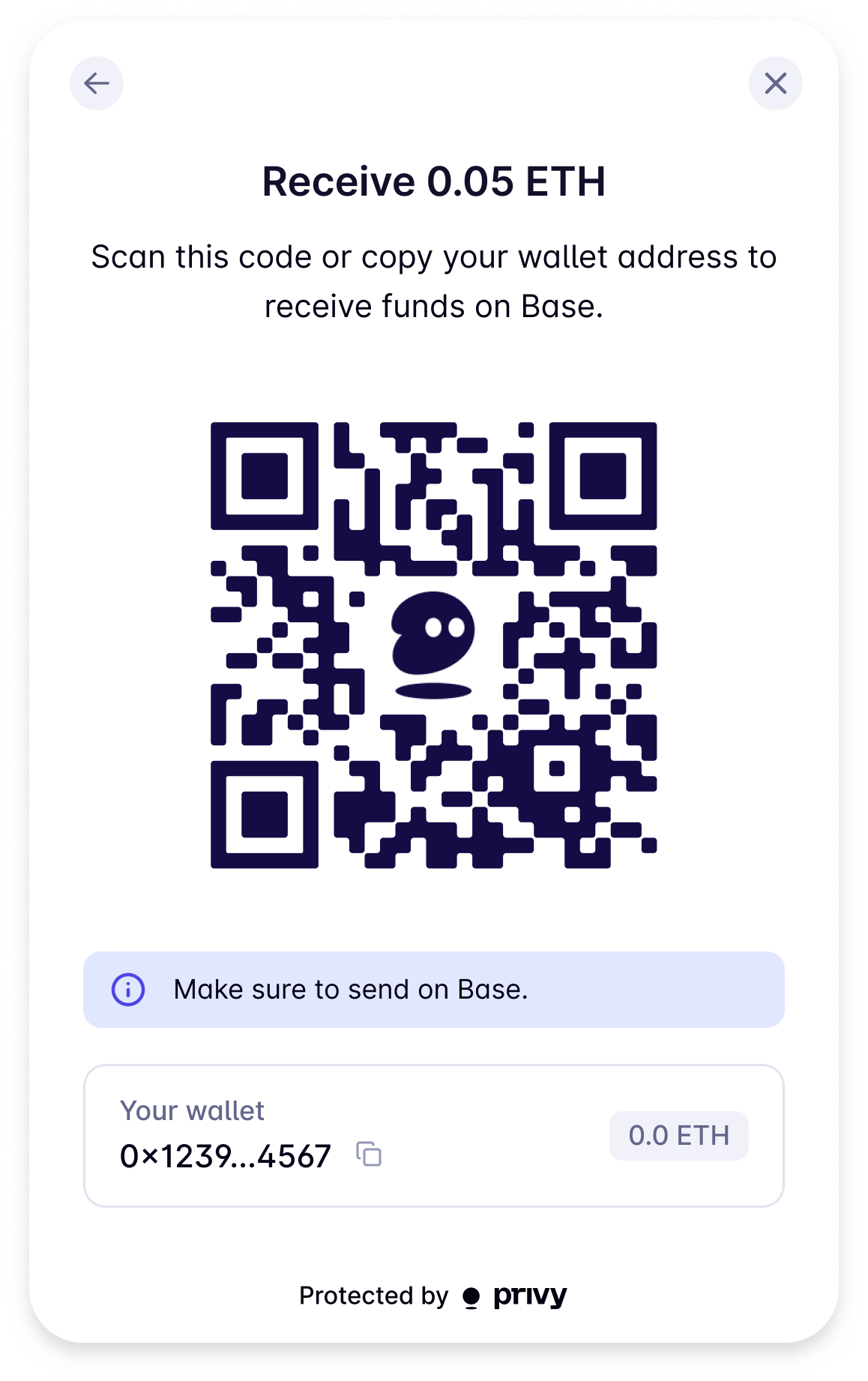
## Customizing the Receive funds screen
Privy allows you to customize the default "Receive funds" screen by providing `uiConfig` options in the `fundWallet` method. You can set the `receiveFundsTitle` and `receiveFundsSubtitle` to customize the title and subtitle of the screen.
You can then call `fundWallet` like so to customize the UI:
```tsx theme={"system"}
import {useFundWallet} from '@privy-io/react-auth';
// ...
const {fundWallet} = useFundWallet();
fundWallet({
address: 'your-wallet-address-here',
options: {
uiConfig: {
receiveFundsTitle: 'Receive 0.05 ETH',
receiveFundsSubtitle: 'Scan this code or copy your wallet address to receive funds on Base.'
}
}
});
```
This will change the default "Receive funds" screen to:
 Make sure `` is mounted first, by following [this
guide](/authentication/user-authentication/ui-component).
Prompt the user to fund their wallets by calling `fundWallet`.
```tsx theme={"system"}
import { useFundWallet } from "@privy-io/expo/ui";
...
const {fundWallet} = useFundWallet();
await fundWallet({address: 'your-wallet-address-here'});
```
Once invoked, the **`fundWallet`** method will open a modal that contains a list of funding options the user can take.
You can pass additional configurations to the funding flow in the second, optional parameter to **`fundWallet`**.
Purchases with third-party providers are not always instantaneous, and there may be some time
before the user completes their purchase and the funds are available in their wallet.
## Setting a funding amount in code
Optionally, you can pass in a **chain, funding amount, and funding asset** to `fundWallet` to override your Dashboard configuration.
To do so, as the second, optional parameter to `fundWallet`, pass an object with the following fields:
| Parameter | Type | Description |
| ------------------------ | ------------------------------------------------------- | ------------------------------------------------------------------------------------------------------------------------------------------------------------------------------------------------------------------------------------------------------------- |
| `address` | `string` | The destination address to fund. |
| `chain` | [`Chain`](https://viem.sh/docs/chains/introduction) | Optional. A [`viem/chains`](https://viem.sh/docs/chains/introduction) object for the network on which users should fund their accounts. Defaults to the network you configured in the Privy Dashboard. |
| `asset` | `'native-currency' \| 'USDC' \| {tokenAddress: string}` | Optional. The asset you'd like the user to fund their accounts with. Set `'native-currency'` to fund with the `chain`'s native currency (e.g. ETH), `'USDC'` to fund with USDC, or pass the token address to `tokenAddress`. Defaults to `'native-currency'`. |
| `amount` | `string` | Required if `asset` is set, optional otherwise. The amount of the asset to fund as a decimal string. Defaults to the amount you configured in the Privy Dashboard. |
| `defaultPaymentMethod` | `'card' \| 'exchange'` | Optional. If provided, skip the payment method selection screen and immediately trigger the funding flow with the provider. |
| `card.preferredProvider` | `'coinbase' \| 'moonpay'` | Optional. Configure the 3rd-party provider for card based funding flows. |
Testnets are not supported for the `chain` parameter.
```tsx theme={"system"}
import {useFundWallet} from '@privy-io/expo/ui';
// Replace this with your desired network
import {base} from 'viem/chains';
// ...
const {fundWallet} = useFundWallet();
fundWallet({
address: '0x2F3eb40872143b77D54a6f6e7Cc120464C764c09',
asset: 'USDC',
chain: base,
amount: '1',
defaultPaymentMethod: 'card',
card: {
preferredProvider: 'coinbase'
}
});
```
To skip directly to the provider's on-ramp experience you can use the `defaultPaymentMethod`
option.
Make sure `` is mounted first, by following [this
guide](/authentication/user-authentication/ui-component).
Prompt the user to fund their wallets by calling `fundWallet`.
```tsx theme={"system"}
import { useFundWallet } from "@privy-io/expo/ui";
...
const {fundWallet} = useFundWallet();
await fundWallet({address: 'your-wallet-address-here'});
```
Once invoked, the **`fundWallet`** method will open a modal that contains a list of funding options the user can take.
You can pass additional configurations to the funding flow in the second, optional parameter to **`fundWallet`**.
Purchases with third-party providers are not always instantaneous, and there may be some time
before the user completes their purchase and the funds are available in their wallet.
## Setting a funding amount in code
Optionally, you can pass in a **chain, funding amount, and funding asset** to `fundWallet` to override your Dashboard configuration.
To do so, as the second, optional parameter to `fundWallet`, pass an object with the following fields:
| Parameter | Type | Description |
| ------------------------ | ------------------------------------------------------- | ------------------------------------------------------------------------------------------------------------------------------------------------------------------------------------------------------------------------------------------------------------- |
| `address` | `string` | The destination address to fund. |
| `chain` | [`Chain`](https://viem.sh/docs/chains/introduction) | Optional. A [`viem/chains`](https://viem.sh/docs/chains/introduction) object for the network on which users should fund their accounts. Defaults to the network you configured in the Privy Dashboard. |
| `asset` | `'native-currency' \| 'USDC' \| {tokenAddress: string}` | Optional. The asset you'd like the user to fund their accounts with. Set `'native-currency'` to fund with the `chain`'s native currency (e.g. ETH), `'USDC'` to fund with USDC, or pass the token address to `tokenAddress`. Defaults to `'native-currency'`. |
| `amount` | `string` | Required if `asset` is set, optional otherwise. The amount of the asset to fund as a decimal string. Defaults to the amount you configured in the Privy Dashboard. |
| `defaultPaymentMethod` | `'card' \| 'exchange'` | Optional. If provided, skip the payment method selection screen and immediately trigger the funding flow with the provider. |
| `card.preferredProvider` | `'coinbase' \| 'moonpay'` | Optional. Configure the 3rd-party provider for card based funding flows. |
Testnets are not supported for the `chain` parameter.
```tsx theme={"system"}
import {useFundWallet} from '@privy-io/expo/ui';
// Replace this with your desired network
import {base} from 'viem/chains';
// ...
const {fundWallet} = useFundWallet();
fundWallet({
address: '0x2F3eb40872143b77D54a6f6e7Cc120464C764c09',
asset: 'USDC',
chain: base,
amount: '1',
defaultPaymentMethod: 'card',
card: {
preferredProvider: 'coinbase'
}
});
```
To skip directly to the provider's on-ramp experience you can use the `defaultPaymentMethod`
option.