> ## Documentation Index
> Fetch the complete documentation index at: https://docs.privy.io/llms.txt
> Use this file to discover all available pages before exploring further.
# Unlinking accounts from users
Developers can use Privy to unlink users' linked accounts (such as a wallet or Discord profile) at *any point* in their user journey. This might be useful whenever the user has either created a new external account (such as a new Twitter profile or email address) and want to remove the old linked account from their user.
The React SDK supports unlinking all supported account types via dedicated hooks.
**To prompt a user to unlink an account, use the corresponding hook:**
| Hook | Description |
| -------------------- | ------------------------------------------------ |
| `useUnlinkEmail` | Unlinks an email address |
| `useUnlinkPhone` | Unlinks a phone number |
| `useUnlinkWallet` | Unlinks an external wallet |
| `useUnlinkOAuth` | Unlinks an OAuth account (Google, Twitter, etc.) |
| `useUnlinkFarcaster` | Unlinks a Farcaster account |
| `useUnlinkTelegram` | Unlinks a Telegram account |
| `useUnlinkPasskey` | Unlinks a passkey |
Each hook returns an `unlink` method that accepts an object with the relevant identifier.
Users are only permitted to unlink **an account** so long as they have at least one more linked account.
Below is an example button for prompting a user to unlink certain linked accounts:
```tsx theme={"system"}
import {usePrivy} from '@privy-io/react-auth';
import {useUnlinkEmail, useUnlinkWallet, useUnlinkOAuth} from '@privy-io/react-auth';
function UnlinkOptions() {
const {user} = usePrivy();
const {unlink: unlinkEmail} = useUnlinkEmail();
const {unlink: unlinkWallet} = useUnlinkWallet();
const {unlink: unlinkOAuth} = useUnlinkOAuth();
return (
);
}
```
### Unlinking OAuth accounts
The `useUnlinkOAuth` hook supports unlinking any OAuth provider, including built-in providers (e.g., `'google'`, `'twitter'`) and [additional OAuth providers](/authentication/user-authentication/login-methods/custom-oauth) (e.g., `'custom:twitch'`).
```tsx theme={"system"}
import {usePrivy} from '@privy-io/react-auth';
import {useUnlinkOAuth} from '@privy-io/react-auth';
function UnlinkOAuthButton() {
const {user} = usePrivy();
const {unlink: unlinkOAuth} = useUnlinkOAuth();
// Find the OAuth account to unlink
const twitchAccount = user?.linkedAccounts?.find(
(account) => account.type === 'custom:twitch'
);
const handleUnlink = () => {
if (twitchAccount) {
unlinkOAuth({
provider: 'custom:twitch',
subject: twitchAccount.subject
});
}
};
return (
);
}
```
#### Parameters
The `unlink` method from `useUnlinkOAuth` accepts an object with the following fields:
The OAuth provider to unlink. Use a built-in provider (e.g., `'google'`, `'twitter'`) or a custom provider in the format `'custom:'` (e.g., `'custom:twitch'`).
The provider-specific subject identifier that uniquely identifies the user for the selected OAuth provider. This can be found in the linked account's `subject` field.
The React Native SDK supports unlinking all supported account types via our modal-guided unlink methods.
**To unlink an account, use the respective functions and hooks:**
| Account type | Description | Hook to invoke |
| ------------ | ------------------------- | -------------------- |
| `Email` | Unlinks email address | `useUnlinkEmail` |
| `Wallet` | Unlinks external wallet | `useUnlinkWallet` |
| `Google` | Unlinks Google account | `useUnlinkOAuth` |
| `Apple` | Unlinks Apple account | `useUnlinkOAuth` |
| `Twitter` | Unlinks Twitter account | `useUnlinkOAuth` |
| `Discord` | Unlinks Discord account | `useUnlinkOAuth` |
| `Github` | Unlinks Github account | `useUnlinkOAuth` |
| `LinkedIn` | Unlinks LinkedIn account | `useUnlinkOAuth` |
| `TikTok` | Unlinks TikTok account | `useUnlinkOAuth` |
| `Spotify` | Unlinks Spotify account | `useUnlinkOAuth` |
| `Instagram` | Unlinks Instagram account | `useUnlinkOAuth` |
| `Farcaster` | Unlinks Farcaster account | `useUnlinkFarcaster` |
Users are only permitted to unlink **an account** so long as they have at least one more linked account.
### Usage
```tsx theme={"system"}
import {useUnlinkEmail} from '@privy-io/expo';
const {unlinkEmail} = useUnlinkEmail();
await unlinkEmail({ email: 'user@example.com' });
```
### Parameters
The email address to unlink from the current user.
### Callbacks
You can optionally register an `onSuccess` or `onError` callback on the `useUnlinkEmail` hook.
```tsx theme={"system"}
import {useUnlinkEmail} from '@privy-io/expo';
const {unlinkEmail} = useUnlinkEmail({
onSuccess: (user) => {
console.log('Email unlinked', user);
},
onError: (err) => console.error(err),
});
```
Optional callback to run after a user successfully unlinks an email address.
Optional callback to run after there is an error during email unlinking.
### Usage
```tsx theme={"system"}
import {useUnlinkWallet} from '@privy-io/expo';
const {unlinkWallet} = useUnlinkWallet();
await unlinkWallet({ address: 'wallet_address' });
```
### Parameters
The wallet address to unlink from the current user.
### Callbacks
You can optionally register an `onSuccess` or `onError` callback on the `useUnlinkWallet` hook.
```tsx theme={"system"}
import {useUnlinkWallet} from '@privy-io/expo';
const {unlinkWallet} = useUnlinkWallet({
onSuccess: (user, isNewUser) => {
console.log('Wallet unlinked', user, isNewUser);
},
onError: (err) => console.error(err),
});
```
Optional callback to run after a user successfully unlinks a wallet.
Optional callback to run after there is an error during wallet unlinking.
### Usage
```tsx theme={"system"}
import {useUnlinkOAuth} from '@privy-io/expo';
const {unlinkOAuth} = useUnlinkOAuth();
await unlinkOAuth({ provider: 'google', subject: 'subject_identifier' });
```
### Parameters
The OAuth provider for the account to unlink.
The provider-specific subject ("sub" claim) that uniquely identifies the user for the selected OAuth provider.
### Usage
```tsx theme={"system"}
import {useUnlinkFarcaster} from '@privy-io/expo';
const {unlinkFarcaster} = useUnlinkFarcaster();
await unlinkFarcaster({ fid: 123 });
```
### Parameters
The Farcaster ID to unlink from the current user.
### Callbacks
You can optionally register an `onSuccess` or `onError` callback on the `useUnlinkFarcaster` hook.
```tsx theme={"system"}
import {useUnlinkFarcaster} from '@privy-io/expo';
const {unlinkFarcaster} = useUnlinkFarcaster({
onSuccess: (user) => console.log('Farcaster unlinked', user),
onError: (err) => console.error(err),
});
```
Optional callback to run after a user successfully unlinks a Farcaster account.
Optional callback to run after there is an error during Farcaster unlinking.
Users are only permitted to unlink **an account** so long as they have at least one more linked account.
Use the following method from the `email` handler to unlink an email address:
```swift theme={"system"}
func unlink(email: String) async throws -> PrivyUser
```
### Returns
The updated user object with the email removed.
### Usage
```swift theme={"system"}
do {
// unlink email address
let user = try await privy.email.unlink(email: email)
// successfully unlinked email
} catch {
// error unlinking email
}
```
Use the following method from the `sms` handler to unlink a phone number:
```swift theme={"system"}
func unlink(phoneNumber: String) async throws -> PrivyUser
```
### Returns
The updated user object with the phone number removed.
### Usage
```swift theme={"system"}
do {
// unlink phone number
let user = try await privy.sms.unlink(phoneNumber: phoneNumber)
// successfully unlinked phone number
} catch {
// error unlinking phone number
}
```
Use the following method from the `siwe` handler to unlink an Ethereum wallet:
```swift theme={"system"}
func unlink(address: String) async throws -> PrivyUser
```
### Returns
The updated user object with the wallet removed.
### Usage
```swift theme={"system"}
do {
// unlink Ethereum wallet with address
let user = try await privy.siwe.unlink(address: address)
// successfully unlinked Ethereum wallet
} catch {
// error unlinking Ethereum wallet
}
```
Use the following method from the `siws` handler to unlink a Solana wallet:
```swift theme={"system"}
func unlink(address: String) async throws -> PrivyUser
```
### Returns
The updated user object with the wallet removed.
### Usage
```swift theme={"system"}
do {
// unlink Solana wallet with address
let user = try await privy.siws.unlink(address: address)
// successfully unlinked Solana wallet
} catch {
// error unlinking Solana wallet
}
```
Use the following method from the `passkey` handler to unlink a user's passkey:
```swift theme={"system"}
func unlink(credentialId: String) async throws -> PrivyUser
```
### Returns
The updated user object with the passkey removed.
### Usage
```swift theme={"system"}
do {
// unlink passkey with credential id
let user = try await privy.passkey.unlink(credentialId: credentialId)
// successfully unlinked passkey
} catch {
// error unlinking passkey
}
```
Use the following method from the `oAuth` handler to unlink an OAuth account:
```swift theme={"system"}
func unlink(with provider: OAuthProvider, subject: String) async throws -> PrivyUser
```
### Parameters
The OAuth provider for the account to unlink (e.g., `.google`, `.discord`, `.twitter`).
The provider-specific subject identifier that uniquely identifies the user for the selected OAuth provider.
### Returns
The updated user object with the OAuth account removed.
### Usage
```swift theme={"system"}
do {
// unlink OAuth account
let user = try await privy.oAuth.unlink(with: provider, subject: subject)
// successfully unlinked OAuth account
} catch {
// error unlinking OAuth account
}
```
Users are only permitted to unlink **an account** so long as they have at least one more linked account.
Use the following method from the `email` handler to unlink an email address:
```kotlin theme={"system"}
public suspend fun unlink(email: String): Result
```
### Returns
A result type encapsulating the PrivyUser on success.
### Usage
```kotlin theme={"system"}
val unlinkResult: Result = privy.email.unlink(email = "user@example.com")
unlinkResult.fold(
onSuccess = { updatedUser ->
// Email successfully unlinked
// updatedUser contains the updated user object with the email removed
},
onFailure = {
println("Error unlinking email: ${it.message}")
}
)
```
Use the following method from the `sms` handler to unlink a phone number:
```kotlin theme={"system"}
public suspend fun unlink(phoneNumber: String): Result
```
### Returns
A result type encapsulating the PrivyUser on success.
### Usage
```kotlin theme={"system"}
val unlinkResult: Result = privy.sms.unlink(phoneNumber = "+1234567890")
unlinkResult.fold(
onSuccess = { updatedUser ->
// Phone number successfully unlinked
// updatedUser contains the updated user object with the phone number removed
},
onFailure = {
println("Error unlinking SMS: ${it.message}")
}
)
```
Use the following method from the `siwe` handler to unlink an Ethereum wallet:
```kotlin theme={"system"}
public suspend fun unlink(address: String): Result
```
### Returns
A result type encapsulating the PrivyUser on success.
### Usage
```kotlin theme={"system"}
val unlinkResult: Result = privy.siwe.unlink(address = "wallet_address")
unlinkResult.fold(
onSuccess = { updatedUser ->
// Wallet successfully unlinked
// updatedUser contains the updated user object with the wallet removed
},
onFailure = {
println("Error unlinking wallet: ${it.message}")
}
)
```
Use the following method from the `siws` handler to unlink a Solana wallet:
```kotlin theme={"system"}
public suspend fun unlink(address: String): Result
```
### Returns
A result type encapsulating the PrivyUser on success.
### Usage
```kotlin theme={"system"}
val unlinkResult: Result = privy.siws.unlink(address = "wallet_address")
unlinkResult.fold(
onSuccess = { updatedUser ->
// Wallet successfully unlinked
// updatedUser contains the updated user object with the wallet removed
},
onFailure = {
println("Error unlinking wallet: ${it.message}")
}
)
```
Use the following method from the `passkey` handler to unlink a passkey:
```kotlin theme={"system"}
public suspend fun unlink(credentialId: String): Result
```
### Returns
A result type encapsulating the PrivyUser on success.
### Usage
```kotlin theme={"system"}
val unlinkResult: Result = privy.passkey.unlink(credentialId = "credential_id")
unlinkResult.fold(
onSuccess = { updatedUser ->
// Passkey successfully unlinked
// updatedUser contains the updated user object with the passkey removed
},
onFailure = {
println("Error unlinking passkey: ${it.message}")
}
)
```
Users are only permitted to unlink **an account** so long as they have at least one more linked account.
Use the following method from the `email` handler to unlink an email address:
```dart theme={"system"}
Future> unlink(String email)
```
### Parameters
The email address to unlink from the user.
### Returns
A Result object encapsulating the updated PrivyUser on success, providing immediate access to the user object with the email removed.
### Usage
```dart theme={"system"}
final unlinkResult = await privy.email.unlink("user@example.com");
unlinkResult.fold(
onSuccess: (updatedUser) {
// Email successfully unlinked
// updatedUser contains the updated user object with the email removed
},
onFailure: (error) {
print("Error unlinking email: ${error.message}");
},
);
```
Use the following method from the `sms` handler to unlink a phone number:
```dart theme={"system"}
Future> unlink(String phoneNumber)
```
### Parameters
The phone number to unlink from the user.
### Returns
A Result object encapsulating the updated PrivyUser on success, providing immediate access to the user object with the phone number removed.
### Usage
```dart theme={"system"}
final unlinkResult = await privy.sms.unlink("+1234567890");
unlinkResult.fold(
onSuccess: (updatedUser) {
// Phone number successfully unlinked
// updatedUser contains the updated user object with the phone number removed
},
onFailure: (error) {
print("Error unlinking phone: ${error.message}");
},
);
```
Use the following method from the `siwe` handler to unlink an Ethereum wallet:
```dart theme={"system"}
Future> unlink(String address)
```
### Parameters
The Ethereum wallet address to unlink from the user.
### Returns
A Result object encapsulating the updated PrivyUser on success, providing immediate access to the user object with the wallet removed.
### Usage
```dart theme={"system"}
final unlinkResult = await privy.siwe.unlink("0x1234...5678");
unlinkResult.fold(
onSuccess: (updatedUser) {
// Wallet successfully unlinked
// updatedUser contains the updated user object with the wallet removed
},
onFailure: (error) {
print("Error unlinking wallet: ${error.message}");
},
);
```
Use the following method from the `siws` handler to unlink a Solana wallet:
```dart theme={"system"}
Future> unlink(String address)
```
### Parameters
The Solana wallet address to unlink from the user.
### Returns
A Result object encapsulating the updated PrivyUser on success, providing immediate access to the user object with the wallet removed.
### Usage
```dart theme={"system"}
final unlinkResult = await privy.siws.unlink("wallet_address");
unlinkResult.fold(
onSuccess: (updatedUser) {
// Wallet successfully unlinked
// updatedUser contains the updated user object with the wallet removed
},
onFailure: (error) {
print("Error unlinking wallet: ${error.message}");
},
);
```
Use the following method from the `passkey` handler to unlink a passkey:
```dart theme={"system"}
Future> unlink(String credentialId)
```
### Parameters
The credential ID of the passkey to unlink.
### Returns
A Result object encapsulating the updated PrivyUser on success, providing immediate access to the user object with the passkey removed.
### Usage
```dart theme={"system"}
final unlinkResult = await privy.passkey.unlink("credential_id");
unlinkResult.fold(
onSuccess: (updatedUser) {
// Passkey successfully unlinked
// updatedUser contains the updated user object with the passkey removed
},
onFailure: (error) {
print("Error unlinking passkey: ${error.message}");
},
);
```
Use the following method from the `oAuth` handler to unlink an OAuth account:
```dart theme={"system"}
Future> unlink({
required OAuthProvider provider,
required String subject,
})
```
### Parameters
The OAuth provider for the account to unlink (e.g., `OAuthProvider.google`, `OAuthProvider.discord`, `OAuthProvider.twitter`, `OAuthProvider.apple`, `OAuthProvider.telegram`).
The provider-specific subject identifier that uniquely identifies the user for the selected OAuth provider.
### Returns
A Result object encapsulating the updated PrivyUser on success, providing immediate access to the user object with the OAuth account removed.
### Usage
```dart theme={"system"}
final unlinkResult = await privy.oAuth.unlink(
provider: OAuthProvider.google,
subject: subject,
);
unlinkResult.fold(
onSuccess: (user) {
// Successfully unlinked OAuth account
},
onFailure: (error) {
print("Unlinking failed: ${error.message}");
},
);
```
Make a `POST` request to:
```bash theme={"system"}
https://auth.privy.io/api/v1/apps//users/unlink
```
Replace `` with your Privy app ID and pass in the following parameters:
| Parameter | Type | Description |
| ---------- | -------- | ------------------------------------------------------------------------------------------- |
| `user_id` | `string` | Privy DID of the user |
| `type` | `string` | Linked account type (see supported types below) |
| `handle` | `string` | The identifier for the account (e.g., email address, wallet address) |
| `provider` | `string` | (Only required for cross app unlinking) The cross app provider id, prefixed with `'privy:'` |
### Supported Account Types
The following account types can be unlinked via the API:
* `email` - Email accounts
* `phone` - Phone number accounts
* `wallet` - Externally connected wallets (Ethereum or Solana)
* `smart_wallet` - Smart contract wallets
* `farcaster` - Farcaster accounts
* `telegram` - Telegram accounts
* `cross_app` - Cross app accounts
* OAuth providers:
* `google_oauth`
* `discord_oauth`
* `twitter_oauth`
* `github_oauth`
* `linkedin_oauth`
* `apple_oauth`
* `spotify_oauth`
* `instagram_oauth`
* `tiktok_oauth`
The API does not support unlinking `passkey`, `custom_auth`, or `guest` account types.
### Example Requests
```bash Email account theme={"system"}
curl --request POST "https://auth.privy.io/api/v1/apps//users/unlink" \
-u ":" \
-H "privy-app-id: " \
-H 'Content-Type: application/json' \
-d '{
"user_id": "",
"type": "email",
"handle": "test@privy.io"
}'
```
```bash Wallet account theme={"system"}
curl --request POST "https://auth.privy.io/api/v1/apps//users/unlink" \
-u ":" \
-H "privy-app-id: " \
-H 'Content-Type: application/json' \
-d '{
"user_id": "",
"type": "wallet",
"handle": "0x1234...5678"
}'
```
```bash OAuth account theme={"system"}
curl --request POST "https://auth.privy.io/api/v1/apps//users/unlink" \
-u ":" \
-H "privy-app-id: " \
-H 'Content-Type: application/json' \
-d '{
"user_id": "",
"type": "google_oauth",
"handle": ""
}'
```
```bash Cross app account theme={"system"}
curl --request POST "https://auth.privy.io/api/v1/apps//users/unlink" \
-u ":" \
-H "privy-app-id: " \
-H 'Content-Type: application/json' \
-d '{
"user_id": "",
"type": "cross_app",
"handle": "",
"provider": "privy:"
}'
```
### Response
If the unlinking is successful, the API will return a 200 status code.
If there's no account associated with the Privy DID that matches the type and handle, the API will return a 400 status code.
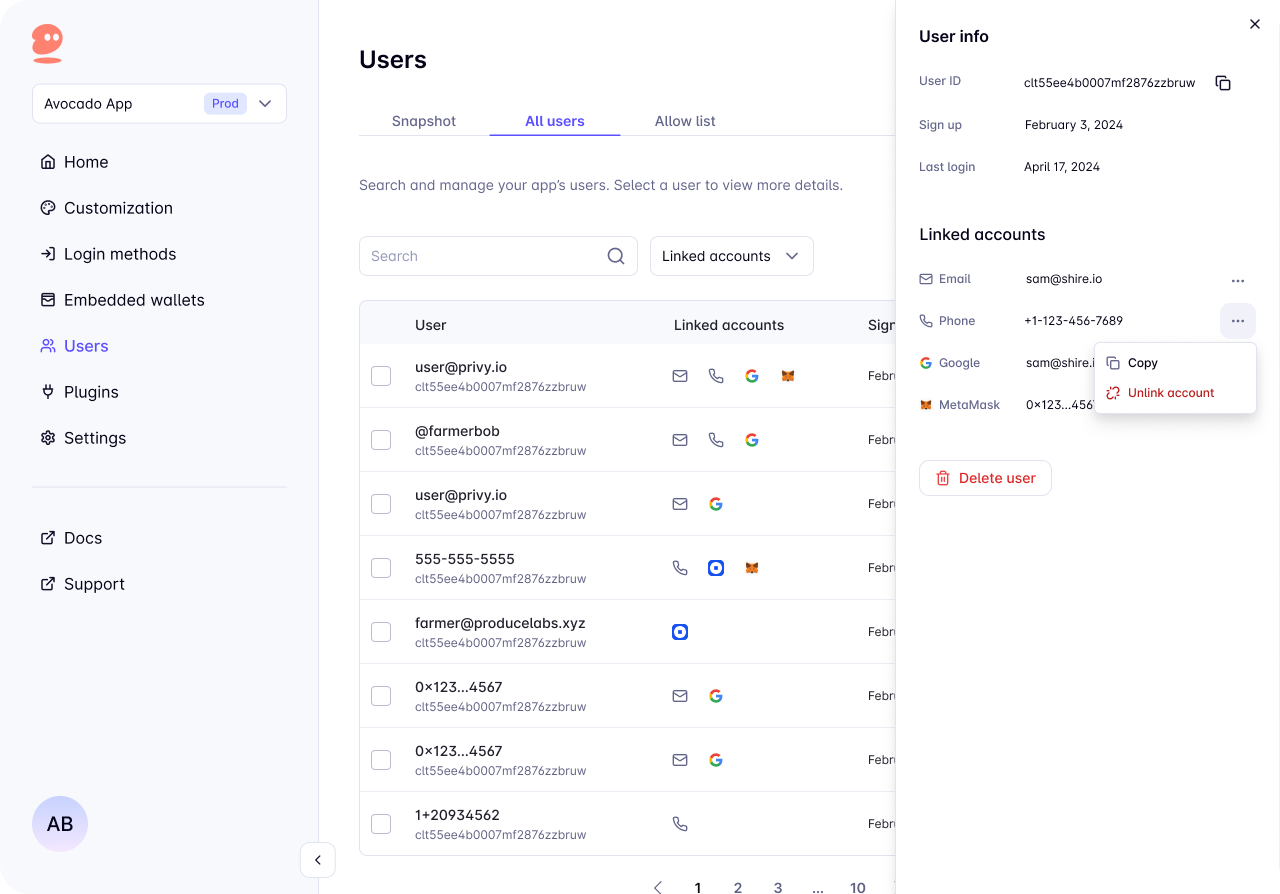
To unlink via the dashboard:
1. Navigate to the [Users page](https://dashboard.privy.io/?page=users\&tab=all-users)
2. Select the user
3. Click the button beside the account you want to unlink
4. Click `Unlink account`
The unlink option won't appear if unlinking is not available for the account.