> ## Documentation Index
> Fetch the complete documentation index at: https://docs.privy.io/llms.txt
> Use this file to discover all available pages before exploring further.
# User authorization keys
[Authorization keys](/security/wallet-infrastructure/policy-and-controls) are the core primitive for control of Privy's [Wallet API](/security/wallet-infrastructure/architecture). Authorization key signatures prove that requests are authorized directly by the permitted user.
**Self-custodial** wallets are those owned directly by a user. Privy enables users to fully control their wallets by issuing time-bound authorization keys to users who authenticate via a verified JWT. Once users retrieve a time-bound authorization key, they can make requests with the key. This configuration results in cryptographically-enforced user custody of wallets.
All Privy client-side SDKs enable **fully user self-custodial wallets by default**.
### Authentication methods
Privy integrates directly with any OIDC or JWT-based authentication system and also offers [dozens of login methods natively](/security/authentication/user-authentication), including email, SMS, social login, passkeys, and more. If a user is logged in, they always have access to their wallet.
### Multi-factor authentication
Privy also enables multi-factor authentication for access to user authorization keys. Supported additional factors include:
* Authenticator apps (TOTP)
* Biometric verification (passkeys)
* SMS confirmation
* Hardware security keys
This means your app can require additional user verification for sensitive wallet operations. [Learn more](/authentication/user-authentication/mfa#mfa)
## Direct access via API
Directly managing user authorization keys via the API is an advanced setting. We recommend using
Privy’s SDKs, which internally manage user authorization keys.
Privy enables users to retrieve a **time-bound authorization key directly via a REST API**. This API can be called from either your app's frontend or backend.
Privy infrastructure issues authorization keys from within trusted execution environments (TEEs)—see [TEE architecture](/security/wallet-infrastructure/architecture) for more information. Privy integrates with any asymmetric JWT-based authentication system, such as Privy's native authentication system, Auth0, Firebase, or any OIDC or OAuth authentication provider.
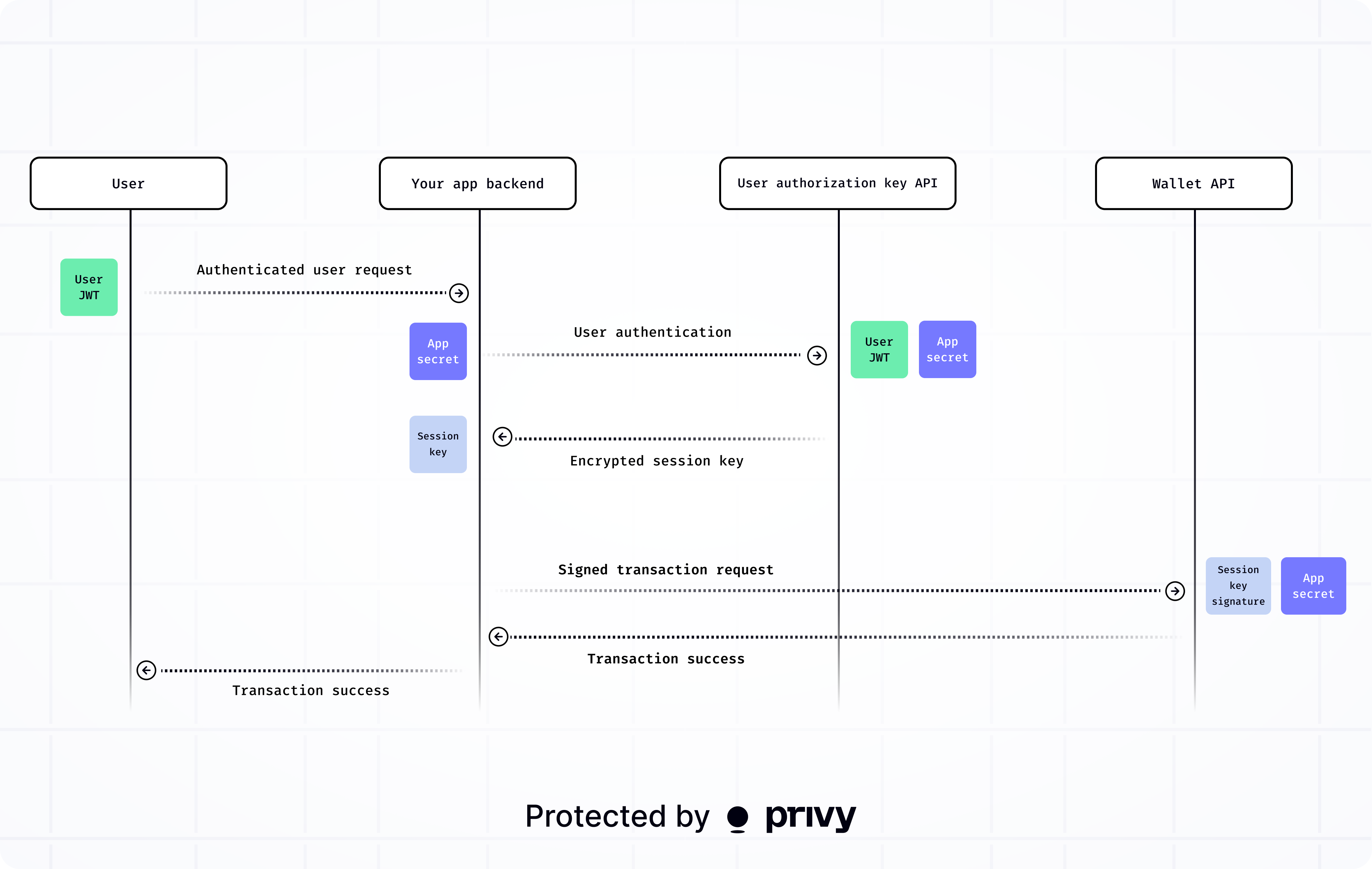
The architecture works as follows:
1. Your app makes a request to the Privy API using the authentication token from your JWT-based authentication system.
2. The TEE issues a time-bound user authorization key in response.
3. Use the authorization key to authorize requests to the Wallet API.
The following diagram illustrates an server-side integration. Note that Privy client-side SDKs fully manage direct client-side integrations.
 When you use a Privy SDK to provision and transact with user wallets, the SDK fully manages user authorization keys internally.
### Encryption
The returned time-bound authorization key is encrypted from the TEE to the client using HPKE (Hybrid Public Key Encryption), using the same method used by the [wallet export API](/api-reference/wallets/export).
When you use a Privy SDK to provision and transact with user wallets, the SDK fully manages user authorization keys internally.
### Encryption
The returned time-bound authorization key is encrypted from the TEE to the client using HPKE (Hybrid Public Key Encryption), using the same method used by the [wallet export API](/api-reference/wallets/export).