> ## Documentation Index
> Fetch the complete documentation index at: https://docs.privy.io/llms.txt
> Use this file to discover all available pages before exploring further.
# Execution wallets
Privy enables teams to add a programmable execution layer on top of existing treasury infrastructure, without moving funds out of custody.
Execution wallets are Privy wallets upgraded via [EIP-7702](/recipes/react/eip-7702) to operate as smart accounts. Each wallet sits alongside external wallet providers, interacting with onchain protocols on behalf of the treasury. EIP-7702 enables batched transactions, so each execution wallet bundles multiple calls into a single transaction. A fleet of execution wallets operates in parallel — each with its own nonce — eliminating the sequential bottleneck that limits throughput in single-wallet custody setups.
Execution wallets do not need to hold a working balance. The EIP-7702 smart account layer handles gas sponsorship, so treasury funds stay in custody throughout.
Execution wallets work alongside existing external wallet setups. For setting up a treasury from
scratch with Privy, see the [business wallets guide](/recipes/wallets/business-wallets).
## Architecture
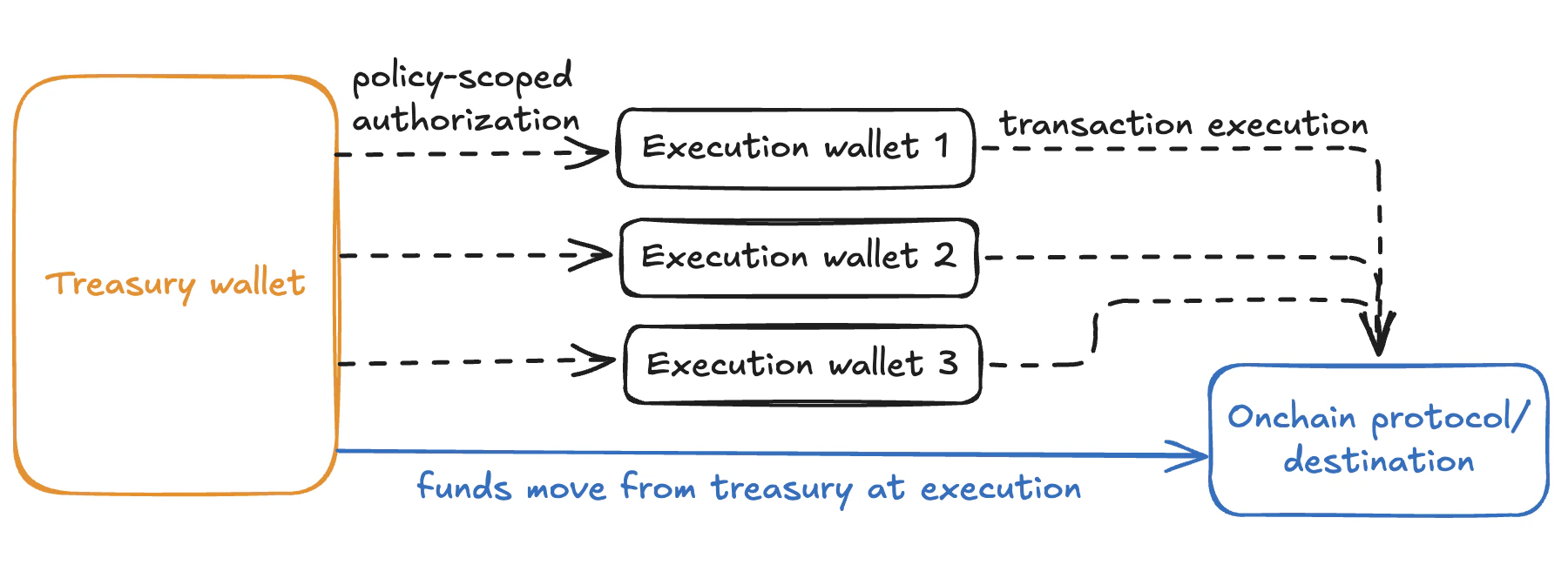 Execution wallets operate as a delegation layer between treasury custody and onchain protocols:
* **Treasury funds remain in custody** (e.g., Bridge or another provider)
* **Execution wallets are EIP-7702 smart accounts** authorized to act on approved funds under policy constraints
* **Batched transactions** allow each wallet to execute multiple protocol interactions atomically in a single transaction
* **A fleet of execution wallets can run in parallel** across different strategies, with no shared nonce or ordering constraint across wallets
* **No working balance required** — gas is sponsored via the EIP-7702 smart account layer
## Setup
Your backend controls execution wallets via authorization keys. These keys sign requests to Privy's API on behalf of each wallet, enabling programmatic execution without manual approvals.
Create [authorization keys](/controls/authorization-keys/owners/types#authorization-keys) in the Privy Dashboard and securely store the corresponding private keys.
For higher-value wallets, register the authorization keys in a [key quorum](/controls/authorization-keys/owners/types#key-quorums). This requires multiple parties to sign before a wallet action is executed.
Create authorization keys in your Privy Dashboard.
Set up a key quorum for multi-party governance.
Policies constrain what each execution wallet can do. Well-scoped policies ensure that execution wallets can only interact with approved protocols and move funds within defined limits.
Common policy configurations for execution wallets include:
* **Allowlisted contracts**: Restrict the wallet to interact only with specific onchain protocols (e.g., a particular lending pool or liquidity venue)
* **Transfer limits**: Cap the amount that can be moved per transaction or within a time window
* **Recipient restrictions**: Limit where funds can be sent, such as only back to the treasury address
* **Chain restrictions**: Restrict execution to specific networks
Follow the guide below to create a policy. Save the `id` after creation to assign it to the wallets you provision later.
Learn how to construct policies with Privy's policy language.
Create a policy for your execution wallets.
Create one or more Privy wallets, each owned by the authorization key (or key quorum) and subject to the policies you defined.
Provisioning multiple wallets allows your application to distribute transactions across the fleet and execute in parallel. Each wallet is an independent EOA with its own nonce, so there is no ordering constraint between wallets.
When creating each wallet:
* Set `owner_id` to the `id` of the authorization key or key quorum
* Set `policy_ids` to include the `id` of the policy you created
Provision wallets for your execution fleet.
Reuse the same policy ID across the fleet so every wallet is subject to the same constraints. To apply different permissions to different wallets — for example, separate wallets for separate protocols — create distinct policies for each.
Upgrade each execution wallet to a smart account using EIP-7702. This gives each wallet the ability to send batched transactions and enables gas sponsorship, so the wallets do not need to hold a native token balance for gas.
Use Privy's `sign7702Authorization` method to generate the delegation authorization for each wallet, then submit the upgrade transaction via your preferred account abstraction provider.
Learn how to upgrade EOAs with EIP-7702.
Sign an EIP-7702 authorization with a Privy wallet.
Each upgraded execution wallet can now send multiple protocol interactions atomically in a single batched transaction. Distribute transactions across the fleet to parallelize execution — for example, separate wallets can interact with different protocols simultaneously, or multiple wallets can execute the same strategy concurrently.
Execute transactions on Solana.
Follow the batch transactions guide for the transaction submission pattern.
Privy provides webhooks for transaction lifecycle events and balance changes. Use these to observe execution activity, trigger downstream workflows, and reconcile with your treasury system.
Monitor transaction status and completion events.
Track deposits and withdrawals across the fleet.
## Learn more
Set up a business wallet with key quorums and policies.
Learn how EIP-7702 enables batch transactions and gas sponsorship.
Configure fine-grained execution controls.
Add human review for high-value or sensitive transactions.
Execution wallets operate as a delegation layer between treasury custody and onchain protocols:
* **Treasury funds remain in custody** (e.g., Bridge or another provider)
* **Execution wallets are EIP-7702 smart accounts** authorized to act on approved funds under policy constraints
* **Batched transactions** allow each wallet to execute multiple protocol interactions atomically in a single transaction
* **A fleet of execution wallets can run in parallel** across different strategies, with no shared nonce or ordering constraint across wallets
* **No working balance required** — gas is sponsored via the EIP-7702 smart account layer
## Setup
Your backend controls execution wallets via authorization keys. These keys sign requests to Privy's API on behalf of each wallet, enabling programmatic execution without manual approvals.
Create [authorization keys](/controls/authorization-keys/owners/types#authorization-keys) in the Privy Dashboard and securely store the corresponding private keys.
For higher-value wallets, register the authorization keys in a [key quorum](/controls/authorization-keys/owners/types#key-quorums). This requires multiple parties to sign before a wallet action is executed.
Create authorization keys in your Privy Dashboard.
Set up a key quorum for multi-party governance.
Policies constrain what each execution wallet can do. Well-scoped policies ensure that execution wallets can only interact with approved protocols and move funds within defined limits.
Common policy configurations for execution wallets include:
* **Allowlisted contracts**: Restrict the wallet to interact only with specific onchain protocols (e.g., a particular lending pool or liquidity venue)
* **Transfer limits**: Cap the amount that can be moved per transaction or within a time window
* **Recipient restrictions**: Limit where funds can be sent, such as only back to the treasury address
* **Chain restrictions**: Restrict execution to specific networks
Follow the guide below to create a policy. Save the `id` after creation to assign it to the wallets you provision later.
Learn how to construct policies with Privy's policy language.
Create a policy for your execution wallets.
Create one or more Privy wallets, each owned by the authorization key (or key quorum) and subject to the policies you defined.
Provisioning multiple wallets allows your application to distribute transactions across the fleet and execute in parallel. Each wallet is an independent EOA with its own nonce, so there is no ordering constraint between wallets.
When creating each wallet:
* Set `owner_id` to the `id` of the authorization key or key quorum
* Set `policy_ids` to include the `id` of the policy you created
Provision wallets for your execution fleet.
Reuse the same policy ID across the fleet so every wallet is subject to the same constraints. To apply different permissions to different wallets — for example, separate wallets for separate protocols — create distinct policies for each.
Upgrade each execution wallet to a smart account using EIP-7702. This gives each wallet the ability to send batched transactions and enables gas sponsorship, so the wallets do not need to hold a native token balance for gas.
Use Privy's `sign7702Authorization` method to generate the delegation authorization for each wallet, then submit the upgrade transaction via your preferred account abstraction provider.
Learn how to upgrade EOAs with EIP-7702.
Sign an EIP-7702 authorization with a Privy wallet.
Each upgraded execution wallet can now send multiple protocol interactions atomically in a single batched transaction. Distribute transactions across the fleet to parallelize execution — for example, separate wallets can interact with different protocols simultaneously, or multiple wallets can execute the same strategy concurrently.
Execute transactions on Solana.
Follow the batch transactions guide for the transaction submission pattern.
Privy provides webhooks for transaction lifecycle events and balance changes. Use these to observe execution activity, trigger downstream workflows, and reconcile with your treasury system.
Monitor transaction status and completion events.
Track deposits and withdrawals across the fleet.
## Learn more
Set up a business wallet with key quorums and policies.
Learn how EIP-7702 enables batch transactions and gas sponsorship.
Configure fine-grained execution controls.
Add human review for high-value or sensitive transactions.