> ## Documentation Index
> Fetch the complete documentation index at: https://docs.privy.io/llms.txt
> Use this file to discover all available pages before exploring further.
# HyperEVM
Learn how to build on HyperEVM using Privy's wallet infrastructure.
Before continuing with this guide, make sure you have set up your Privy client as shown in the
[Getting Started guide](/recipes/hyperliquid-guide).
## Overview
[HyperEVM](https://hyperliquid.gitbook.io/hyperliquid-docs/hyperevm) is Hyperliquid's EVM-compatible blockchain that enables:
* Deploying smart contracts with Solidity
* Building DeFi applications
* Creating custom trading logic
* Integrating with existing EVM tooling
## Setting Up HyperEVM
Configure your application to work with HyperEVM:
```javascript NodeJS theme={"system"}
import {PrivyClient} from '@privy-io/node';
import {hyperevmTestnet} from 'viem/chains';
const privy = new PrivyClient({
appId: 'insert-your-app-id',
appSecret: 'insert-your-app-secret'
});
// Send a transaction on HyperEVM testnet
const {hash, caip2} = await privy
.wallets()
.ethereum()
.sendTransaction('insert-wallet-id', {
caip2: `eip155:${hyperevmTestnet.id}`,
params: {
transaction: {
to: '0xE3070d3e4309afA3bC9a6b057685743CF42da77C',
value: '0x2386F26FC10000',
chain_id: hyperevmTestnet.id
}
}
});
```
```javascript React theme={"system"}
import {PrivyProvider} from '@privy-io/react-auth';
import {hyperliquidEvmTestnet} from 'viem/chains';
function App() {
return (
{/* Your app components */}
);
}
```
## Gas Sponsorship
### Smart Wallets on HyperEVM
HyperEVM supports [ERC-4337](https://eips.ethereum.org/EIPS/eip-4337) Smart Wallet accounts, allowing you to pay for your users' transaction fees using gas sponsorship.
HyperEVM is compatible with popular smart wallet providers including Alchemy, ZeroDev, and
Biconomy. You can use Privy's smart wallet infrastructure with any of these providers.
### Setting Up a Paymaster and Bundler
Follow these steps to configure gas sponsorship for HyperEVM:
#### 1. Navigate to Smart Wallets Settings
In your [Privy Dashboard](https://dashboard.privy.io), go to **Wallet Infrastructure** → **Smart Wallets**.
#### 2. Choose a Smart Wallet Provider
Select one of the supported providers:
* **ZeroDev**
* **Alchemy**
* **Biconomy**
#### 3. Add HyperEVM as a Custom Chain
Click **Add a new Chain** → **Custom Chain** and configure HyperEVM:
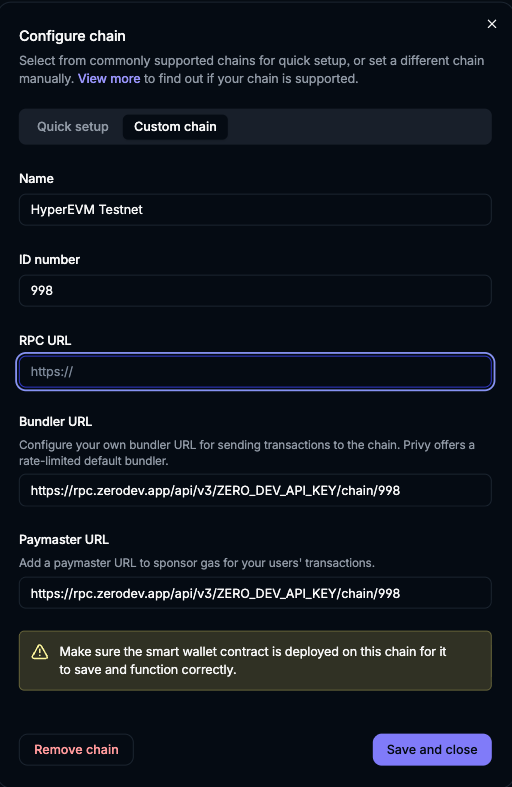 * **Name**: HyperEVM Testnet
* **ID number**: 998
* **RPC URL**: Your HyperEVM RPC endpoint
* **Bundler URL**: Your provider's bundler URL (e.g., `https://rpc.zerodev.app/api/v3/ZERO_DEV_API_KEY/chain/998`)
* **Paymaster URL**: Your provider's paymaster URL (e.g., `https://rpc.zerodev.app/api/v3/ZERO_DEV_API_KEY/chain/998`)
Make sure the smart wallet contract is deployed on HyperEVM for it to save and function correctly.
#### 4. Save and Test
After configuring the chain, click **Save and close**. Your app can now sponsor gas fees for users on HyperEVM using smart wallets.
## Resources
Official HyperEVM smart contract documentation
Learn more about using smart wallets, including how to send transactions, batch operations, and
configure advanced features.
## Next Steps
Return to the getting started guide
Learn common trading patterns
* **Name**: HyperEVM Testnet
* **ID number**: 998
* **RPC URL**: Your HyperEVM RPC endpoint
* **Bundler URL**: Your provider's bundler URL (e.g., `https://rpc.zerodev.app/api/v3/ZERO_DEV_API_KEY/chain/998`)
* **Paymaster URL**: Your provider's paymaster URL (e.g., `https://rpc.zerodev.app/api/v3/ZERO_DEV_API_KEY/chain/998`)
Make sure the smart wallet contract is deployed on HyperEVM for it to save and function correctly.
#### 4. Save and Test
After configuring the chain, click **Save and close**. Your app can now sponsor gas fees for users on HyperEVM using smart wallets.
## Resources
Official HyperEVM smart contract documentation
Learn more about using smart wallets, including how to send transactions, batch operations, and
configure advanced features.
## Next Steps
Return to the getting started guide
Learn common trading patterns