> ## Documentation Index
> Fetch the complete documentation index at: https://docs.privy.io/llms.txt
> Use this file to discover all available pages before exploring further.
# Configuration
> Enable and configure deposit methods in the Privy Dashboard
Privy supports multiple deposit methods that can be enabled and configured from the [Privy Dashboard](https://dashboard.privy.io).
Select your app and navigate to the [Funding](https://dashboard.privy.io/apps?page=funding) page. From there, enable your desired deposit methods.
## Card onramps
To enable users to [fund wallets with debit cards, credit cards, Apple Pay, and Google Pay](/wallets/funding/add-funds), enable **card onramps.**
By default, Privy enables [Stripe Crypto Onramp](https://stripe.com/crypto-onramp) (USD, EUR) and [MoonPay](https://www.moonpay.com/) (AUD, BRL) for your application. To enable users to purchase with additional fiat currencies, complete KYB with [Meld](https://www.meld.io/) to access their global onramp network.
Once card onramps are enabled, your app can prompt users via the React and React Native SDKs to fund their wallets.
Visit the [Privy Demo](https://demo.privy.io/) to try card onramps as a user.
## Bank transfer
To enable [fiat deposits](/wallets/funding/fiat-deposits/overview), enable **bank transfer** funding. Once the method is enabled, configure your Bridge API keys per the steps below.
### Onboard with Bridge
If your app does not already have a Bridge account, [request access with Bridge](https://apidocs.bridge.xyz/get-started/introduction/quick-start/get-set-up-with-bridge). Bridge reviews the application and onboards the business before any verification can be initiated.
If your app has already verified users with Bridge directly, those customers do not need to be
verified again. Please reach out to [support@privy.io](mailto:support@privy.io) for additional
details on linking an existing Bridge customer to a Privy user.
### Register a Bridge API key with Privy
1. Create an API key in the [Bridge dashboard](https://dashboard.bridge.xyz/). Bridge issues separate keys for its sandbox and production environments.
2. Register the key in the Privy Dashboard under [Onramps > Bridge > Configure](https://dashboard.privy.io/apps?page=funding).
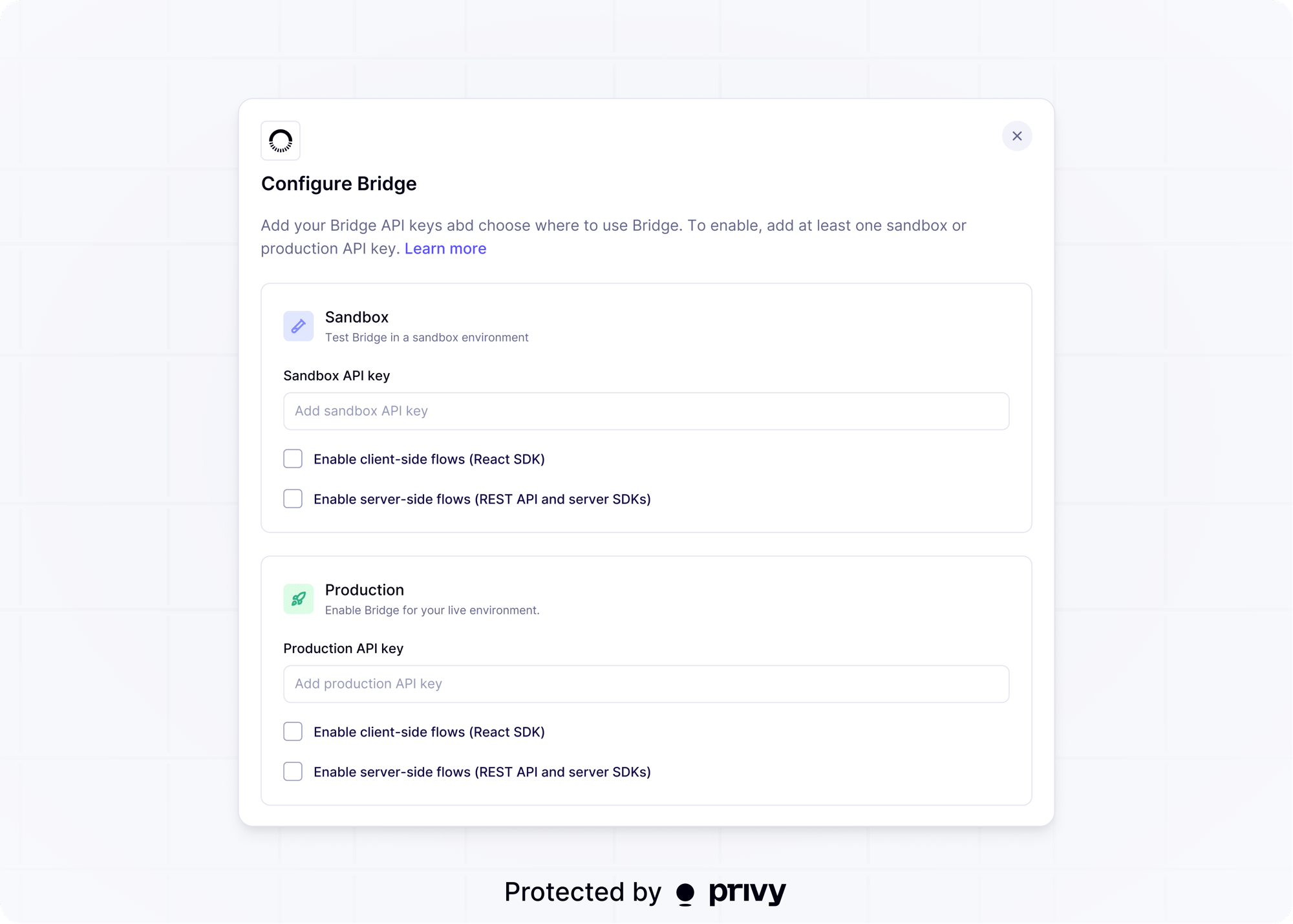 Add at least one sandbox or production API key to enable Bridge for your app. For each environment, select where Bridge can be used:
| Setting | Description |
| ------------------------------------ | ------------------------------------------------------------------------------------------------------------- |
| Enable client-side flows (React SDK) | Allows Bridge flows to be initiated from your app's frontend. |
| Enable server-side flows (REST API) | Allows Bridge flows to be initiated from your app's backend, including KYC verification and KYB verification. |
The sandbox environment does not move real money and does not require real identity or bank
information. It is not a testnet: wallets and assets used in sandbox flows are still mainnet. See
Bridge's guide to [setting up a sandbox
environment](https://apidocs.bridge.xyz/get-started/introduction/quick-start/setting-up-sandbox)
for what Bridge simulates, including [simulated KYC
approvals](https://apidocs.bridge.xyz/api-reference/sandbox/simulate-kyc-approval-sandbox-only).
## Exchange
To enable users to [fund their wallets via a crypto exchange](/wallets/funding/add-funds), enable **exchange** funding.
Privy currently supports users funding their wallets with a connected exchange account from Coinbase. Once the method is enabled, follow [this guide](https://docs.cdp.coinbase.com/onramp/introduction/welcome) to create a Coinbase Developer Platform account and add your Onramp API keys.
## Crypto deposits
To fund wallets via [crypto deposits](/wallets/funding/crypto-deposits/overview), enable [swaps](/wallets/actions/swap/setup) and [app-pays gas sponsorship](/wallets/gas-and-asset-management/gas/setup) for each source chain. Incoming deposits are then converted into a target asset you specify.
The **crypto deposits** switch on the Funding page reflects those dependencies. It is not a separate enablement step.
Under the hood, Privy's crypto deposits feature uses the [swap](/financial-flows/swap) API.
Add at least one sandbox or production API key to enable Bridge for your app. For each environment, select where Bridge can be used:
| Setting | Description |
| ------------------------------------ | ------------------------------------------------------------------------------------------------------------- |
| Enable client-side flows (React SDK) | Allows Bridge flows to be initiated from your app's frontend. |
| Enable server-side flows (REST API) | Allows Bridge flows to be initiated from your app's backend, including KYC verification and KYB verification. |
The sandbox environment does not move real money and does not require real identity or bank
information. It is not a testnet: wallets and assets used in sandbox flows are still mainnet. See
Bridge's guide to [setting up a sandbox
environment](https://apidocs.bridge.xyz/get-started/introduction/quick-start/setting-up-sandbox)
for what Bridge simulates, including [simulated KYC
approvals](https://apidocs.bridge.xyz/api-reference/sandbox/simulate-kyc-approval-sandbox-only).
## Exchange
To enable users to [fund their wallets via a crypto exchange](/wallets/funding/add-funds), enable **exchange** funding.
Privy currently supports users funding their wallets with a connected exchange account from Coinbase. Once the method is enabled, follow [this guide](https://docs.cdp.coinbase.com/onramp/introduction/welcome) to create a Coinbase Developer Platform account and add your Onramp API keys.
## Crypto deposits
To fund wallets via [crypto deposits](/wallets/funding/crypto-deposits/overview), enable [swaps](/wallets/actions/swap/setup) and [app-pays gas sponsorship](/wallets/gas-and-asset-management/gas/setup) for each source chain. Incoming deposits are then converted into a target asset you specify.
The **crypto deposits** switch on the Funding page reflects those dependencies. It is not a separate enablement step.
Under the hood, Privy's crypto deposits feature uses the [swap](/financial-flows/swap) API.