> ## Documentation Index
> Fetch the complete documentation index at: https://docs.privy.io/llms.txt
> Use this file to discover all available pages before exploring further.
# Creating key quorums
To create a key quorum, first [create the authorization keys](/controls/authorization-keys/keys/create/key) and/or [get the user IDs](/controls/authorization-keys/keys/create/user/overview) of the users that will constitute the key quorum. Key quorums can also include other [key quorums](/controls/key-quorum/overview) as members (one level deep).
Once you have the user ID(s), authorization key(s), and/or key quorum ID(s), register the key quorum with Privy via the Dashboard or the REST API.
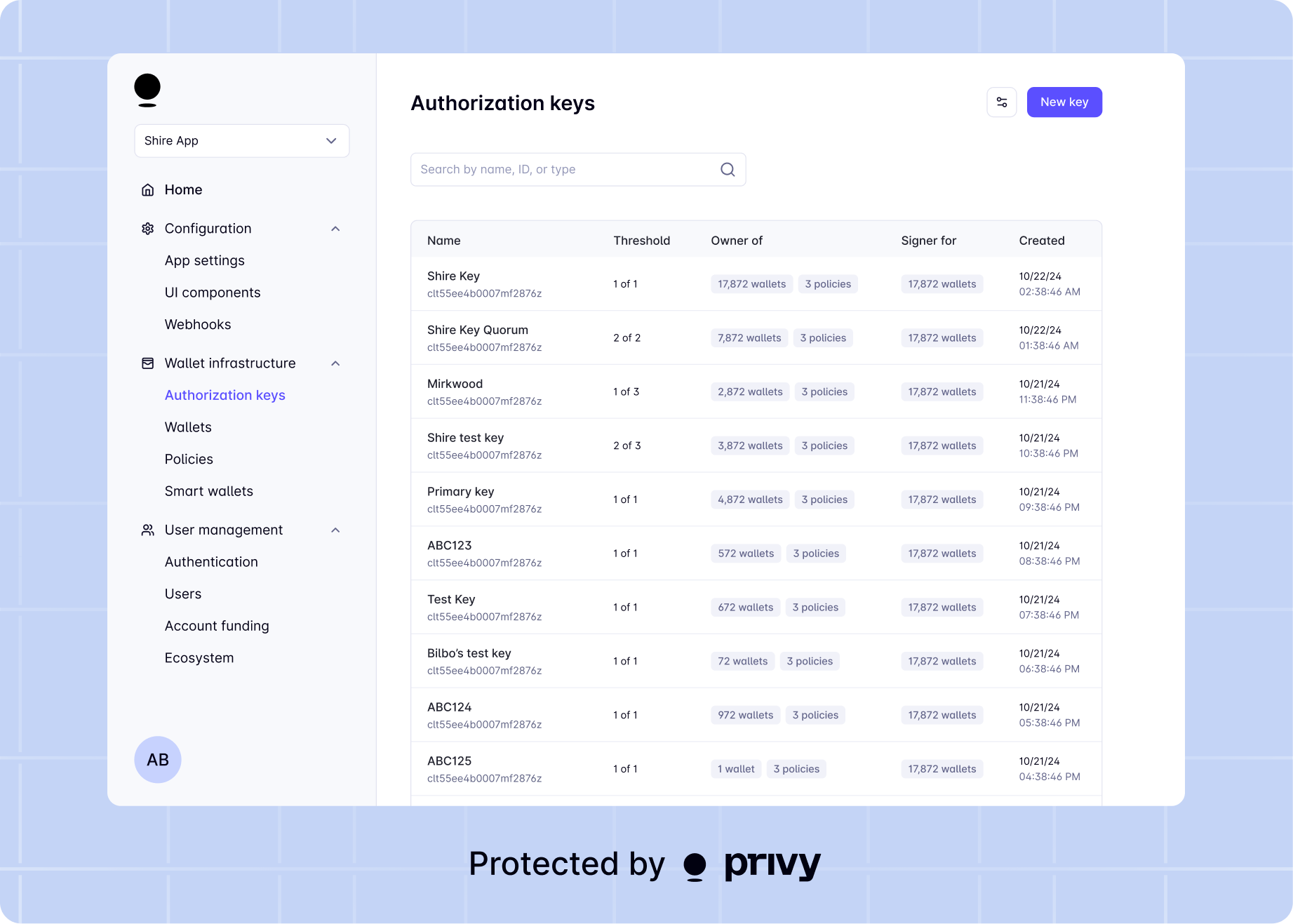
Visit the [**Authorization keys**](https://dashboard.privy.io/apps?page=authorization-keys) page of the **Wallets** section for your app, click **New key**, and select **Register key quorum instead**.
Specify the public keys you'd like to add to the quorum and an authorization threshold.
Key quorums containing both user IDs and authorization keys must be created via the REST API.
 You can create a key quorum using the Node SDK by using the `keyQuorums().create()` method.
### Usage
The returned `id` for the key quorum is used as the `owner_id` field when creating or updating resources (e.g. wallets or policies) in the Privy API.
```ts title="Example: Create a 2-of-2 key quorum with an authorization key and a user" theme={"system"}
try {
const keyQuorum = await privyClient.keyQuorums().create({
public_keys: ['authorization-key'],
user_ids: ['user-id'],
key_quorum_ids: ['key-quorum-id'], // Optional: nest other key quorums as members
display_name: '2 of 2 Test Key Quorum',
authorization_threshold: 2, // Require 2 signatures (both keys)
});
const keyQuorumId = keyQuorum.id;
} catch (error) {
console.error(error);
}
```
Refer to the [API reference](/api-reference/key-quorums/create) for more details on the available parameters and returns.
You can create a key quorum using the Java SDK by using the `keyQuorums().create()` method.
### Usage
The returned `id` for the key quorum is used as the `ownerId` field when creating or updating resources (e.g. wallets or policies) in the Privy API.
```java title="Example: Create a 2-of-2 key quorum with an authorization key and a user" theme={"system"}
try {
KeyQuorumCreateRequestBody keyQuorumRequest = KeyQuorumCreateRequestBody.builder()
.publicKeys(List.of("authorization-key"))
.userIds(List.of("user-id"))
.keyQuorumIds(List.of("key-quorum-id")) // Optional: nest other key quorums as members
.displayName("2 of 2 Test Key Quorum")
.authorizationThreshold(2.0) // Require 2 signatures (both keys)
.build();
KeyQuorumCreateResponse keyQuorumResponse = privyClient
.keyQuorums()
.create(keyQuorumRequest);
if (keyQuorumResponse.keyQuorum().isPresent()) {
KeyQuorum keyQuorum = keyQuorumResponse.keyQuorum().get();
String keyQuorumId = keyQuorum.id();
}
} catch (APIException e) {
String errorBody = e.bodyAsString();
System.err.println(errorBody);
} catch (Exception e) {
System.err.println(e.getMessage());
}
```
### Parameters
When creating a key quorum, you can specify the following values on the `KeyQuorumCreateRequestBody` builder:
A list of base64-encoded, DER-formatted P-256 public keys to register.
A list of user IDs to include in the key quorum.
A list of key quorum IDs to include as members of this key quorum (one level deep). Each nested quorum counts as one member toward the parent's authorization threshold.
The minimum number of signatures required to authorize an action. If left unset, the default is all keys.
Human readable display name to attach to the key.
### Returns
The `KeyQuorumCreateResponse` object contains an optional `keyQuorum()` field, present if the key quorum was created successfully.
The created `KeyQuorum` object.
Unique ID for the key quorum, used to assign the `owner_id` to a resource.
The list of authorization keys included in the key quorum.
The public key of the authorization key.
The display name of the authorization key.
The list of user IDs included in the key quorum.
The list of key quorum IDs nested as members of this key quorum.
The minimum number of signatures required to authorize an action. If left unset, the default is all keys.
Human readable display name to attach to the key.
You can create a key quorum using the Rust SDK by using the `key_quorums().create()` method.
### Usage
The returned `id` for the key quorum is used as the `owner_id` field when creating or updating resources (e.g. wallets or policies) in the Privy API.
```rust title="Example: Create a 2-of-2 key quorum with an authorization key and a user" theme={"system"}
use privy_rs::{PrivyClient, generated::types::*};
let client = PrivyClient::new(app_id, app_secret)?;
let request = CreateKeyQuorumBody {
public_keys: Some(vec!["authorization-key".to_string()]),
user_ids: Some(vec!["user-id".to_string()]),
key_quorum_ids: Some(vec!["key-quorum-id".to_string()]), // Optional: nest other key quorums
display_name: Some("2 of 2 Test Key Quorum".to_string()),
authorization_threshold: Some(2.0), // Require 2 signatures (both keys)
};
let key_quorum = client
.key_quorums()
.create(request)
.await?;
let key_quorum_id = key_quorum.id;
println!("Created key quorum: {}", key_quorum_id);
```
### Parameters and Returns
See the Rust SDK documentation for detailed parameter and return types, including embedded examples:
* [KeyQuorumsClient::create](https://docs.rs/privy-rs/latest/privy_rs/subclients/struct.KeyQuorumsClient.html#method.create)
For REST API details, see the [API reference](/api-reference/key-quorums/create).
To create a key quorum with the Go SDK, use the `New` method on the `KeyQuorums` service.
### Usage
The returned `Id` for the key quorum is used as the `OwnerId` field when creating or updating
resources (e.g. wallets or policies) in the Privy API.
```go title="Example: Create a 2-of-2 key quorum with an authorization key and a user" theme={"system"}
quorum, err := client.KeyQuorums.New(context.Background(), privy.KeyQuorumNewParams{
KeyQuorumCreateRequestBody: privy.KeyQuorumCreateRequestBody{
PublicKeys: []string{"authorization-key"},
UserIDs: []string{"user-id"},
KeyQuorumIDs: []string{"key-quorum-id"}, // Optional: nest other key quorums
DisplayName: privy.String("2 of 2 Test Key Quorum"),
AuthorizationThreshold: privy.Float(2), // Require 2 signatures (both keys)
},
})
if err != nil {
log.Fatalf("failed to create key quorum: %v", err)
}
keyQuorumID := quorum.ID
```
### Parameters and Returns
See the [API reference](/api-reference/key-quorums/create) for more details.
To create a key quorum with the Ruby SDK, use the `create` method on the `key_quorums` service.
### Usage
The returned `id` for the key quorum is used as the `owner_id` field when creating or updating
resources (e.g. wallets or policies) in the Privy API.
```ruby title="Example: Create a 2-of-2 key quorum with an authorization key and a user" theme={"system"}
quorum = client.key_quorums.create(
key_quorum_create_params: {
public_keys: ["authorization-key"],
user_ids: ["user-id"],
key_quorum_ids: ["key-quorum-id"], # Optional: nest other key quorums
display_name: "2 of 2 Test Key Quorum",
authorization_threshold: 2 # Require 2 signatures (both keys)
}
)
puts(quorum.id)
```
### Parameters and Returns
See the [API reference](/api-reference/key-quorums/create) for more details.
Register the key quorum with Privy by making a `POST` request to:
```sh theme={"system"}
https://api.privy.io/v1/key_quorums
```
In the request body, include the following.
A list of base64-encoded, DER-formatted P-256 public keys to register.
A list of user IDs to include in the key quorum.
A list of key quorum IDs to include as members of this key quorum (one level deep). Each nested quorum counts as one member toward the parent's authorization threshold.
The minimum number of signatures required to authorize an action. If left unset, the default is all keys.
Human readable display name to attach to the key.
If the request is successful, Privy will return the following fields in the response.
Unique ID for the key quorum, used to assign the `owner_id` to a resource.
The list of public keys and their display names.
The list of user IDs included in the key quorum.
The list of key quorum IDs nested as members of this key quorum.
The minimum number of signatures required to authorize an action. If left unset, the default is all keys.
Human readable display name to attach to the key.
The returned `id` for the key quorum is used as the `owner_id` field when creating or updating resources (e.g. wallets or policies) in the Privy API.
See an example request for creating a key quorum below.
As an example, a request to register a 2 of 2 key quorum might look like the following:
```bash theme={"system"}
$ curl --request POST https://api.privy.io/v1/key_quorums \
-u ":" \
-H "privy-app-id: " \
-H 'Content-Type: application/json' \
-d '{
"display_name": "Sample key",
"public_keys": [
"MFkwEwYHKoZIzj0CAQYIKoZIzj0DAQcDQgAEx4aoeD72yykviK+f/ckqE2CItVIG\n1rCnvC3/XZ1HgpOcMEMialRmTrqIK4oZlYd1RfxU3za/C9yjhboIuoPD3g==",
"MFkwEwYHKoZIzj0CAQYIKoZIzj0DAQcDQgAErzZtQr/bMIh3Y8f9ZqseB9i/AfjQ\nhu+agbNqXcJy/TfoNqvc/Y3Mh7gIZ8ZLXQEykycx4mYSpqrxp1lBKqsZDQ=="
],
"key_quorum_ids": [""],
"authorization_threshold": 2
}'
```
An example successful response would look like:
```json theme={"system"}
{
"id": "",
"display_name": "Sample key",
"public_keys": [
{
"public_key": "MFkwEwYHKoZIzj0CAQYIKoZIzj0DAQcDQgAEx4aoeD72yykviK+f/ckqE2CItVIG\n1rCnvC3/XZ1HgpOcMEMialRmTrqIK4oZlYd1RfxU3za/C9yjhboIuoPD3g=="
},
{
"public_key": "MFkwEwYHKoZIzj0CAQYIKoZIzj0DAQcDQgAErzZtQr/bMIh3Y8f9ZqseB9i/AfjQ\nhu+agbNqXcJy/TfoNqvc/Y3Mh7gIZ8ZLXQEykycx4mYSpqrxp1lBKqsZDQ=="
}
],
"key_quorum_ids": [""],
"authorization_threshold": 2
}
```
You can create a key quorum using the Node SDK by using the `keyQuorums().create()` method.
### Usage
The returned `id` for the key quorum is used as the `owner_id` field when creating or updating resources (e.g. wallets or policies) in the Privy API.
```ts title="Example: Create a 2-of-2 key quorum with an authorization key and a user" theme={"system"}
try {
const keyQuorum = await privyClient.keyQuorums().create({
public_keys: ['authorization-key'],
user_ids: ['user-id'],
key_quorum_ids: ['key-quorum-id'], // Optional: nest other key quorums as members
display_name: '2 of 2 Test Key Quorum',
authorization_threshold: 2, // Require 2 signatures (both keys)
});
const keyQuorumId = keyQuorum.id;
} catch (error) {
console.error(error);
}
```
Refer to the [API reference](/api-reference/key-quorums/create) for more details on the available parameters and returns.
You can create a key quorum using the Java SDK by using the `keyQuorums().create()` method.
### Usage
The returned `id` for the key quorum is used as the `ownerId` field when creating or updating resources (e.g. wallets or policies) in the Privy API.
```java title="Example: Create a 2-of-2 key quorum with an authorization key and a user" theme={"system"}
try {
KeyQuorumCreateRequestBody keyQuorumRequest = KeyQuorumCreateRequestBody.builder()
.publicKeys(List.of("authorization-key"))
.userIds(List.of("user-id"))
.keyQuorumIds(List.of("key-quorum-id")) // Optional: nest other key quorums as members
.displayName("2 of 2 Test Key Quorum")
.authorizationThreshold(2.0) // Require 2 signatures (both keys)
.build();
KeyQuorumCreateResponse keyQuorumResponse = privyClient
.keyQuorums()
.create(keyQuorumRequest);
if (keyQuorumResponse.keyQuorum().isPresent()) {
KeyQuorum keyQuorum = keyQuorumResponse.keyQuorum().get();
String keyQuorumId = keyQuorum.id();
}
} catch (APIException e) {
String errorBody = e.bodyAsString();
System.err.println(errorBody);
} catch (Exception e) {
System.err.println(e.getMessage());
}
```
### Parameters
When creating a key quorum, you can specify the following values on the `KeyQuorumCreateRequestBody` builder:
A list of base64-encoded, DER-formatted P-256 public keys to register.
A list of user IDs to include in the key quorum.
A list of key quorum IDs to include as members of this key quorum (one level deep). Each nested quorum counts as one member toward the parent's authorization threshold.
The minimum number of signatures required to authorize an action. If left unset, the default is all keys.
Human readable display name to attach to the key.
### Returns
The `KeyQuorumCreateResponse` object contains an optional `keyQuorum()` field, present if the key quorum was created successfully.
The created `KeyQuorum` object.
Unique ID for the key quorum, used to assign the `owner_id` to a resource.
The list of authorization keys included in the key quorum.
The public key of the authorization key.
The display name of the authorization key.
The list of user IDs included in the key quorum.
The list of key quorum IDs nested as members of this key quorum.
The minimum number of signatures required to authorize an action. If left unset, the default is all keys.
Human readable display name to attach to the key.
You can create a key quorum using the Rust SDK by using the `key_quorums().create()` method.
### Usage
The returned `id` for the key quorum is used as the `owner_id` field when creating or updating resources (e.g. wallets or policies) in the Privy API.
```rust title="Example: Create a 2-of-2 key quorum with an authorization key and a user" theme={"system"}
use privy_rs::{PrivyClient, generated::types::*};
let client = PrivyClient::new(app_id, app_secret)?;
let request = CreateKeyQuorumBody {
public_keys: Some(vec!["authorization-key".to_string()]),
user_ids: Some(vec!["user-id".to_string()]),
key_quorum_ids: Some(vec!["key-quorum-id".to_string()]), // Optional: nest other key quorums
display_name: Some("2 of 2 Test Key Quorum".to_string()),
authorization_threshold: Some(2.0), // Require 2 signatures (both keys)
};
let key_quorum = client
.key_quorums()
.create(request)
.await?;
let key_quorum_id = key_quorum.id;
println!("Created key quorum: {}", key_quorum_id);
```
### Parameters and Returns
See the Rust SDK documentation for detailed parameter and return types, including embedded examples:
* [KeyQuorumsClient::create](https://docs.rs/privy-rs/latest/privy_rs/subclients/struct.KeyQuorumsClient.html#method.create)
For REST API details, see the [API reference](/api-reference/key-quorums/create).
To create a key quorum with the Go SDK, use the `New` method on the `KeyQuorums` service.
### Usage
The returned `Id` for the key quorum is used as the `OwnerId` field when creating or updating
resources (e.g. wallets or policies) in the Privy API.
```go title="Example: Create a 2-of-2 key quorum with an authorization key and a user" theme={"system"}
quorum, err := client.KeyQuorums.New(context.Background(), privy.KeyQuorumNewParams{
KeyQuorumCreateRequestBody: privy.KeyQuorumCreateRequestBody{
PublicKeys: []string{"authorization-key"},
UserIDs: []string{"user-id"},
KeyQuorumIDs: []string{"key-quorum-id"}, // Optional: nest other key quorums
DisplayName: privy.String("2 of 2 Test Key Quorum"),
AuthorizationThreshold: privy.Float(2), // Require 2 signatures (both keys)
},
})
if err != nil {
log.Fatalf("failed to create key quorum: %v", err)
}
keyQuorumID := quorum.ID
```
### Parameters and Returns
See the [API reference](/api-reference/key-quorums/create) for more details.
To create a key quorum with the Ruby SDK, use the `create` method on the `key_quorums` service.
### Usage
The returned `id` for the key quorum is used as the `owner_id` field when creating or updating
resources (e.g. wallets or policies) in the Privy API.
```ruby title="Example: Create a 2-of-2 key quorum with an authorization key and a user" theme={"system"}
quorum = client.key_quorums.create(
key_quorum_create_params: {
public_keys: ["authorization-key"],
user_ids: ["user-id"],
key_quorum_ids: ["key-quorum-id"], # Optional: nest other key quorums
display_name: "2 of 2 Test Key Quorum",
authorization_threshold: 2 # Require 2 signatures (both keys)
}
)
puts(quorum.id)
```
### Parameters and Returns
See the [API reference](/api-reference/key-quorums/create) for more details.
Register the key quorum with Privy by making a `POST` request to:
```sh theme={"system"}
https://api.privy.io/v1/key_quorums
```
In the request body, include the following.
A list of base64-encoded, DER-formatted P-256 public keys to register.
A list of user IDs to include in the key quorum.
A list of key quorum IDs to include as members of this key quorum (one level deep). Each nested quorum counts as one member toward the parent's authorization threshold.
The minimum number of signatures required to authorize an action. If left unset, the default is all keys.
Human readable display name to attach to the key.
If the request is successful, Privy will return the following fields in the response.
Unique ID for the key quorum, used to assign the `owner_id` to a resource.
The list of public keys and their display names.
The list of user IDs included in the key quorum.
The list of key quorum IDs nested as members of this key quorum.
The minimum number of signatures required to authorize an action. If left unset, the default is all keys.
Human readable display name to attach to the key.
The returned `id` for the key quorum is used as the `owner_id` field when creating or updating resources (e.g. wallets or policies) in the Privy API.
See an example request for creating a key quorum below.
As an example, a request to register a 2 of 2 key quorum might look like the following:
```bash theme={"system"}
$ curl --request POST https://api.privy.io/v1/key_quorums \
-u ":" \
-H "privy-app-id: " \
-H 'Content-Type: application/json' \
-d '{
"display_name": "Sample key",
"public_keys": [
"MFkwEwYHKoZIzj0CAQYIKoZIzj0DAQcDQgAEx4aoeD72yykviK+f/ckqE2CItVIG\n1rCnvC3/XZ1HgpOcMEMialRmTrqIK4oZlYd1RfxU3za/C9yjhboIuoPD3g==",
"MFkwEwYHKoZIzj0CAQYIKoZIzj0DAQcDQgAErzZtQr/bMIh3Y8f9ZqseB9i/AfjQ\nhu+agbNqXcJy/TfoNqvc/Y3Mh7gIZ8ZLXQEykycx4mYSpqrxp1lBKqsZDQ=="
],
"key_quorum_ids": [""],
"authorization_threshold": 2
}'
```
An example successful response would look like:
```json theme={"system"}
{
"id": "",
"display_name": "Sample key",
"public_keys": [
{
"public_key": "MFkwEwYHKoZIzj0CAQYIKoZIzj0DAQcDQgAEx4aoeD72yykviK+f/ckqE2CItVIG\n1rCnvC3/XZ1HgpOcMEMialRmTrqIK4oZlYd1RfxU3za/C9yjhboIuoPD3g=="
},
{
"public_key": "MFkwEwYHKoZIzj0CAQYIKoZIzj0DAQcDQgAErzZtQr/bMIh3Y8f9ZqseB9i/AfjQ\nhu+agbNqXcJy/TfoNqvc/Y3Mh7gIZ8ZLXQEykycx4mYSpqrxp1lBKqsZDQ=="
}
],
"key_quorum_ids": [""],
"authorization_threshold": 2
}
```