> ## Documentation Index
> Fetch the complete documentation index at: https://docs.privy.io/llms.txt
> Use this file to discover all available pages before exploring further.
# Propose intents for review
For resources owned by a key quorum of team members, propose **intents** to make changes such as wallet updates, policy updates, signatures, or transactions.
Once a team member submits an intent, it is queued for manual review by the team members in the assigned key quorum. Team members can then review the proposed change in the Dashboard and decide to approve or reject it. Once enough reviewers approve, the intent executes.
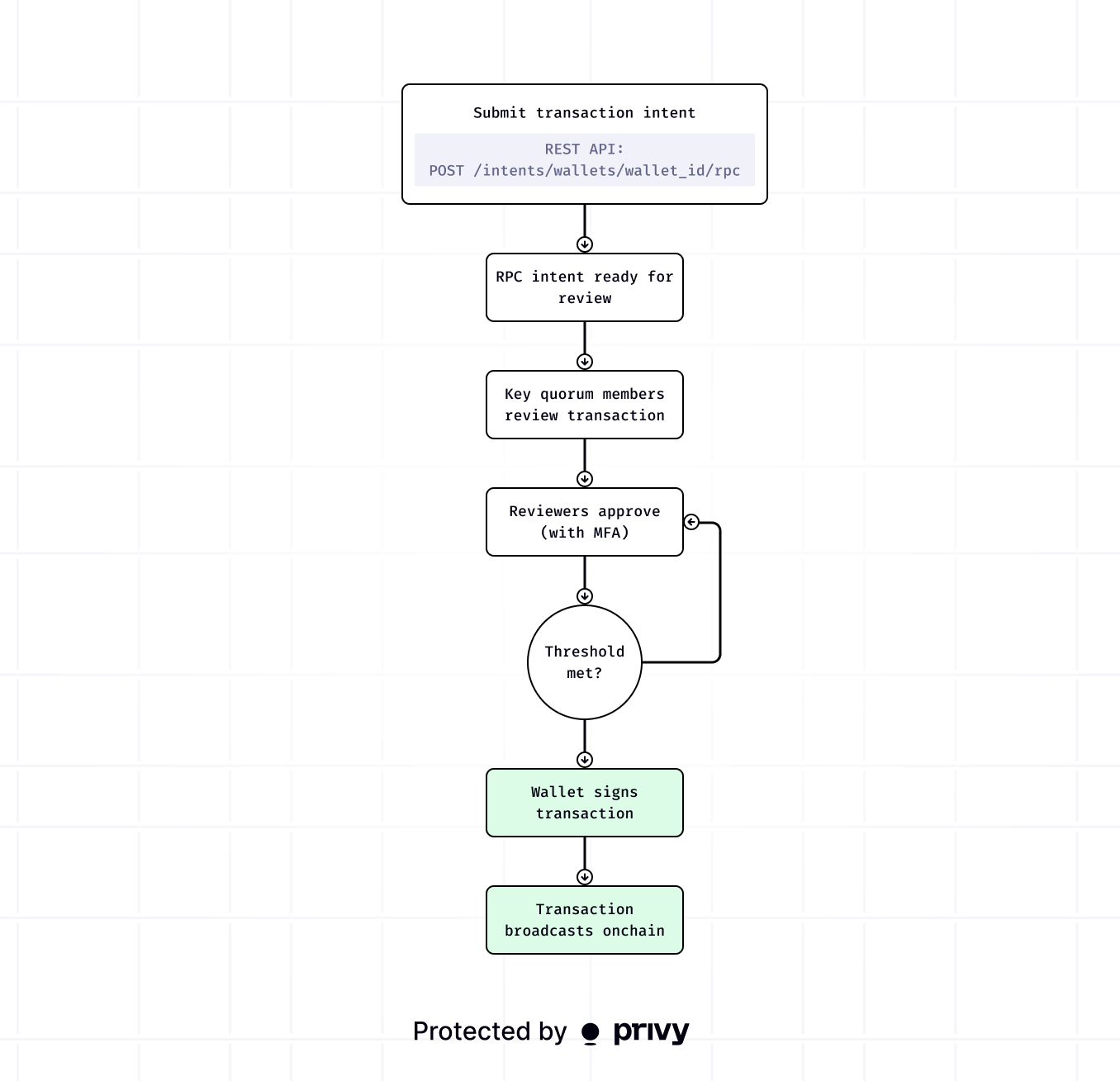 There are two ways to propose intents:
* **Dashboard:** From the **Wallets** and **Policies** pages, create an intent to update an existing wallet or policy owned by a key quorum of your team members.
* **REST API:** Create an intent to update a wallet, update a policy, or execute a signature or transaction.
Intents expire 72 hours after creation. Reviewers must [approve](/controls/dashboard/approvals)
them within this window.
Learn more about proposing intents for the following flows.
Propose an intent to transfer funds
Propose an RPC intent to send a transaction
Propose a policy intent for review
***
## Transfer funds
Propose an intent to transfer funds from a wallet to a destination address via the Dashboard or REST API.
### Dashboard
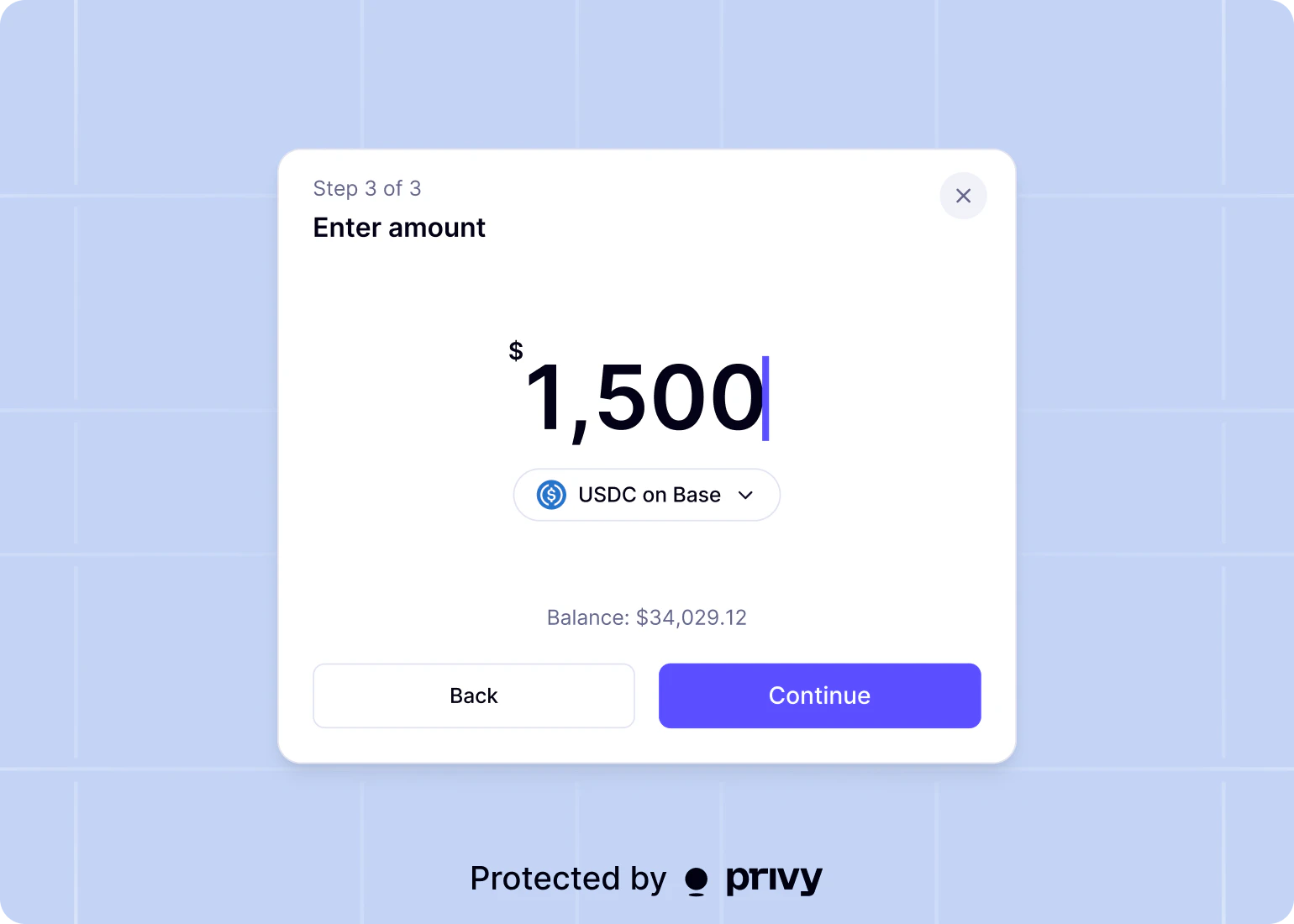
Visit the [**Wallets**](https://dashboard.privy.io/apps?page=wallets) page. Click **Transfer**, select a source wallet and destination address, choose a token and chain, enter an amount, and submit to propose an intent for review.
There are two ways to propose intents:
* **Dashboard:** From the **Wallets** and **Policies** pages, create an intent to update an existing wallet or policy owned by a key quorum of your team members.
* **REST API:** Create an intent to update a wallet, update a policy, or execute a signature or transaction.
Intents expire 72 hours after creation. Reviewers must [approve](/controls/dashboard/approvals)
them within this window.
Learn more about proposing intents for the following flows.
Propose an intent to transfer funds
Propose an RPC intent to send a transaction
Propose a policy intent for review
***
## Transfer funds
Propose an intent to transfer funds from a wallet to a destination address via the Dashboard or REST API.
### Dashboard
Visit the [**Wallets**](https://dashboard.privy.io/apps?page=wallets) page. Click **Transfer**, select a source wallet and destination address, choose a token and chain, enter an amount, and submit to propose an intent for review.
 ### API
```bash theme={"system"}
curl -X POST https://api.privy.io/v1/intents/wallets//transfer \
-u ":" \
-H "privy-app-id: " \
-H "Content-Type: application/json" \
-d '{
"source": {
"asset": "usdc",
"amount": "10.0",
"chain": "tempo"
},
"destination": {
"address": "0xB00F0759DbeeF5E543Cc3E3B07A6442F5f3928a2"
}
}'
```
From the response, note the returned `intent_id`. Use this ID to check approval progress and execution results.
View [API reference](/api-reference/intents/transfer) for submitting a transfer intent.
***
## Authorize a transaction
Propose an intent to authorize and execute a signature or transaction via the REST API. The Dashboard does not currently support proposing RPC intents.
This endpoint accepts the same request body as the synchronous [**RPC**](/api-reference/wallets/ethereum/eth-send-transaction) endpoint but does **not** require authorization signatures in the request. Instead, the intent is queued for manual review and executes once enough reviewers approve.
```bash theme={"system"}
curl -X POST https://api.privy.io/v1/intents/wallets//rpc \
-u ":" \
-H "privy-app-id: " \
-H "Content-Type: application/json" \
-d '{
"method": "eth_sendTransaction",
"caip2": "eip155:8453",
"sponsor": "true",
"params": {
"transaction": {
"to": "0xE3070d3e4309afA3bC9a6b057685743CF42da77C",
"value": "0x2386F26FC10000"
}
}
}'
```
```typescript {skip-check} theme={"system"}
import {PrivyClient, type EthereumSendTransactionRpcInput} from '@privy-io/node';
const client = new PrivyClient({
appId: 'your-app-id',
appSecret: 'your-app-secret'
});
const rpcRequest: EthereumSendTransactionRpcInput = {
method: 'eth_sendTransaction',
caip2: 'eip155:8453',
sponsor: true,
params: {
transaction: {
to: '0xE3070d3e4309afA3bC9a6b057685743CF42da77C',
value: '0x2386F26FC10000'
}
}
};
const intent = await client.intents().rpc('insert-wallet-id', rpcRequest);
console.log(intent.intent_id, intent.status, intent.authorization_details);
```
```go theme={"system"}
import privy "github.com/privy-io/go-sdk"
client := privy.NewPrivyClient(privy.PrivyClientOptions{
AppID: "your-app-id",
AppSecret: "your-app-secret",
})
transaction := privy.UnsignedStandardEthereumTransaction{
To: privy.String("0xE3070d3e4309afA3bC9a6b057685743CF42da77C"),
Value: privy.QuantityUnion{
OfString: privy.String("0x2386F26FC10000"),
},
}
rpcInput := &privy.EthereumSendTransactionRpcInput{
Method: privy.EthereumSendTransactionRpcInputMethodEthSendTransaction,
Caip2: "eip155:8453",
Params: privy.EthereumSendTransactionRpcInputParams{
Transaction: transaction,
},
}
intent, err := client.Intents.Rpc(ctx, "wallet-id", privy.IntentRpcParams{
WalletRpcRequestBody: privy.WalletRpcRequestBodyUnion{
OfEthSendTransaction: rpcInput,
},
})
```
```ruby theme={"system"}
require "privy"
client = Privy::PrivyClient.new(
app_id: "your-app-id",
app_secret: "your-app-secret"
)
intent = client.intents.rpc(
"wallet-id",
wallet_rpc_request_body: {
method: "eth_sendTransaction",
caip2: "eip155:8453",
params: {
transaction: {
to: "0xE3070d3e4309afA3bC9a6b057685743CF42da77C",
value: "0x2386F26FC10000"
}
}
}
)
puts(intent.intent_id, intent.status, intent.authorization_details)
```
From the response, note the returned `intent_id`. Use this ID to check approval progress and execution results.
View [API reference](/api-reference/intents/rpc) for submitting an RPC intent.
***
## Update wallet
Propose an intent to update a wallet via the Dashboard or REST API.
### Dashboard
Visit the [**Wallets**](https://dashboard.privy.io/apps?page=wallets) page and select the target wallet.
Click **Update wallet**, make the desired changes, then select **Propose changes** to submit the intent for review.
### API
This endpoint accepts the same request body as the synchronous [**Update wallet**](/api-reference/wallets/update) endpoint but does **not** require authorization signatures in the request. Instead, the intent is queued for manual review and executes once enough reviewers approve.
```bash theme={"system"}
curl -X PATCH https://api.privy.io/v1/intents/wallets/ \
-u ":" \
-H "privy-app-id: " \
-H "Content-Type: application/json" \
-d '{
"policy_ids": ["new-policy-id"]
}'
```
```typescript {skip-check} theme={"system"}
import {PrivyClient, type IntentUpdateWalletParams} from '@privy-io/node';
const client = new PrivyClient({
appId: 'your-app-id',
appSecret: 'your-app-secret'
});
const walletUpdate: IntentUpdateWalletParams = {
policy_ids: ['new-policy-id']
};
const intent = await client.intents().updateWallet('insert-wallet-id', walletUpdate);
console.log(intent.intent_id, intent.status, intent.authorization_details);
```
```go theme={"system"}
import privy "github.com/privy-io/go-sdk"
client := privy.NewPrivyClient(privy.PrivyClientOptions{
AppID: "your-app-id",
AppSecret: "your-app-secret",
})
intent, err := client.Intents.UpdateWallet(ctx, "wallet-id", privy.IntentUpdateWalletParams{
WalletUpdateRequestBody: privy.WalletUpdateRequestBody{
PolicyIDs: []string{"new-policy-id"},
},
})
```
```ruby theme={"system"}
require "privy"
client = Privy::PrivyClient.new(
app_id: "your-app-id",
app_secret: "your-app-secret"
)
intent = client.intents.update_wallet(
"wallet-id",
policy_ids: ["new-policy-id"]
)
puts(intent.intent_id, intent.status, intent.authorization_details)
```
From the response, note the returned `intent_id`. Use this ID to check approval progress and execution results.
View [API reference](/api-reference/intents/update-wallet) for submitting a wallet intent.
***
## Update policy
Propose an intent to update a policy via the Dashboard or REST API.
### Dashboard
Visit the [**Policies**](https://dashboard.privy.io/apps?page=policies) page and select the target policy.
Make the desired changes and click **Propose changes** to submit the intent for review.
### API
This endpoint accepts the same request body as the synchronous [**Update policy**](/api-reference/policies/update) endpoint but does **not** require authorization signatures in the request. Instead, the intent is queued for manual review and executes once enough reviewers approve.
```bash theme={"system"}
curl -X PATCH https://api.privy.io/v1/intents/policies/ \
-u ":" \
-H "privy-app-id: " \
-H "Content-Type: application/json" \
-d '{
"name": "Updated policy name"
}'
```
```typescript {skip-check} theme={"system"}
import {PrivyClient, type IntentUpdatePolicyParams} from '@privy-io/node';
const client = new PrivyClient({
appId: 'your-app-id',
appSecret: 'your-app-secret'
});
const policyUpdate: IntentUpdatePolicyParams = {
name: 'Updated policy name'
};
const intent = await client.intents().updatePolicy('insert-policy-id', policyUpdate);
console.log(intent.intent_id, intent.status, intent.authorization_details);
```
```go theme={"system"}
import privy "github.com/privy-io/go-sdk"
client := privy.NewPrivyClient(privy.PrivyClientOptions{
AppID: "your-app-id",
AppSecret: "your-app-secret",
})
intent, err := client.Intents.UpdatePolicy(ctx, "policy-id", privy.IntentUpdatePolicyParams{
Name: privy.String("updated-policy-name"),
})
```
```ruby theme={"system"}
require "privy"
client = Privy::PrivyClient.new(
app_id: "your-app-id",
app_secret: "your-app-secret"
)
intent = client.intents.update_policy(
"policy-id",
name: "updated-policy-name"
)
puts(intent.intent_id, intent.status, intent.authorization_details)
```
From the response, note the returned `intent_id`. Use this ID to check approval progress and execution results.
View [API reference](/api-reference/intents/update-policy) for submitting a policy intent.
***
## Update policy rules
Propose an intent to add, edit, or remove rules for a policy via the Dashboard or REST API.
### Dashboard
Visit the [**Policies**](https://dashboard.privy.io/apps?page=policies) page, select a policy, and navigate to its rules.
Make the desired changes and click **Propose changes** to submit the intent for review.
### API
The example below shows how to add a new rule. Each rule action uses a different HTTP method and endpoint:
| Action | Method | Endpoint |
| ------------- | -------- | -------------------------------------------------- |
| Add a rule | `POST` | `/v1/intents/policies/{policy_id}/rules` |
| Update a rule | `PATCH` | `/v1/intents/policies/{policy_id}/rules/{rule_id}` |
| Delete a rule | `DELETE` | `/v1/intents/policies/{policy_id}/rules/{rule_id}` |
```bash theme={"system"}
curl -X POST https://api.privy.io/v1/intents/policies//rules \
-u ":" \
-H "privy-app-id: " \
-H "Content-Type: application/json" \
-d '{
"name": "Restrict destination address",
"method": "eth_sendTransaction",
"action": "ALLOW",
"conditions": [
{
"field": "to",
"field_source": "ethereum_transaction",
"operator": "eq",
"value": "0x833589fCD6eDb6E08f4c7C32D4f71b54bdA02913"
}
]
}'
```
```typescript {skip-check} theme={"system"}
import {PrivyClient, type IntentCreatePolicyRuleParams} from '@privy-io/node';
const client = new PrivyClient({
appId: 'your-app-id',
appSecret: 'your-app-secret'
});
const rule: IntentCreatePolicyRuleParams = {
name: 'Restrict destination address',
method: 'eth_sendTransaction',
action: 'ALLOW',
conditions: [
{
field: 'to',
field_source: 'ethereum_transaction',
operator: 'eq',
value: '0x833589fCD6eDb6E08f4c7C32D4f71b54bdA02913'
}
]
};
const intent = await client.intents().createPolicyRule('insert-policy-id', rule);
console.log(intent.intent_id, intent.status, intent.authorization_details);
```
```go theme={"system"}
import privy "github.com/privy-io/go-sdk"
client := privy.NewPrivyClient(privy.PrivyClientOptions{
AppID: "your-app-id",
AppSecret: "your-app-secret",
})
intent, err := client.Intents.NewPolicyRule(ctx, "policy-id", privy.IntentNewPolicyRuleParams{
PolicyRuleRequestBody: privy.PolicyRuleRequestBody{
Name: "Restrict destination address",
Action: privy.PolicyActionAllow,
Method: privy.PolicyMethodEthSendTransaction,
Conditions: []privy.PolicyConditionUnion{
{
OfEthereumTransaction: &privy.EthereumTransactionCondition{
Field: privy.EthereumTransactionConditionFieldTo,
FieldSource: privy.EthereumTransactionConditionFieldSourceEthereumTransaction,
Operator: privy.ConditionOperatorEq,
Value: privy.ConditionValueUnion{OfString: privy.String("0x833589fCD6eDb6E08f4c7C32D4f71b54bdA02913")},
},
},
},
},
})
```
```ruby theme={"system"}
require "privy"
client = Privy::PrivyClient.new(
app_id: "your-app-id",
app_secret: "your-app-secret"
)
intent = client.intents.create_policy_rule(
"policy-id",
name: "Restrict destination address",
method_: "eth_sendTransaction",
action: "ALLOW",
conditions: [
{
field: "to",
field_source: "ethereum_transaction",
operator: "eq",
value: "0x833589fCD6eDb6E08f4c7C32D4f71b54bdA02913"
}
]
)
puts(intent.intent_id, intent.status, intent.authorization_details)
```
Each endpoint accepts the same request body as its synchronous counterpart ([create](/api-reference/policies/rules/create), [update](/api-reference/policies/rules/update), [delete](/api-reference/policies/rules/delete)) but does **not** require authorization signatures in the request. Instead, the intent is queued for manual review and executes once enough reviewers approve.
From the response, note the returned `intent_id`. Use this ID to check approval progress and execution results.
View [API reference](/api-reference/intents/create-rule) for submitting a rule intent.
***
## Update key quorum
Your app can also propose an update to the key quorum itself -- changing its name, members, or authorization threshold.
This intent must be approved by a sufficient number of members of the existing quorum in order to be executed.
### Dashboard
Visit the [**Authorization**](https://dashboard.privy.io/apps?page=authorization-keys) page and select the target key quorum.
Select **Update key quorum**, make the desired changes, and select **Propose changes** to submit the intent for review.
### API
This endpoint accepts the same request body as the synchronous [**Update key quorum**](/api-reference/key-quorums/update) endpoint but does **not** require authorization signatures in the request. Instead, the intent is queued for manual review and executes once enough reviewers approve.
```bash theme={"system"}
curl -X PATCH https://api.privy.io/v1/intents/key_quorums/ \
-u ":" \
-H "privy-app-id: " \
-H "Content-Type: application/json" \
-d '{
"authorization_threshold": 2
}'
```
```typescript {skip-check} theme={"system"}
import {PrivyClient, type IntentUpdateKeyQuorumParams} from '@privy-io/node';
const client = new PrivyClient({
appId: 'your-app-id',
appSecret: 'your-app-secret'
});
const quorumUpdate: IntentUpdateKeyQuorumParams = {
authorization_threshold: 2
};
const intent = await client.intents().updateKeyQuorum('insert-key-quorum-id', quorumUpdate);
console.log(intent.intent_id, intent.status, intent.authorization_details);
```
```go theme={"system"}
import privy "github.com/privy-io/go-sdk"
client := privy.NewPrivyClient(privy.PrivyClientOptions{
AppID: "your-app-id",
AppSecret: "your-app-secret",
})
intent, err := client.Intents.UpdateKeyQuorum(ctx, "key-quorum-id", privy.IntentUpdateKeyQuorumParams{
KeyQuorumUpdateRequestBody: privy.KeyQuorumUpdateRequestBody{
AuthorizationThreshold: privy.Float(2),
},
})
```
```ruby theme={"system"}
require "privy"
client = Privy::PrivyClient.new(
app_id: "your-app-id",
app_secret: "your-app-secret"
)
intent = client.intents.update_key_quorum(
"key-quorum-id",
authorization_threshold: 2
)
puts(intent.intent_id, intent.status, intent.authorization_details)
```
From the response, note the returned `intent_id`. Use this ID to check approval progress and execution results.
View [API reference](/api-reference/intents/update-key-quorum) for submitting a key quorum intent.
## Next steps
Approve or reject intents in the Privy Dashboard.
Learn more about the lifecycle of an intent.
### API
```bash theme={"system"}
curl -X POST https://api.privy.io/v1/intents/wallets//transfer \
-u ":" \
-H "privy-app-id: " \
-H "Content-Type: application/json" \
-d '{
"source": {
"asset": "usdc",
"amount": "10.0",
"chain": "tempo"
},
"destination": {
"address": "0xB00F0759DbeeF5E543Cc3E3B07A6442F5f3928a2"
}
}'
```
From the response, note the returned `intent_id`. Use this ID to check approval progress and execution results.
View [API reference](/api-reference/intents/transfer) for submitting a transfer intent.
***
## Authorize a transaction
Propose an intent to authorize and execute a signature or transaction via the REST API. The Dashboard does not currently support proposing RPC intents.
This endpoint accepts the same request body as the synchronous [**RPC**](/api-reference/wallets/ethereum/eth-send-transaction) endpoint but does **not** require authorization signatures in the request. Instead, the intent is queued for manual review and executes once enough reviewers approve.
```bash theme={"system"}
curl -X POST https://api.privy.io/v1/intents/wallets//rpc \
-u ":" \
-H "privy-app-id: " \
-H "Content-Type: application/json" \
-d '{
"method": "eth_sendTransaction",
"caip2": "eip155:8453",
"sponsor": "true",
"params": {
"transaction": {
"to": "0xE3070d3e4309afA3bC9a6b057685743CF42da77C",
"value": "0x2386F26FC10000"
}
}
}'
```
```typescript {skip-check} theme={"system"}
import {PrivyClient, type EthereumSendTransactionRpcInput} from '@privy-io/node';
const client = new PrivyClient({
appId: 'your-app-id',
appSecret: 'your-app-secret'
});
const rpcRequest: EthereumSendTransactionRpcInput = {
method: 'eth_sendTransaction',
caip2: 'eip155:8453',
sponsor: true,
params: {
transaction: {
to: '0xE3070d3e4309afA3bC9a6b057685743CF42da77C',
value: '0x2386F26FC10000'
}
}
};
const intent = await client.intents().rpc('insert-wallet-id', rpcRequest);
console.log(intent.intent_id, intent.status, intent.authorization_details);
```
```go theme={"system"}
import privy "github.com/privy-io/go-sdk"
client := privy.NewPrivyClient(privy.PrivyClientOptions{
AppID: "your-app-id",
AppSecret: "your-app-secret",
})
transaction := privy.UnsignedStandardEthereumTransaction{
To: privy.String("0xE3070d3e4309afA3bC9a6b057685743CF42da77C"),
Value: privy.QuantityUnion{
OfString: privy.String("0x2386F26FC10000"),
},
}
rpcInput := &privy.EthereumSendTransactionRpcInput{
Method: privy.EthereumSendTransactionRpcInputMethodEthSendTransaction,
Caip2: "eip155:8453",
Params: privy.EthereumSendTransactionRpcInputParams{
Transaction: transaction,
},
}
intent, err := client.Intents.Rpc(ctx, "wallet-id", privy.IntentRpcParams{
WalletRpcRequestBody: privy.WalletRpcRequestBodyUnion{
OfEthSendTransaction: rpcInput,
},
})
```
```ruby theme={"system"}
require "privy"
client = Privy::PrivyClient.new(
app_id: "your-app-id",
app_secret: "your-app-secret"
)
intent = client.intents.rpc(
"wallet-id",
wallet_rpc_request_body: {
method: "eth_sendTransaction",
caip2: "eip155:8453",
params: {
transaction: {
to: "0xE3070d3e4309afA3bC9a6b057685743CF42da77C",
value: "0x2386F26FC10000"
}
}
}
)
puts(intent.intent_id, intent.status, intent.authorization_details)
```
From the response, note the returned `intent_id`. Use this ID to check approval progress and execution results.
View [API reference](/api-reference/intents/rpc) for submitting an RPC intent.
***
## Update wallet
Propose an intent to update a wallet via the Dashboard or REST API.
### Dashboard
Visit the [**Wallets**](https://dashboard.privy.io/apps?page=wallets) page and select the target wallet.
Click **Update wallet**, make the desired changes, then select **Propose changes** to submit the intent for review.
### API
This endpoint accepts the same request body as the synchronous [**Update wallet**](/api-reference/wallets/update) endpoint but does **not** require authorization signatures in the request. Instead, the intent is queued for manual review and executes once enough reviewers approve.
```bash theme={"system"}
curl -X PATCH https://api.privy.io/v1/intents/wallets/ \
-u ":" \
-H "privy-app-id: " \
-H "Content-Type: application/json" \
-d '{
"policy_ids": ["new-policy-id"]
}'
```
```typescript {skip-check} theme={"system"}
import {PrivyClient, type IntentUpdateWalletParams} from '@privy-io/node';
const client = new PrivyClient({
appId: 'your-app-id',
appSecret: 'your-app-secret'
});
const walletUpdate: IntentUpdateWalletParams = {
policy_ids: ['new-policy-id']
};
const intent = await client.intents().updateWallet('insert-wallet-id', walletUpdate);
console.log(intent.intent_id, intent.status, intent.authorization_details);
```
```go theme={"system"}
import privy "github.com/privy-io/go-sdk"
client := privy.NewPrivyClient(privy.PrivyClientOptions{
AppID: "your-app-id",
AppSecret: "your-app-secret",
})
intent, err := client.Intents.UpdateWallet(ctx, "wallet-id", privy.IntentUpdateWalletParams{
WalletUpdateRequestBody: privy.WalletUpdateRequestBody{
PolicyIDs: []string{"new-policy-id"},
},
})
```
```ruby theme={"system"}
require "privy"
client = Privy::PrivyClient.new(
app_id: "your-app-id",
app_secret: "your-app-secret"
)
intent = client.intents.update_wallet(
"wallet-id",
policy_ids: ["new-policy-id"]
)
puts(intent.intent_id, intent.status, intent.authorization_details)
```
From the response, note the returned `intent_id`. Use this ID to check approval progress and execution results.
View [API reference](/api-reference/intents/update-wallet) for submitting a wallet intent.
***
## Update policy
Propose an intent to update a policy via the Dashboard or REST API.
### Dashboard
Visit the [**Policies**](https://dashboard.privy.io/apps?page=policies) page and select the target policy.
Make the desired changes and click **Propose changes** to submit the intent for review.
### API
This endpoint accepts the same request body as the synchronous [**Update policy**](/api-reference/policies/update) endpoint but does **not** require authorization signatures in the request. Instead, the intent is queued for manual review and executes once enough reviewers approve.
```bash theme={"system"}
curl -X PATCH https://api.privy.io/v1/intents/policies/ \
-u ":" \
-H "privy-app-id: " \
-H "Content-Type: application/json" \
-d '{
"name": "Updated policy name"
}'
```
```typescript {skip-check} theme={"system"}
import {PrivyClient, type IntentUpdatePolicyParams} from '@privy-io/node';
const client = new PrivyClient({
appId: 'your-app-id',
appSecret: 'your-app-secret'
});
const policyUpdate: IntentUpdatePolicyParams = {
name: 'Updated policy name'
};
const intent = await client.intents().updatePolicy('insert-policy-id', policyUpdate);
console.log(intent.intent_id, intent.status, intent.authorization_details);
```
```go theme={"system"}
import privy "github.com/privy-io/go-sdk"
client := privy.NewPrivyClient(privy.PrivyClientOptions{
AppID: "your-app-id",
AppSecret: "your-app-secret",
})
intent, err := client.Intents.UpdatePolicy(ctx, "policy-id", privy.IntentUpdatePolicyParams{
Name: privy.String("updated-policy-name"),
})
```
```ruby theme={"system"}
require "privy"
client = Privy::PrivyClient.new(
app_id: "your-app-id",
app_secret: "your-app-secret"
)
intent = client.intents.update_policy(
"policy-id",
name: "updated-policy-name"
)
puts(intent.intent_id, intent.status, intent.authorization_details)
```
From the response, note the returned `intent_id`. Use this ID to check approval progress and execution results.
View [API reference](/api-reference/intents/update-policy) for submitting a policy intent.
***
## Update policy rules
Propose an intent to add, edit, or remove rules for a policy via the Dashboard or REST API.
### Dashboard
Visit the [**Policies**](https://dashboard.privy.io/apps?page=policies) page, select a policy, and navigate to its rules.
Make the desired changes and click **Propose changes** to submit the intent for review.
### API
The example below shows how to add a new rule. Each rule action uses a different HTTP method and endpoint:
| Action | Method | Endpoint |
| ------------- | -------- | -------------------------------------------------- |
| Add a rule | `POST` | `/v1/intents/policies/{policy_id}/rules` |
| Update a rule | `PATCH` | `/v1/intents/policies/{policy_id}/rules/{rule_id}` |
| Delete a rule | `DELETE` | `/v1/intents/policies/{policy_id}/rules/{rule_id}` |
```bash theme={"system"}
curl -X POST https://api.privy.io/v1/intents/policies//rules \
-u ":" \
-H "privy-app-id: " \
-H "Content-Type: application/json" \
-d '{
"name": "Restrict destination address",
"method": "eth_sendTransaction",
"action": "ALLOW",
"conditions": [
{
"field": "to",
"field_source": "ethereum_transaction",
"operator": "eq",
"value": "0x833589fCD6eDb6E08f4c7C32D4f71b54bdA02913"
}
]
}'
```
```typescript {skip-check} theme={"system"}
import {PrivyClient, type IntentCreatePolicyRuleParams} from '@privy-io/node';
const client = new PrivyClient({
appId: 'your-app-id',
appSecret: 'your-app-secret'
});
const rule: IntentCreatePolicyRuleParams = {
name: 'Restrict destination address',
method: 'eth_sendTransaction',
action: 'ALLOW',
conditions: [
{
field: 'to',
field_source: 'ethereum_transaction',
operator: 'eq',
value: '0x833589fCD6eDb6E08f4c7C32D4f71b54bdA02913'
}
]
};
const intent = await client.intents().createPolicyRule('insert-policy-id', rule);
console.log(intent.intent_id, intent.status, intent.authorization_details);
```
```go theme={"system"}
import privy "github.com/privy-io/go-sdk"
client := privy.NewPrivyClient(privy.PrivyClientOptions{
AppID: "your-app-id",
AppSecret: "your-app-secret",
})
intent, err := client.Intents.NewPolicyRule(ctx, "policy-id", privy.IntentNewPolicyRuleParams{
PolicyRuleRequestBody: privy.PolicyRuleRequestBody{
Name: "Restrict destination address",
Action: privy.PolicyActionAllow,
Method: privy.PolicyMethodEthSendTransaction,
Conditions: []privy.PolicyConditionUnion{
{
OfEthereumTransaction: &privy.EthereumTransactionCondition{
Field: privy.EthereumTransactionConditionFieldTo,
FieldSource: privy.EthereumTransactionConditionFieldSourceEthereumTransaction,
Operator: privy.ConditionOperatorEq,
Value: privy.ConditionValueUnion{OfString: privy.String("0x833589fCD6eDb6E08f4c7C32D4f71b54bdA02913")},
},
},
},
},
})
```
```ruby theme={"system"}
require "privy"
client = Privy::PrivyClient.new(
app_id: "your-app-id",
app_secret: "your-app-secret"
)
intent = client.intents.create_policy_rule(
"policy-id",
name: "Restrict destination address",
method_: "eth_sendTransaction",
action: "ALLOW",
conditions: [
{
field: "to",
field_source: "ethereum_transaction",
operator: "eq",
value: "0x833589fCD6eDb6E08f4c7C32D4f71b54bdA02913"
}
]
)
puts(intent.intent_id, intent.status, intent.authorization_details)
```
Each endpoint accepts the same request body as its synchronous counterpart ([create](/api-reference/policies/rules/create), [update](/api-reference/policies/rules/update), [delete](/api-reference/policies/rules/delete)) but does **not** require authorization signatures in the request. Instead, the intent is queued for manual review and executes once enough reviewers approve.
From the response, note the returned `intent_id`. Use this ID to check approval progress and execution results.
View [API reference](/api-reference/intents/create-rule) for submitting a rule intent.
***
## Update key quorum
Your app can also propose an update to the key quorum itself -- changing its name, members, or authorization threshold.
This intent must be approved by a sufficient number of members of the existing quorum in order to be executed.
### Dashboard
Visit the [**Authorization**](https://dashboard.privy.io/apps?page=authorization-keys) page and select the target key quorum.
Select **Update key quorum**, make the desired changes, and select **Propose changes** to submit the intent for review.
### API
This endpoint accepts the same request body as the synchronous [**Update key quorum**](/api-reference/key-quorums/update) endpoint but does **not** require authorization signatures in the request. Instead, the intent is queued for manual review and executes once enough reviewers approve.
```bash theme={"system"}
curl -X PATCH https://api.privy.io/v1/intents/key_quorums/ \
-u ":" \
-H "privy-app-id: " \
-H "Content-Type: application/json" \
-d '{
"authorization_threshold": 2
}'
```
```typescript {skip-check} theme={"system"}
import {PrivyClient, type IntentUpdateKeyQuorumParams} from '@privy-io/node';
const client = new PrivyClient({
appId: 'your-app-id',
appSecret: 'your-app-secret'
});
const quorumUpdate: IntentUpdateKeyQuorumParams = {
authorization_threshold: 2
};
const intent = await client.intents().updateKeyQuorum('insert-key-quorum-id', quorumUpdate);
console.log(intent.intent_id, intent.status, intent.authorization_details);
```
```go theme={"system"}
import privy "github.com/privy-io/go-sdk"
client := privy.NewPrivyClient(privy.PrivyClientOptions{
AppID: "your-app-id",
AppSecret: "your-app-secret",
})
intent, err := client.Intents.UpdateKeyQuorum(ctx, "key-quorum-id", privy.IntentUpdateKeyQuorumParams{
KeyQuorumUpdateRequestBody: privy.KeyQuorumUpdateRequestBody{
AuthorizationThreshold: privy.Float(2),
},
})
```
```ruby theme={"system"}
require "privy"
client = Privy::PrivyClient.new(
app_id: "your-app-id",
app_secret: "your-app-secret"
)
intent = client.intents.update_key_quorum(
"key-quorum-id",
authorization_threshold: 2
)
puts(intent.intent_id, intent.status, intent.authorization_details)
```
From the response, note the returned `intent_id`. Use this ID to check approval progress and execution results.
View [API reference](/api-reference/intents/update-key-quorum) for submitting a key quorum intent.
## Next steps
Approve or reject intents in the Privy Dashboard.
Learn more about the lifecycle of an intent.