> ## Documentation Index
> Fetch the complete documentation index at: https://docs.privy.io/llms.txt
> Use this file to discover all available pages before exploring further.
# Webhooks overview
> Set up webhooks to receive real-time notifications when users take actions in your application
Webhooks allow you to specify a backend endpoint that Privy will call with a
signed payload whenever a user makes an action in your application, such as
logging in, or linking a new account.
As soon as you register an endpoint, Privy will start sending subscribed events
in near real-time.
The following functionality exists for [wallets reconstituted
server-side](/wallets/wallets/create/create-a-wallet). More on [Privy architecture
here](/security/wallet-infrastructure/architecture)
Webhooks can be tested at no cost in development environments. To enable webhooks in production,
upgrade to the Enterprise plan in the Privy Dashboard.
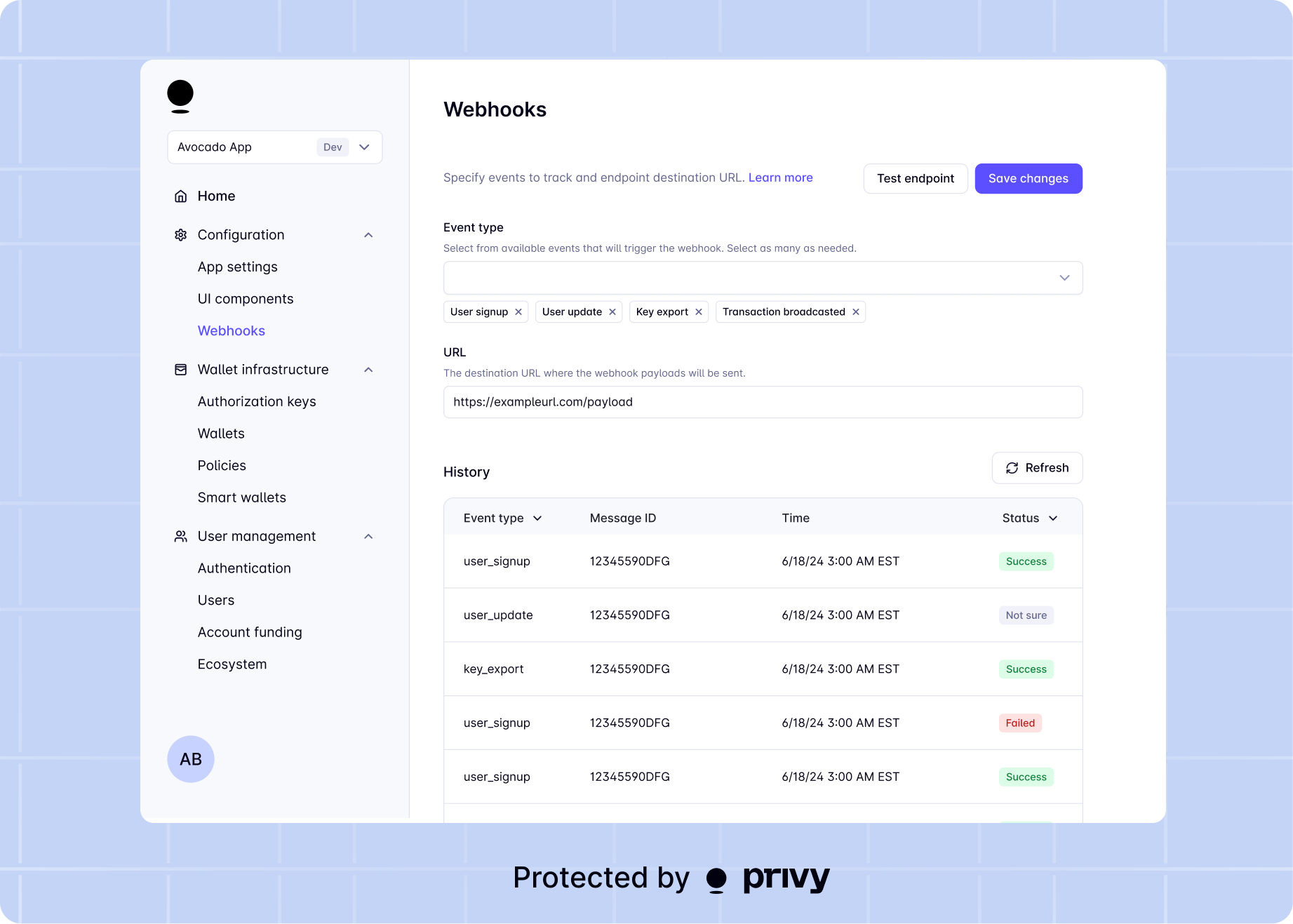 ## Registering an endpoint
1. In your backend, create a new endpoint that will accept **POST** requests from Privy
When creating your endpoint to receive webhook events, always verify the payload signature by
following our [webhook signing key
documentation](/api-reference/webhooks/overview#webhook-signing-key).
2. In the dashboard, go to the **Configuration > Webhooks** page
3. Add your new endpoint as the destination URL and select any event types you'd like to be notified for. The URL must begin with `https://`.
You can specify which user events your webhook endpoint will be notified about. The options are as follows:
### User events
| Event Name | Type | Action |
| ------------------------ | ------------------------- | ------------------------------------------------------------------------------ |
| User created | user.created | A user was created in the application. |
| User authenticated | user.authenticated | A user successfully logged into the application. |
| User linked account | user.linked\_account | A user successfully linked a new login method. |
| User unlinked account | user.unlinked\_account | A user successfully unlinked an existing login method. |
| User updated account | user.updated\_account | A user successfully updated the email or phone number linked to their account. |
| User transferred account | user.transferred\_account | A user successfully transferred their account to a new account. |
| Wallet created for user | user.wallet\_created | A wallet (embedded or smart wallet) was successfully created for a user. |
| MFA enabled | mfa.enabled | A user enabled MFA for their account. |
| MFA disabled | mfa.disabled | A user disabled MFA for their account. |
### Wallet events
| Event Name | Type | Action |
| --------------------- | --------------------------- | ---------------------------------------------------------- |
| Wallet archived | wallet.archived | A wallet was archived via the API. |
| Wallet restored | wallet.restored | A wallet was restored from archive. |
| Funds deposited | wallet.funds\_deposited | Funds were deposited into a user's embedded wallet. |
| Funds withdrawn | wallet.funds\_withdrawn | Funds were withdrawn from a user's embedded wallet. |
| Private key exported | wallet.private\_key\_export | A user exported their private key from an embedded wallet. |
| Seed phrase exported | wallet.seed\_phrase\_export | A user exported their seed phrase from an embedded wallet. |
| Wallet recovery setup | wallet.recovery\_setup | A user set up wallet recovery for their embedded wallet. |
| Wallet recovered | wallet.recovered | A user successfully recovered their embedded wallet. |
### Transaction events
| Event Name | Type | Action |
| ------------------------- | ------------------------------- | ---------------------------------------------------------------------------- |
| Transaction broadcasted | transaction.broadcasted | A transaction was submitted to the network and is awaiting confirmation. |
| Transaction confirmed | transaction.confirmed | A transaction was confirmed on-chain. |
| Transaction failed | transaction.failed | A transaction failed to be submitted to the network. |
| Execution reverted | transaction.execution\_reverted | A transaction was confirmed on-chain but execution reverted. |
| Transaction replaced | transaction.replaced | A transaction was replaced by another transaction (e.g. speed-up or cancel). |
| Transaction still pending | transaction.still\_pending | A transaction remained pending for an extended period. |
| Provider error | transaction.provider\_error | A provider error occurred while submitting a transaction. |
### Wallet action events
| Event Name | Type | Action |
| -------------------- | ---------------------------------------- | ------------------------------------------------------------------------------------------------------------------------ |
| Swap | wallet\_action.swap.\* | A token swap was created, succeeded, was rejected, or failed. |
| Transfer | wallet\_action.transfer.\* | A token transfer was created, succeeded, was rejected, or failed. |
| Earn deposit | wallet\_action.earn\_deposit.\* | A vault deposit was created, succeeded, was rejected, or failed. See [earn webhooks](/wallets/actions/earn/webhooks). |
| Earn withdrawal | wallet\_action.earn\_withdraw.\* | A vault withdrawal was created, succeeded, was rejected, or failed. See [earn webhooks](/wallets/actions/earn/webhooks). |
| Earn incentive claim | wallet\_action.earn\_incentive\_claim.\* | An incentive claim was created, succeeded, was rejected, or failed. See [earn webhooks](/wallets/actions/earn/webhooks). |
### Intent events
| Event Name | Type | Action |
| ----------------- | ----------------- | -------------------------------------------------------------------------------- |
| Intent created | intent.created | An [intent](/controls/dashboard/overview) was proposed and is awaiting approval. |
| Intent authorized | intent.authorized | A team member authorized an intent. |
| Intent rejected | intent.rejected | An intent was rejected by a team member. |
| Intent executed | intent.executed | An intent was fully approved and the action completed successfully. |
| Intent failed | intent.failed | An intent was fully approved but the action failed during execution. |
### User operation events
| Event Name | Type | Action |
| ------------------------ | ------------------------- | ------------------------------------------ |
| User operation completed | user\_operation.completed | An ERC-4337 UserOperation landed on-chain. |
**That's it! You've successfully configured webhooks for your app.** 🎉
## Testing the webhook setup
During development and testing, you can quickly verify your webhook endpoint is working correctly. Here's a simple step-by-step guide:
#### Step 1: Expose your local endpoint
If you're testing locally, you'll need to expose your local server to the internet. Use a tool like [ngrok](https://ngrok.com/) or [Cloudflare Tunnel](https://developers.cloudflare.com/cloudflare-one/connections/connect-apps/):
```bash theme={"system"}
# Using ngrok (after installing: https://ngrok.com/download)
ngrok http 3000
# Or using Cloudflare Tunnel (after installing: https://developers.cloudflare.com/cloudflare-one/connections/connect-apps/install-and-setup/installation/)
cloudflared tunnel --url http://localhost:3000
```
Copy the public URL (e.g., `https://abc123.ngrok.io` or `https://abc123.trycloudflare.com`).
#### Step 2: Create your webhook endpoint
Create a simple endpoint in your backend that accepts POST requests:
```tsx theme={"system"}
import {NextRequest, NextResponse} from 'next/server';
export async function POST(req: NextRequest) {
const body = await req.json();
// Log the webhook payload
console.log('Webhook received:', body);
// Return 200 to acknowledge receipt
return NextResponse.json({received: true}, {status: 200});
}
```
#### Step 3: Register your endpoint in the dashboard
1. Go to **Configuration > Webhooks** in the Privy Dashboard
2. Add your public URL (from Step 1) as the webhook endpoint
3. Select the event types you want to test
#### Step 4: Test your endpoint
Click the **"Test webhook"** button in the dashboard. This will send a test webhook (`privy.test`) to your endpoint with the following payload:
```json theme={"system"}
{
"type": "privy.test",
"message": "Hello, World!"
}
```
#### Step 5: Verify receipt
Check your server logs to confirm you received the webhook. You should see:
* The webhook payload in your console/logs
* A successful 200 response returned to Privy
For quick testing, you can also use services like [webhook.site](https://webhook.site/) or
[RequestBin](https://requestbin.com/) to get a temporary endpoint URL without setting up your own
server.
## Webhook delivery
Privy sends webhooks to your configured endpoint via Svix.
The webhook system operates on an **at least once** delivery basis with
automatic retries if the endpoint does not successfully respond.
Redundant webhook deliveries can be identified using the `idempotency_key` field where available,
ensuring your application can safely handle duplicate events.
### Retry behavior
Your endpoint must return a 2xx response for the webhook delivery to be
considered successful.
Anything else is considered an error response, and will be retried based on the
following schedule, where each period is started following the failure of the
preceding attempt:
* Immediately
* 5 seconds
* 5 minutes
* 30 minutes
* 2 hours
* 5 hours
* 10 hours
* 10 hours (in addition to the previous)
After the final attempt, the message will be marked as a failure, and must be manually retried from the dashboard. If all attempts to your endpoint fail for 5 consecutive days, your endpoint will be automatically disabled.
### Static IPs
Webhooks will be delivered from the following list of IP addresses:
```
44.228.126.217
50.112.21.217
52.24.126.164
54.148.139.208
2600:1f24:64:8000::/56
```
## Webhook signing key
The webhook signing key is necessary to verify that the payloads sent to your endpoint are from Privy. Follow the steps below in order to set up webhook verification in your backend.
Webhook payloads must be verified before they are trusted and used on your server. This is done by verifying a signature sent with your webhook. Privy uses [`svix`](https://www.svix.com/) for webhooks infrastructure.
Your endpoint must return a 2xx (status code 200-299) response for the webhook to be marked as
delivered. Any other statuses (including 3xx) are considered failed deliveries. Your endpoint will
be automatically disabled after 5 consecutive days of delivery failures
### Verify a webhook with the SDK
Use the **`PrivyClient`**'s **`webhooks().verify`** method to verify an incoming webhook. Pass in the request body and svix headers. As an example, for a Next.js API request:
```tsx theme={"system"}
import {PrivyClient} from '@privy-io/node';
const privy = new PrivyClient({
appId: process.env.PRIVY_APP_ID,
appSecret: process.env.PRIVY_APP_SECRET,
webhookSigningSecret: process.env.PRIVY_WEBHOOK_SIGNING_SECRET
});
// req is an input of type `NextApiRequest`.
// `headers` must include `svix-id`, `svix-timestamp`, and `svix-signature`.
const verifiedPayload = privy.webhooks().verify({
payload: req.body,
headers: req.headers
});
```
If the webhook payload is valid, the method returns the verified payload. If the webhook payload is invalid, the method throws an `InvalidWebhookError`.
Use the **`PrivyClient`**'s **`Webhooks.Verify`** method to verify an incoming webhook. Pass in the raw request body bytes and the request headers:
```go theme={"system"}
package main
import (
"io"
"log"
"net/http"
"os"
privy "github.com/privy-io/go-sdk"
)
var client = privy.NewPrivyClient(privy.PrivyClientOptions{
AppID: os.Getenv("PRIVY_APP_ID"),
AppSecret: os.Getenv("PRIVY_APP_SECRET"),
WebhookSigningSecret: os.Getenv("PRIVY_WEBHOOK_SIGNING_SECRET"),
})
func webhookHandler(w http.ResponseWriter, r *http.Request) {
body, err := io.ReadAll(r.Body)
if err != nil {
http.Error(w, "failed to read body", http.StatusBadRequest)
return
}
payload, err := client.Webhooks.Verify(privy.VerifyInput{
Payload: body,
Headers: r.Header,
})
if err != nil {
http.Error(w, "invalid webhook", http.StatusUnauthorized)
return
}
log.Printf("verified webhook payload: %+v", payload)
w.WriteHeader(http.StatusOK)
}
```
If the webhook payload is valid, the method returns the verified `*WebhookPayload`. If the webhook payload is invalid, the method returns an `*InvalidWebhookError`.
Use the **`PrivyClient`**'s **`webhooks.unsafe_unwrap`** method to parse an incoming webhook payload into a typed event. Pass in the raw request body as a string:
```ruby theme={"system"}
# Verify the Svix signature at your HTTP layer (e.g. with the `svix` gem)
# before calling unsafe_unwrap. The Ruby SDK does not yet have a built-in
# verifier — this is on the roadmap.
event = client.webhooks.unsafe_unwrap(raw_payload_string)
case event
when Privy::Models::TransactionConfirmedWebhookPayload
puts(event.transaction_hash)
when Privy::Models::UserCreatedWebhookPayload
puts(event.user.id)
end
```
### Manual verification
In order to verify an incoming webhook, please refer to svix's [manual verification guide](https://docs.svix.com/receiving/verifying-payloads/how-manual) or [library verification guide](https://docs.svix.com/receiving/verifying-payloads/how).
## Webhook events reference
Events for user creation, authentication, and account linking. Includes
[`user.created`](/api-reference/webhooks/user/created),
[`user.authenticated`](/api-reference/webhooks/user/authenticated), and more.
Events for deposits, withdrawals, and wallet security. Includes
[`wallet.funds_deposited`](/api-reference/webhooks/wallet/funds_deposited),
[`wallet.funds_withdrawn`](/api-reference/webhooks/wallet/funds_withdrawn), and more.
Events for transaction lifecycle. Includes
[`transaction.confirmed`](/api-reference/webhooks/transaction/confirmed),
[`transaction.failed`](/api-reference/webhooks/transaction/failed), and more.
Events for swaps, transfers, and earn actions. Includes `wallet_action.swap.*`,
`wallet_action.transfer.*`, and more.
Events for multi-factor authentication. Includes
[`mfa.enabled`](/api-reference/webhooks/mfa/enabled) and
[`mfa.disabled`](/api-reference/webhooks/mfa/disabled).
Events for the intent approval lifecycle. Includes
[`intent.created`](/api-reference/webhooks/intents/created),
[`intent.authorized`](/api-reference/webhooks/intents/authorized), and
[`intent.rejected`](/api-reference/webhooks/intents/rejected).
Events for ERC-4337 UserOperation lifecycle. Includes
[`user_operation.completed`](/api-reference/webhooks/user-operation/completed).
## Registering an endpoint
1. In your backend, create a new endpoint that will accept **POST** requests from Privy
When creating your endpoint to receive webhook events, always verify the payload signature by
following our [webhook signing key
documentation](/api-reference/webhooks/overview#webhook-signing-key).
2. In the dashboard, go to the **Configuration > Webhooks** page
3. Add your new endpoint as the destination URL and select any event types you'd like to be notified for. The URL must begin with `https://`.
You can specify which user events your webhook endpoint will be notified about. The options are as follows:
### User events
| Event Name | Type | Action |
| ------------------------ | ------------------------- | ------------------------------------------------------------------------------ |
| User created | user.created | A user was created in the application. |
| User authenticated | user.authenticated | A user successfully logged into the application. |
| User linked account | user.linked\_account | A user successfully linked a new login method. |
| User unlinked account | user.unlinked\_account | A user successfully unlinked an existing login method. |
| User updated account | user.updated\_account | A user successfully updated the email or phone number linked to their account. |
| User transferred account | user.transferred\_account | A user successfully transferred their account to a new account. |
| Wallet created for user | user.wallet\_created | A wallet (embedded or smart wallet) was successfully created for a user. |
| MFA enabled | mfa.enabled | A user enabled MFA for their account. |
| MFA disabled | mfa.disabled | A user disabled MFA for their account. |
### Wallet events
| Event Name | Type | Action |
| --------------------- | --------------------------- | ---------------------------------------------------------- |
| Wallet archived | wallet.archived | A wallet was archived via the API. |
| Wallet restored | wallet.restored | A wallet was restored from archive. |
| Funds deposited | wallet.funds\_deposited | Funds were deposited into a user's embedded wallet. |
| Funds withdrawn | wallet.funds\_withdrawn | Funds were withdrawn from a user's embedded wallet. |
| Private key exported | wallet.private\_key\_export | A user exported their private key from an embedded wallet. |
| Seed phrase exported | wallet.seed\_phrase\_export | A user exported their seed phrase from an embedded wallet. |
| Wallet recovery setup | wallet.recovery\_setup | A user set up wallet recovery for their embedded wallet. |
| Wallet recovered | wallet.recovered | A user successfully recovered their embedded wallet. |
### Transaction events
| Event Name | Type | Action |
| ------------------------- | ------------------------------- | ---------------------------------------------------------------------------- |
| Transaction broadcasted | transaction.broadcasted | A transaction was submitted to the network and is awaiting confirmation. |
| Transaction confirmed | transaction.confirmed | A transaction was confirmed on-chain. |
| Transaction failed | transaction.failed | A transaction failed to be submitted to the network. |
| Execution reverted | transaction.execution\_reverted | A transaction was confirmed on-chain but execution reverted. |
| Transaction replaced | transaction.replaced | A transaction was replaced by another transaction (e.g. speed-up or cancel). |
| Transaction still pending | transaction.still\_pending | A transaction remained pending for an extended period. |
| Provider error | transaction.provider\_error | A provider error occurred while submitting a transaction. |
### Wallet action events
| Event Name | Type | Action |
| -------------------- | ---------------------------------------- | ------------------------------------------------------------------------------------------------------------------------ |
| Swap | wallet\_action.swap.\* | A token swap was created, succeeded, was rejected, or failed. |
| Transfer | wallet\_action.transfer.\* | A token transfer was created, succeeded, was rejected, or failed. |
| Earn deposit | wallet\_action.earn\_deposit.\* | A vault deposit was created, succeeded, was rejected, or failed. See [earn webhooks](/wallets/actions/earn/webhooks). |
| Earn withdrawal | wallet\_action.earn\_withdraw.\* | A vault withdrawal was created, succeeded, was rejected, or failed. See [earn webhooks](/wallets/actions/earn/webhooks). |
| Earn incentive claim | wallet\_action.earn\_incentive\_claim.\* | An incentive claim was created, succeeded, was rejected, or failed. See [earn webhooks](/wallets/actions/earn/webhooks). |
### Intent events
| Event Name | Type | Action |
| ----------------- | ----------------- | -------------------------------------------------------------------------------- |
| Intent created | intent.created | An [intent](/controls/dashboard/overview) was proposed and is awaiting approval. |
| Intent authorized | intent.authorized | A team member authorized an intent. |
| Intent rejected | intent.rejected | An intent was rejected by a team member. |
| Intent executed | intent.executed | An intent was fully approved and the action completed successfully. |
| Intent failed | intent.failed | An intent was fully approved but the action failed during execution. |
### User operation events
| Event Name | Type | Action |
| ------------------------ | ------------------------- | ------------------------------------------ |
| User operation completed | user\_operation.completed | An ERC-4337 UserOperation landed on-chain. |
**That's it! You've successfully configured webhooks for your app.** 🎉
## Testing the webhook setup
During development and testing, you can quickly verify your webhook endpoint is working correctly. Here's a simple step-by-step guide:
#### Step 1: Expose your local endpoint
If you're testing locally, you'll need to expose your local server to the internet. Use a tool like [ngrok](https://ngrok.com/) or [Cloudflare Tunnel](https://developers.cloudflare.com/cloudflare-one/connections/connect-apps/):
```bash theme={"system"}
# Using ngrok (after installing: https://ngrok.com/download)
ngrok http 3000
# Or using Cloudflare Tunnel (after installing: https://developers.cloudflare.com/cloudflare-one/connections/connect-apps/install-and-setup/installation/)
cloudflared tunnel --url http://localhost:3000
```
Copy the public URL (e.g., `https://abc123.ngrok.io` or `https://abc123.trycloudflare.com`).
#### Step 2: Create your webhook endpoint
Create a simple endpoint in your backend that accepts POST requests:
```tsx theme={"system"}
import {NextRequest, NextResponse} from 'next/server';
export async function POST(req: NextRequest) {
const body = await req.json();
// Log the webhook payload
console.log('Webhook received:', body);
// Return 200 to acknowledge receipt
return NextResponse.json({received: true}, {status: 200});
}
```
#### Step 3: Register your endpoint in the dashboard
1. Go to **Configuration > Webhooks** in the Privy Dashboard
2. Add your public URL (from Step 1) as the webhook endpoint
3. Select the event types you want to test
#### Step 4: Test your endpoint
Click the **"Test webhook"** button in the dashboard. This will send a test webhook (`privy.test`) to your endpoint with the following payload:
```json theme={"system"}
{
"type": "privy.test",
"message": "Hello, World!"
}
```
#### Step 5: Verify receipt
Check your server logs to confirm you received the webhook. You should see:
* The webhook payload in your console/logs
* A successful 200 response returned to Privy
For quick testing, you can also use services like [webhook.site](https://webhook.site/) or
[RequestBin](https://requestbin.com/) to get a temporary endpoint URL without setting up your own
server.
## Webhook delivery
Privy sends webhooks to your configured endpoint via Svix.
The webhook system operates on an **at least once** delivery basis with
automatic retries if the endpoint does not successfully respond.
Redundant webhook deliveries can be identified using the `idempotency_key` field where available,
ensuring your application can safely handle duplicate events.
### Retry behavior
Your endpoint must return a 2xx response for the webhook delivery to be
considered successful.
Anything else is considered an error response, and will be retried based on the
following schedule, where each period is started following the failure of the
preceding attempt:
* Immediately
* 5 seconds
* 5 minutes
* 30 minutes
* 2 hours
* 5 hours
* 10 hours
* 10 hours (in addition to the previous)
After the final attempt, the message will be marked as a failure, and must be manually retried from the dashboard. If all attempts to your endpoint fail for 5 consecutive days, your endpoint will be automatically disabled.
### Static IPs
Webhooks will be delivered from the following list of IP addresses:
```
44.228.126.217
50.112.21.217
52.24.126.164
54.148.139.208
2600:1f24:64:8000::/56
```
## Webhook signing key
The webhook signing key is necessary to verify that the payloads sent to your endpoint are from Privy. Follow the steps below in order to set up webhook verification in your backend.
Webhook payloads must be verified before they are trusted and used on your server. This is done by verifying a signature sent with your webhook. Privy uses [`svix`](https://www.svix.com/) for webhooks infrastructure.
Your endpoint must return a 2xx (status code 200-299) response for the webhook to be marked as
delivered. Any other statuses (including 3xx) are considered failed deliveries. Your endpoint will
be automatically disabled after 5 consecutive days of delivery failures
### Verify a webhook with the SDK
Use the **`PrivyClient`**'s **`webhooks().verify`** method to verify an incoming webhook. Pass in the request body and svix headers. As an example, for a Next.js API request:
```tsx theme={"system"}
import {PrivyClient} from '@privy-io/node';
const privy = new PrivyClient({
appId: process.env.PRIVY_APP_ID,
appSecret: process.env.PRIVY_APP_SECRET,
webhookSigningSecret: process.env.PRIVY_WEBHOOK_SIGNING_SECRET
});
// req is an input of type `NextApiRequest`.
// `headers` must include `svix-id`, `svix-timestamp`, and `svix-signature`.
const verifiedPayload = privy.webhooks().verify({
payload: req.body,
headers: req.headers
});
```
If the webhook payload is valid, the method returns the verified payload. If the webhook payload is invalid, the method throws an `InvalidWebhookError`.
Use the **`PrivyClient`**'s **`Webhooks.Verify`** method to verify an incoming webhook. Pass in the raw request body bytes and the request headers:
```go theme={"system"}
package main
import (
"io"
"log"
"net/http"
"os"
privy "github.com/privy-io/go-sdk"
)
var client = privy.NewPrivyClient(privy.PrivyClientOptions{
AppID: os.Getenv("PRIVY_APP_ID"),
AppSecret: os.Getenv("PRIVY_APP_SECRET"),
WebhookSigningSecret: os.Getenv("PRIVY_WEBHOOK_SIGNING_SECRET"),
})
func webhookHandler(w http.ResponseWriter, r *http.Request) {
body, err := io.ReadAll(r.Body)
if err != nil {
http.Error(w, "failed to read body", http.StatusBadRequest)
return
}
payload, err := client.Webhooks.Verify(privy.VerifyInput{
Payload: body,
Headers: r.Header,
})
if err != nil {
http.Error(w, "invalid webhook", http.StatusUnauthorized)
return
}
log.Printf("verified webhook payload: %+v", payload)
w.WriteHeader(http.StatusOK)
}
```
If the webhook payload is valid, the method returns the verified `*WebhookPayload`. If the webhook payload is invalid, the method returns an `*InvalidWebhookError`.
Use the **`PrivyClient`**'s **`webhooks.unsafe_unwrap`** method to parse an incoming webhook payload into a typed event. Pass in the raw request body as a string:
```ruby theme={"system"}
# Verify the Svix signature at your HTTP layer (e.g. with the `svix` gem)
# before calling unsafe_unwrap. The Ruby SDK does not yet have a built-in
# verifier — this is on the roadmap.
event = client.webhooks.unsafe_unwrap(raw_payload_string)
case event
when Privy::Models::TransactionConfirmedWebhookPayload
puts(event.transaction_hash)
when Privy::Models::UserCreatedWebhookPayload
puts(event.user.id)
end
```
### Manual verification
In order to verify an incoming webhook, please refer to svix's [manual verification guide](https://docs.svix.com/receiving/verifying-payloads/how-manual) or [library verification guide](https://docs.svix.com/receiving/verifying-payloads/how).
## Webhook events reference
Events for user creation, authentication, and account linking. Includes
[`user.created`](/api-reference/webhooks/user/created),
[`user.authenticated`](/api-reference/webhooks/user/authenticated), and more.
Events for deposits, withdrawals, and wallet security. Includes
[`wallet.funds_deposited`](/api-reference/webhooks/wallet/funds_deposited),
[`wallet.funds_withdrawn`](/api-reference/webhooks/wallet/funds_withdrawn), and more.
Events for transaction lifecycle. Includes
[`transaction.confirmed`](/api-reference/webhooks/transaction/confirmed),
[`transaction.failed`](/api-reference/webhooks/transaction/failed), and more.
Events for swaps, transfers, and earn actions. Includes `wallet_action.swap.*`,
`wallet_action.transfer.*`, and more.
Events for multi-factor authentication. Includes
[`mfa.enabled`](/api-reference/webhooks/mfa/enabled) and
[`mfa.disabled`](/api-reference/webhooks/mfa/disabled).
Events for the intent approval lifecycle. Includes
[`intent.created`](/api-reference/webhooks/intents/created),
[`intent.authorized`](/api-reference/webhooks/intents/authorized), and
[`intent.rejected`](/api-reference/webhooks/intents/rejected).
Events for ERC-4337 UserOperation lifecycle. Includes
[`user_operation.completed`](/api-reference/webhooks/user-operation/completed).